

ArtistA: Cartoon Photo Editor
Lyrebird Studio
Installs
10M+
Developer
Lyrebird Studio
-
Category
Generative AI
-
Content Rating
Rated for 3+
Developer Email
Privacy Policy
https://lyrebirdstudio.net/privacy_policy.htm
Screenshots
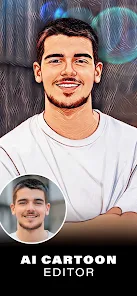
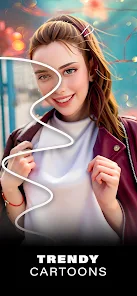
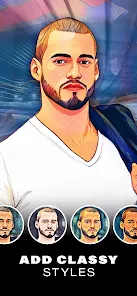
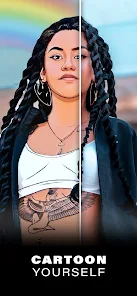
Expert Review
I've been using ArtistA: Cartoon Photo Editor for a while now, and it's become my go-to app for turning regular photos into cool cartoon art. The app, as the name suggests, is a photo editor focused on transforming pictures into various cartoon and artistic styles. It first launched a few years back and you can easily find it on the Google Play store. I downloaded it for free, and it has a huge number of installs, which gave me some confidence in trying it out. You don't need to register to start using it, which is great for quick edits. The app itself is free to download and install, but like many free apps, it does show ads and offers in-app purchases to unlock more filters and remove watermarks.
Using the app is pretty straightforward. You just pick a photo from your gallery, and then swipe through a bunch of different cartoon filters. My tip is to try the 'Sketch' or 'Comic' styles first—they usually give the most dramatic and fun results. You can also adjust the intensity of the effect, which is handy for getting the look just right. I often use it to create unique profile pictures or funny images to share with friends. It's a simple process: open the app, choose your photo, apply a filter, tweak it, and save. No complicated steps involved.
There are other similar apps out there, like ToonMe or Cartoon Photo Editor by JellyBus. I tried a few before settling on ArtistA. The main reason I stuck with this one is the sheer variety and quality of its filters. Some other apps have filters that look a bit cheap or overdone, but ArtistA's effects often feel more polished and authentic. It just seems to produce better-looking cartoon versions of my photos more consistently. For a free app you can get on Google Play, it's a solid choice if you're into this kind of photo editing.
Key Functional Highlights
- 🎨 Massive Filter Library: The app boasts a huge collection of cartoon and art filters. From classic comic book styles to watercolor paintings and pop art, there's always a new look to try, which keeps the editing process fun and creative.
- ⚡ One-Tap Magic: The core feature is its simplicity. You don't need any editing skills. Just select a photo and tap on any filter to see an instant transformation. It's perfect for quick, satisfying edits on the go.
- 🔧 Basic Adjustment Tools: Beyond the one-tap filters, you get sliders to control the filter strength, brightness, and contrast. This little bit of control helps you fine-tune the cartoon effect so it doesn't look too artificial.
- 📤 Easy Sharing: Once you're done, saving and sharing your creation is seamless. The app integrates directly with all the major social platforms, making it super easy to post your cartoon selfies right away.
Advantages & Benefits
- 👍 Filter Quality Over Quantity: Compared to something like 'Cartoon Art Photo Editor', ArtistA's filters generally look more refined and less 'cheap'. The lines are cleaner, and the colors are more vibrant.
- 👍 Faster Processing: I've found it processes images quicker than some other apps in this genre, like 'ToonCam', especially with higher-resolution photos.
- 👍 Truly Free to Start: You can download, install, and use a good number of filters without paying anything upfront, unlike some apps that lock basic features behind a paywall immediately.
Areas for Improvement
- 👎 Persistent Ads: The free version has quite intrusive video and banner ads. It can get annoying, especially compared to ad-free alternatives like 'Prisma' (which is a different type of art app but serves a similar purpose).
- 👎 Watermarks on Free Saves: Your saved images have a prominent watermark unless you pay to remove it. Other apps, even free ones, sometimes offer a smaller or less obtrusive watermark.
- 👎 Limited Advanced Editing: If you want to do more than apply a filter and tweak intensity, you're out of luck. Apps like 'PicsArt' offer cartoon filters and full editing suites, though they are more complex.
Recommended Apps
![]()
ZEPETO: Avatar, Connect & Play
Naver Z Corporation4.3
![]()
Reverse Voice: Flip Singing
NindaFuit0![]()
AI Chat Ask Assistant - NowAI
Now Tech4.3![]()
Lie Detector Test: Prank App
DkTech inc.4.3![]()
Peachy - AI Face & Body Editor
InShot Video Editor4.8
![]()
AI Video Art Creator - Livensa
FERASET4.5![]()
Google Voice
Google LLC4.3![]()
Horoscopes & Tarot
Astrolis Horoscopes4.7![]()
eBay online shopping & selling
eBay Mobile4.6![]()
JPay
Jpay Mobile4.1![]()
Stranger Things 5 Challenges
MVH Entertainment Team5![]()
Chat Master: Prank Story
ABI Game Studio4.8![]()
Google Maps
Google LLC4.2![]()
AI Chat・Ask Chatbot Assistant
AI Chat Studio4.5![]()
Name Meanings with Impact
Alif Innovative Solution3.7















You May Like
-
![]()
True Tarot Card Reading
KaApps4.2 -
![]()
LinkedIn: Jobs & Business News
LinkedIn4.2 -
![]()
iControl: Easy Widgets Themes
Fancy keyboard for theme apps4.6 -
![]()
Duolingo: Language & Chess
Duolingo4.7 -
![]()
Flipped:Chat with AI Character
First Group pte ltd4.1 -
![]()
Hearing Age
Mobile Solutions Tech0 -
![]()
TikTok
TikTok Pte. Ltd.4.4 -
![]()
Pretty Makeup - Beauty Camera
Photo Editor Perfect Corp.4.4 -
![]()
PhotoRoom AI Photo Editor
PhotoRoom Background Editor App4.7 -
![]()
Lightleap by Lightricks
Lightricks Ltd.4.3 -
![]()
Name Meaning
Dexati4.1 -
![]()
Truth Social
T Media Tech LLC3.3 -
![]()
Ace Hardware
Ace Hardware Corporation4.7 -
![]()
Kpop Fans Demon Hunter Wallpap
JHNStudio4.3 -
![]()
Artplay - AI Photo & Video
Hideaway Technology Limited4.5












































