

Tesla
Tesla, Inc.
Installs
5M+
Developer
Tesla, Inc.
-
Category
Auto & Vehicles
-
Content Rating
Everyone
Developer Email
Privacy Policy
https://www.tesla.com/legal/privacy
Screenshots
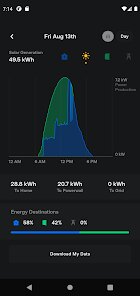
Expert Review
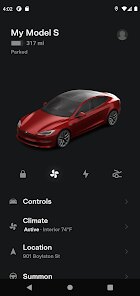
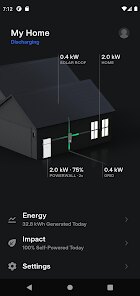
When you search Google Play for electric vehicle companion apps, the official Tesla application stands out due to its direct integration with the carmaker's ecosystem. This free app serves as a remote control and information hub for Tesla owners, and over 10 million installations suggest it is a widely used tool. While the download and install process is straightforward, users should note that the app is primarily functional only if you own a Tesla vehicle. It contains no third-party advertisements, which is a welcome change from many free mobile utilities, though certain premium connectivity features do require a subscription through the vehicle.
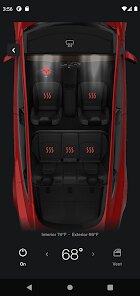
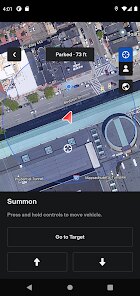
The app connects to your car via Bluetooth or an internet connection, and its interface is built around a clean, dark-themed design that matches the vehicle's minimalist aesthetic. I found unlocking the doors and starting the climate control to be almost instantaneous when within Bluetooth range, which is practical on hot or cold days. Beyond the basics, the interface allows you to monitor charging progress, view live camera feeds from the vehicle's Sentry Mode, and adjust settings like scheduled departure times. Navigating between these functions feels smooth, though occasionally the live camera feed takes a few seconds to load depending on network conditions.
Compared to apps from traditional automakers like FordPass or MyChevrolet, the Tesla app feels more cohesive because it controls nearly every car function from a single screen rather than splitting features across multiple menus. Many rival offerings bury features like remote start or charging schedules in sub-menus, whereas Tesla's approach keeps everything visible and accessible. That said, the app lacks the detailed trip logging and maintenance reminders found in some competitors' software, which can be a drawback for those who like to track long-term vehicle usage.
Key Functional Highlights
- The Sentry Mode live camera access sets the Tesla app apart from typical remote monitoring tools. Being able to check the surroundings while parked gives a real sense of security, though the video stream can appear slightly compressed on slower connections.
- Charging management is handled directly within the app, allowing you to set charge limits, schedule departures, or even precondition the battery before a Supercharger visit. It is noticeably more intuitive than the third-party charging apps I have tested.
- The phone key functionality uses Bluetooth proximity to unlock and start the car automatically. After using it for a few weeks, pulling out a physical key or phone to tap feels like a step backward when driving other vehicles.
- Software updates can be initiated through the app, which notifies you when a new version is available and shows release notes. It is a small touch, but it makes the update process feel less disruptive than manually checking the car's screen.
Advantages & Benefits
- Preconditioning the cabin or charging on a schedule means the car is always comfortable and ready when I leave for work, without needing to remember to toggle settings beforehand.
- Receiving instant notifications if Sentry Mode detects an incident while the car is parked gives useful peace of mind in crowded lots or unfamiliar areas.
- Checking battery levels and charging progress from anywhere makes it easier to plan stops during longer drives, especially when using third-party stations that lack dedicated apps.
Areas for Improvement
- The app can occasionally fail to connect to the vehicle when both are on Wi-Fi, requiring a manual refresh or Bluetooth toggle to re-establish the link, which feels like a minor inconvenience.
- Live camera streams sometimes buffer or disconnect if the car's cellular signal is weak, reducing reliability in underground garages or rural areas where connectivity is already limited.
- There is no built-in trip logging or energy consumption history, so users who want detailed analytics will need to pair the app with third-party tools or Tesla's in-car display.
- The interface lacks a dark mode toggle since it is always dark-themed, which may be a minor annoyance for those who prefer light interfaces during daytime use.
Recommended Apps
![]()
ZEPETO: Avatar, Connect & Play
Naver Z Corporation4.3
![]()
Reverse Voice: Flip Singing
NindaFuit0![]()
AI Chat Ask Assistant - NowAI
Now Tech4.3![]()
Lie Detector Test: Prank App
DkTech inc.4.3![]()
Peachy - AI Face & Body Editor
InShot Video Editor4.8
![]()
AI Video Art Creator - Livensa
FERASET4.5![]()
Google Voice
Google LLC4.3![]()
Horoscopes & Tarot
Astrolis Horoscopes4.7![]()
eBay online shopping & selling
eBay Mobile4.6![]()
JPay
Jpay Mobile4.1![]()
Stranger Things 5 Challenges
MVH Entertainment Team5![]()
Chat Master: Prank Story
ABI Game Studio4.8![]()
Google Maps
Google LLC4.2![]()
AI Chat・Ask Chatbot Assistant
AI Chat Studio4.5![]()
Name Meanings with Impact
Alif Innovative Solution3.7















You May Like
-
![]()
True Tarot Card Reading
KaApps4.2 -
![]()
LinkedIn: Jobs & Business News
LinkedIn4.2 -
![]()
iControl: Easy Widgets Themes
Fancy keyboard for theme apps4.6 -
![]()
Duolingo: Language & Chess
Duolingo4.7 -
![]()
Flipped:Chat with AI Character
First Group pte ltd4.1 -
![]()
Hearing Age
Mobile Solutions Tech0 -
![]()
TikTok
TikTok Pte. Ltd.4.4 -
![]()
Pretty Makeup - Beauty Camera
Photo Editor Perfect Corp.4.4 -
![]()
PhotoRoom AI Photo Editor
PhotoRoom Background Editor App4.7 -
![]()
Lightleap by Lightricks
Lightricks Ltd.4.3 -
![]()
Name Meaning
Dexati4.1 -
![]()
Truth Social
T Media Tech LLC3.3 -
![]()
Ace Hardware
Ace Hardware Corporation4.7 -
![]()
Kpop Fans Demon Hunter Wallpap
JHNStudio4.3 -
![]()
Artplay - AI Photo & Video
Hideaway Technology Limited4.5










































