
Photo Effects, Photo Editor
Lyrebird Studio
Installs
10M+
Developer
Lyrebird Studio
-
Category
Video Players & Editors
-
Content Rating
Rated for 3+
Developer Email
Privacy Policy
https://lyrebirdstudio.net/privacy_policy.htm
Screenshots
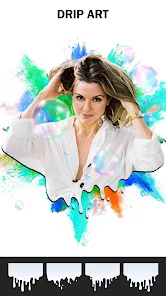
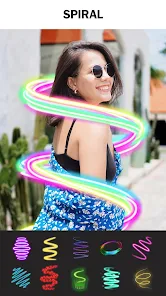
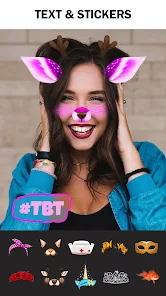
Expert Review
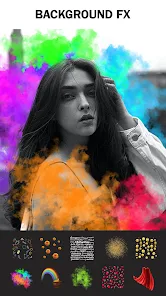
Photo Effects, Photo Editor is a pretty handy app I've been using for a while now. It's a photo editing app that lets you add all sorts of cool effects, filters, and stickers to your pictures. You can download it for free from the Google Play Store. I think it first came out a few years ago, and it's got millions of installs, which shows a lot of people find it useful. You don't need to register or sign up to start using it, which is great for just jumping in. The app itself is free to install, but there are some ads inside and optional in-app purchases if you want to unlock extra filters or remove the ads.
Using the app is straightforward. I usually open a photo from my gallery, then browse through the different effect categories. There's a huge library, from vintage looks to glitch art and double exposure. A good tip is to play with the intensity sliders for each effect; you can make them subtle or go all out. I also like saving my favorite combinations as presets for later. It's become my go-to when I want to give my social media posts a unique vibe without spending hours on a complicated desktop editor.
Compared to other photo editors like PicsArt or VSCO, I keep coming back to Photo Effects. PicsArt is more of a full studio with drawing tools and collages, which can feel overwhelming. VSCO is amazing for its classic film presets but is more focused on color grading. This app, Photo Effects, nails one thing really well: creative, one-tap transformations. If I just want to turn a normal portrait into something that looks like a retro comic book or a psychedelic poster in seconds, this is the app I choose. It's simpler for that specific creative spark.
Key Functional Highlights
- 🎨 Massive, Specialized Effect Library: Unlike general editors, this app is packed with hundreds of niche, artistic effects. Where a popular app like Snapseed offers powerful correction tools, Photo Effects gives you instant access to styles like 'Neon Dreams', 'Watercolor Sketch', or 'VHS Glitch' that are harder to create manually.
- ⚡ One-Tap Creativity & Presets: The core experience is built for speed and experimentation. You tap an effect, and your photo transforms instantly. You can also layer effects and save your own custom combos as presets, which is a standout feature for quickly applying a signature style across multiple photos.
- 🔧 Simple, Effect-Focused Interface: The app's design avoids clutter. Tools are organized around discovering and applying effects, making it less intimidating than a pro editor like Adobe Lightroom. Sliders for adjusting effect strength are always front and center, putting creative control in a simple format.
Advantages & Benefits
- 👍 Unmatched Variety for Artistic Effects: For turning photos into digital art quickly, its effect range beats more mainstream apps like Instagram's built-in filters hands down.
- 👍 No Account Needed: You can download, install, and use it immediately without signing up, unlike some editors that require a login.
- 👍 Great for Social Media Content: The effects are tailored for creating eye-catching posts for platforms like TikTok or Instagram Stories.
Areas for Improvement
- 👎 Ads Can Be Intrusive: The free version has ads, which can interrupt the workflow. Apps like VSCO have a cleaner, ad-free experience after their one-time purchase.
- 👎 Limited Advanced Editing Tools: It's not for detailed corrections like fixing lighting or blemishes. For that, you'd still need another app like Google Photos' editor or Lightroom.
- 👎 Some Effects Locked Behind Paywall: The best and most unique effects often require an in-app purchase, whereas an app like PicsArt might include more in its free tier.
Recommended Apps
![]()
ZEPETO: Avatar, Connect & Play
Naver Z Corporation4.3
![]()
Reverse Voice: Flip Singing
NindaFuit0![]()
AI Chat Ask Assistant - NowAI
Now Tech4.3![]()
Lie Detector Test: Prank App
DkTech inc.4.3![]()
Peachy - AI Face & Body Editor
InShot Video Editor4.8
![]()
AI Video Art Creator - Livensa
FERASET4.5![]()
Google Voice
Google LLC4.3![]()
Horoscopes & Tarot
Astrolis Horoscopes4.7![]()
eBay online shopping & selling
eBay Mobile4.6![]()
JPay
Jpay Mobile4.1![]()
Stranger Things 5 Challenges
MVH Entertainment Team5![]()
Chat Master: Prank Story
ABI Game Studio4.8![]()
Google Maps
Google LLC4.2![]()
AI Chat・Ask Chatbot Assistant
AI Chat Studio4.5![]()
Name Meanings with Impact
Alif Innovative Solution3.7















You May Like
-
![]()
True Tarot Card Reading
KaApps4.2 -
![]()
LinkedIn: Jobs & Business News
LinkedIn4.2 -
![]()
iControl: Easy Widgets Themes
Fancy keyboard for theme apps4.6 -
![]()
Duolingo: Language & Chess
Duolingo4.7 -
![]()
Flipped:Chat with AI Character
First Group pte ltd4.1 -
![]()
Hearing Age
Mobile Solutions Tech0 -
![]()
TikTok
TikTok Pte. Ltd.4.4 -
![]()
Pretty Makeup - Beauty Camera
Photo Editor Perfect Corp.4.4 -
![]()
PhotoRoom AI Photo Editor
PhotoRoom Background Editor App4.7 -
![]()
Lightleap by Lightricks
Lightricks Ltd.4.3 -
![]()
Name Meaning
Dexati4.1 -
![]()
Truth Social
T Media Tech LLC3.3 -
![]()
Ace Hardware
Ace Hardware Corporation4.7 -
![]()
Kpop Fans Demon Hunter Wallpap
JHNStudio4.3 -
![]()
Artplay - AI Photo & Video
Hideaway Technology Limited4.5












































