
FaceLab: Face Editor, Aging
Lyrebird Studio
Installs
10M+
Developer
Lyrebird Studio
-
Category
Video Players & Editors
-
Content Rating
Rated for 3+
Developer Email
Privacy Policy
https://lyrebirdstudio.net/privacy_policy.htm
Screenshots


Expert Review
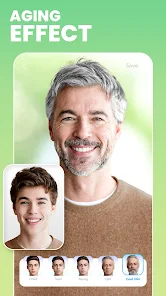
I've been using FaceLab: Face Editor, Aging for a while now, and it's become my go-to app for having fun with photos. Basically, it's a photo editing app focused on face transformations. You can use it to see how you or your friends might look older or younger, swap genders, or just apply funny filters. I first downloaded it from the Google Play Store a couple of years ago. It's also available on the App Store, and it has a huge number of installs, which isn't surprising given how popular these face-altering apps are. The app itself is free to download and install. You don't need to register an account to start playing with it, which I really appreciate for quick fun. Of course, being a free app, it does show ads, and there are premium features locked behind in-app purchases if you want to remove the ads or access more advanced filters.
Using the app is super straightforward. You just open it, pick a photo from your gallery or take a new one, and then choose from a bunch of different effects. The aging and de-aging filters are the main draw. A good tip is to use a clear, well-lit front-facing photo for the best results—the app works much better then. I also found that playing with the intensity sliders for each effect can give you more realistic or more dramatic outcomes, depending on what you're going for. It's perfect for a laugh with friends or creating a funny social media post.
There are a few other apps in this genre, like FaceApp or AgingBooth, that do similar things. I tried a couple before settling on FaceLab. For me, the main reason I stuck with this app is the balance. Some apps feel a bit creepy or too intense with their filters, while others are too simple. FaceLab seems to hit a sweet spot where the transformations are convincing enough to be entertaining but not so over-the-top that they lose all sense of reality. The interface is also less cluttered than some competitors, making it easier to just jump in and start editing without a learning curve. When I want a quick and entertaining face edit, this is the app I open first.
Key Functional Highlights
- 🎭 Realistic Age Progression/Regression: The core feature that makes this app stand out is the quality of its aging filters. Compared to a popular app like FaceApp, FaceLab's results often feel a bit more nuanced and less uniformly applied, which can look more natural in some cases.
- 🔄 Live Camera Preview: A feature I use all the time is the ability to apply effects in real-time using the live camera. You can see yourself age or change before hitting the shutter button, which is great for getting the perfect shot and is more interactive than just applying a filter to a static photo.
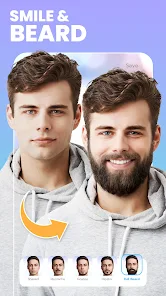
- 🧩 Diverse Filter Library: Beyond just aging, the app packs in a wide variety of other transformations. You've got gender swaps, cartoon effects, and beauty filters all in one place. This variety means you don't need to download multiple apps for different silly photo needs.
- ⚙️ Adjustable Effect Intensity: This is a key detail. Unlike some apps that give you a single, fixed result, FaceLab lets you fine-tune how strong the aging or other effect is with a simple slider. This control allows for a range of outcomes, from subtle changes to full-on transformations.
Advantages & Benefits
- 👍 User-Friendly Interface: The app is incredibly easy to navigate right after you install it. Menus are simple, and getting to the effects takes just a tap or two, which is better than some similar apps that bury their features.
- 👍 No Mandatory Login: You can download, install, and use the app immediately without creating an account. This respect for immediate, hassle-free access is a big plus over apps that require sign-ups.
- 👍 Good Free Tier Balance: For a free app on Google Play, it offers a solid amount of functionality without immediately pushing you to pay. You can have plenty of fun before hitting paywalls, which isn't always the case with competitors.
Areas for Improvement
- 👎 Persistent Advertisements: The free version shows ads quite frequently, which can interrupt the editing flow. Apps like 'AgingBooth' sometimes have a simpler, less ad-intrusive model for their core feature.
- 👎 Premium Feature Pricing: Some of the more interesting filters and the ad-free experience are locked behind a paywall that feels a bit steep for what is essentially a novelty app.
- 👎 Occasional Processing Glitches: Sometimes, especially with complex photos, the final rendered image can have slight artifacts or odd blending around the hairline, which apps like FaceApp sometimes handle more cleanly.
Recommended Apps
![]()
ZEPETO: Avatar, Connect & Play
Naver Z Corporation4.3
![]()
Reverse Voice: Flip Singing
NindaFuit0![]()
AI Chat Ask Assistant - NowAI
Now Tech4.3![]()
Lie Detector Test: Prank App
DkTech inc.4.3![]()
Peachy - AI Face & Body Editor
InShot Video Editor4.8
![]()
AI Video Art Creator - Livensa
FERASET4.5![]()
Google Voice
Google LLC4.3![]()
Horoscopes & Tarot
Astrolis Horoscopes4.7![]()
eBay online shopping & selling
eBay Mobile4.6![]()
JPay
Jpay Mobile4.1![]()
Stranger Things 5 Challenges
MVH Entertainment Team5![]()
Chat Master: Prank Story
ABI Game Studio4.8![]()
Google Maps
Google LLC4.2![]()
AI Chat・Ask Chatbot Assistant
AI Chat Studio4.5![]()
Name Meanings with Impact
Alif Innovative Solution3.7















You May Like
-
![]()
True Tarot Card Reading
KaApps4.2 -
![]()
LinkedIn: Jobs & Business News
LinkedIn4.2 -
![]()
iControl: Easy Widgets Themes
Fancy keyboard for theme apps4.6 -
![]()
Duolingo: Language & Chess
Duolingo4.7 -
![]()
Flipped:Chat with AI Character
First Group pte ltd4.1 -
![]()
Hearing Age
Mobile Solutions Tech0 -
![]()
TikTok
TikTok Pte. Ltd.4.4 -
![]()
Pretty Makeup - Beauty Camera
Photo Editor Perfect Corp.4.4 -
![]()
PhotoRoom AI Photo Editor
PhotoRoom Background Editor App4.7 -
![]()
Lightleap by Lightricks
Lightricks Ltd.4.3 -
![]()
Name Meaning
Dexati4.1 -
![]()
Truth Social
T Media Tech LLC3.3 -
![]()
Ace Hardware
Ace Hardware Corporation4.7 -
![]()
Kpop Fans Demon Hunter Wallpap
JHNStudio4.3 -
![]()
Artplay - AI Photo & Video
Hideaway Technology Limited4.5










































