

Step Tracker - Pedometer
Leap Fitness Group
Installs
10M+
Developer
Leap Fitness Group
-
Category
Health & Fitness
-
Content Rating
Rated for 3+
Developer Email
Privacy Policy
https://leap.app/privacypolicy.html?pkg=steptracker.healthandfitness.walkingtracker.pedometer
Screenshots
Expert Review
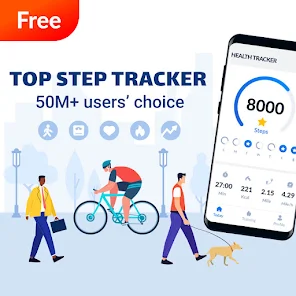
I've been using the Step Tracker - Pedometer app from Leap Fitness Group for a few months now, and it's become my go-to for keeping tabs on my daily activity. This app is a straightforward fitness tracker focused on counting your steps, distance, and calories burned. It first launched a while back, and you can easily find it on the Google Play store. It's had millions of downloads, which tells you a lot of people find it useful. The best part? It's completely free to download and install. You don't even need to register or create an account to start using it, which I really appreciate for quick setup. While the core app is free, there are some optional in-app purchases if you want to remove ads or unlock extra features, and you will see occasional banner ads in the free version.
Using the app is super simple. After you install it, you just carry your phone with you, and it automatically starts counting steps using your phone's sensors. I keep it in my pocket or bag, and it does the rest. A good tip is to make sure the app has the necessary permissions to run in the background, otherwise, it might not track your steps accurately when your screen is off. I also like to set a daily step goal; it gives me a little nudge to take an extra walk during lunch or after dinner. The interface is clean, so checking my progress is just a quick glance away.
I've tried a few other step counters on Google Play, like Google Fit and some other pedometer apps. While Google Fit is great for integrating with other health data, I found Step Tracker to be much simpler and more focused purely on step counting. It doesn't overcomplicate things with too many menus or settings. For someone who just wants a reliable, no-fuss way to see how many steps they've taken in a day, this app from Leap Fitness Group is a solid choice. It does one job and does it well without draining my phone's battery too much.
Key Functional Highlights
- 🎯 Automatic & Accurate Tracking: Once you install the app and grant permissions, it works silently in the background. Compared to some similar apps that require constant calibration, this one uses your phone's built-in sensors smartly to provide a reliable step count without much fuss.
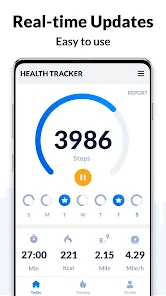
- 📊 Clean, Goal-Oriented Dashboard: The main screen shows your current steps, distance, calories, and active time in a very clear layout. It's easier to read at a glance than the sometimes cluttered interface of apps like Accupedo, making it simple to track progress toward your daily goal.
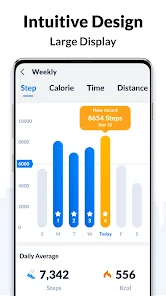
- 📈 Historical Data & Charts: You can view your step history by day, week, or month with simple charts. This feature helps you spot trends, which is something basic pedometer apps often lack. It gives you more insight than just a daily number.
- ⚙️ Low Power Consumption: A standout feature for me is how light it is on battery. Many fitness apps are notorious battery hogs, but this Step Tracker app is optimized to run efficiently in the background, so it doesn't kill my phone's charge by midday.
Advantages & Benefits
- ✅ Truly Free Core Features: Unlike apps like Pacer that lock basic history or goals behind a paywall, Step Tracker's essential tracking and history viewing are completely free post-install.
- ✅ Zero Registration Hassle: You can download, install, and start using it immediately without creating an account. This beats apps like Fitbit or MyFitnessPal, which require sign-up before you can do anything.
- ✅ Simplicity and Focus: It excels at being a dedicated pedometer without unnecessary social features or complex health modules, making it less intimidating than comprehensive platforms like Google Fit.
Areas for Improvement
- ⚠️ Presence of Ads: The free version displays banner ads. While common for free apps, it can be more intrusive than in some alternatives that offer an ad-free experience for a one-time fee.
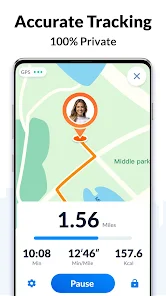
- ⚠️ Limited Advanced Metrics: Compared to an app like Strava or even Samsung Health, it lacks deeper analysis like heart rate integration, route mapping, or detailed pace tracking for runners.
- ⚠️ Sync Limitations: It doesn't automatically sync data to major health platforms (Apple Health, Google Fit) like some other fitness apps do, which can be a downside if you use multiple health services.
Recommended Apps
![]()
ZEPETO: Avatar, Connect & Play
Naver Z Corporation4.3
![]()
Reverse Voice: Flip Singing
NindaFuit0![]()
AI Chat Ask Assistant - NowAI
Now Tech4.3![]()
Lie Detector Test: Prank App
DkTech inc.4.3![]()
Peachy - AI Face & Body Editor
InShot Video Editor4.8
![]()
AI Video Art Creator - Livensa
FERASET4.5![]()
Google Voice
Google LLC4.3![]()
Horoscopes & Tarot
Astrolis Horoscopes4.7![]()
eBay online shopping & selling
eBay Mobile4.6![]()
JPay
Jpay Mobile4.1![]()
Stranger Things 5 Challenges
MVH Entertainment Team5![]()
Chat Master: Prank Story
ABI Game Studio4.8![]()
Google Maps
Google LLC4.2![]()
AI Chat・Ask Chatbot Assistant
AI Chat Studio4.5![]()
Name Meanings with Impact
Alif Innovative Solution3.7















You May Like
-
![]()
True Tarot Card Reading
KaApps4.2 -
![]()
LinkedIn: Jobs & Business News
LinkedIn4.2 -
![]()
iControl: Easy Widgets Themes
Fancy keyboard for theme apps4.6 -
![]()
Duolingo: Language & Chess
Duolingo4.7 -
![]()
Flipped:Chat with AI Character
First Group pte ltd4.1 -
![]()
Hearing Age
Mobile Solutions Tech0 -
![]()
TikTok
TikTok Pte. Ltd.4.4 -
![]()
Pretty Makeup - Beauty Camera
Photo Editor Perfect Corp.4.4 -
![]()
PhotoRoom AI Photo Editor
PhotoRoom Background Editor App4.7 -
![]()
Lightleap by Lightricks
Lightricks Ltd.4.3 -
![]()
Name Meaning
Dexati4.1 -
![]()
Truth Social
T Media Tech LLC3.3 -
![]()
Ace Hardware
Ace Hardware Corporation4.7 -
![]()
Kpop Fans Demon Hunter Wallpap
JHNStudio4.3 -
![]()
Artplay - AI Photo & Video
Hideaway Technology Limited4.5












































