
PhotoDirector: AI Photo Editor
Cyberlink Corp
Installs
50M+
Developer
Cyberlink Corp
-
Category
Video Players & Editors
-
Content Rating
Rated for 3+
Developer Email
Privacy Policy
https://www.cyberlink.com/prog/ap/app-privacy-redirect.jsp?
Screenshots

Expert Review
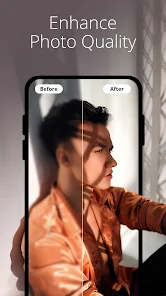
PhotoDirector is a powerful photo editing app I've been using for a while now. It's basically a full-featured mobile photo editor that lets you do everything from basic touch-ups to creating complex artistic compositions. The app is developed by CyberLink, a company known for its multimedia software, and it brings a lot of that desktop-level power to your phone. I first downloaded it from the Google Play Store a few years back, and it's been consistently updated since. It's also available on the App Store for iOS users. With over 50 million installs on Google Play alone, it's a pretty popular choice. The app itself is free to download and install, which is great. You don't need to register an account just to start using the basic tools, which I appreciate. Of course, like many free apps, it does have in-app purchases to unlock premium features and there are some ads, but the free version is surprisingly capable.
I use PhotoDirector for all sorts of things. If I take a quick snap that needs better lighting or color, I'll jump straight into it. The interface is intuitive; you just pick your photo and the tools are right there. A good tip is to start with the 'Auto' enhance button—it often does a solid job with one tap. For more control, I love playing with the color wheels and the clarity sliders. The 'AI' tools are a real time-saver too, like the AI sky replacement or the AI object removal. You just brush over what you want to remove, and it usually handles it cleanly.
Compared to other apps in the same genre, like Snapseed or Adobe Lightroom Mobile, I keep coming back to PhotoDirector. Snapseed is fantastic and completely free, but I find PhotoDirector offers more creative filters and fun features like the double exposure tool. Lightroom is unbeatable for pure photo editing if you're deep into photography, but it can feel a bit serious. PhotoDirector strikes a nice balance for me—it has pro-level tools when I need them, but it's also packed with playful, easy-to-use options for making eye-catching social media posts. That mix is why it stays installed on my phone.
Key Functional Highlights
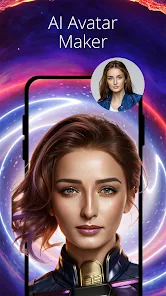
- 🎨 AI-Powered Tools: The AI features are a game-changer. The sky replacement tool is incredibly fun and realistic, letting you swap a dull gray sky for a dramatic sunset in seconds. The AI object removal is also very effective for cleaning up photos without leaving obvious traces.
- 📱 All-in-One Workspace: Unlike some apps that separate basic edits from advanced effects, PhotoDirector packs everything into one smooth workflow. You can adjust lighting, apply artistic filters, add text, and create collages without ever leaving the app to download another tool.
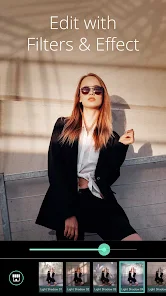
- ✨ Creative Effects Library: This is where the app shines compared to more utilitarian editors. It has a massive collection of filters, light effects, overlays, and frames. The 'Double Exposure' tool is particularly unique and easy to use for creating artistic blends.
- ⚙️ Depth of Control: For users who want more than presets, it offers granular control similar to desktop software. You get detailed color grading wheels, selective editing brushes, and lens correction options, which you often have to pay for in other apps.
Advantages & Benefits
- ✅ Fun Meets Function: It perfectly blends serious editing tools with playful, social-media-ready features. Apps like Lightroom focus purely on editing, while apps like PicsArt are more about graphics. PhotoDirector does both well.
- ✅ Strong Free Tier: You can achieve a lot without paying. The free version of Lightroom, for instance, feels more restricted. PhotoDirector gives you access to core tools and a good selection of effects upfront.
- ✅ Intuitive UI: The layout is cleaner and more beginner-friendly than something like Photoshop Express, making advanced techniques like layer editing more approachable.
Areas for Improvement
- ⚠️ Aggressive Upselling: The push towards premium subscriptions can be annoying. Pop-ups and locked premium filters are more frequent here than in Snapseed, which is entirely free with no ads.
- ⚠️ Performance on Older Phones: With all its features, the app can sometimes lag or run slowly on older devices, especially when applying complex AI effects. Lighter apps like Google Photos' editor are much faster.
- ⚠️ Cloud Sync Limitation: Unlike Adobe Lightroom, its cloud storage and sync features for preserving edits across devices are not as robust or central to the experience, which can be a downside for serious workflows.
Recommended Apps
![]()
ZEPETO: Avatar, Connect & Play
Naver Z Corporation4.3
![]()
Reverse Voice: Flip Singing
NindaFuit0![]()
AI Chat Ask Assistant - NowAI
Now Tech4.3![]()
Lie Detector Test: Prank App
DkTech inc.4.3![]()
Peachy - AI Face & Body Editor
InShot Video Editor4.8
![]()
AI Video Art Creator - Livensa
FERASET4.5![]()
Google Voice
Google LLC4.3![]()
Horoscopes & Tarot
Astrolis Horoscopes4.7![]()
eBay online shopping & selling
eBay Mobile4.6![]()
JPay
Jpay Mobile4.1![]()
Stranger Things 5 Challenges
MVH Entertainment Team5![]()
Chat Master: Prank Story
ABI Game Studio4.8![]()
Google Maps
Google LLC4.2![]()
AI Chat・Ask Chatbot Assistant
AI Chat Studio4.5![]()
Name Meanings with Impact
Alif Innovative Solution3.7















You May Like
-
![]()
True Tarot Card Reading
KaApps4.2 -
![]()
LinkedIn: Jobs & Business News
LinkedIn4.2 -
![]()
iControl: Easy Widgets Themes
Fancy keyboard for theme apps4.6 -
![]()
Duolingo: Language & Chess
Duolingo4.7 -
![]()
Flipped:Chat with AI Character
First Group pte ltd4.1 -
![]()
Hearing Age
Mobile Solutions Tech0 -
![]()
TikTok
TikTok Pte. Ltd.4.4 -
![]()
Pretty Makeup - Beauty Camera
Photo Editor Perfect Corp.4.4 -
![]()
PhotoRoom AI Photo Editor
PhotoRoom Background Editor App4.7 -
![]()
Lightleap by Lightricks
Lightricks Ltd.4.3 -
![]()
Name Meaning
Dexati4.1 -
![]()
Truth Social
T Media Tech LLC3.3 -
![]()
Ace Hardware
Ace Hardware Corporation4.7 -
![]()
Kpop Fans Demon Hunter Wallpap
JHNStudio4.3 -
![]()
Artplay - AI Photo & Video
Hideaway Technology Limited4.5












































