
Photoshop Express Photo Editor
Adobe
Installs
100M+
Developer
Adobe
-
Category
Video Players & Editors
-
Content Rating
Rated for 3+
Developer Email
Privacy Policy
http://www.adobe.com/privacy/policy.html
Screenshots
Expert Review
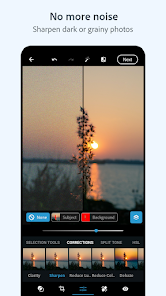
I've been using the Photoshop Express Photo Editor app for a while now, and it's become my go-to tool for quick photo fixes on my phone. It's a free mobile photo editing app from Adobe, the same company behind the famous desktop Photoshop software. The app first launched quite a few years ago and is available for download on both the Google Play Store and the Apple App Store. It has millions of installs on Google Play alone, which shows how popular it is. You can download and install the app for free, and you don't need to create an account or register to start using most of its basic features. There are some premium features locked behind a subscription, and you'll also see occasional ads in the free version, but the core editing tools are completely accessible without paying anything.
I use this app almost daily to touch up photos before sharing them on social media. My usual routine is to open a picture, use the auto-fix feature for a quick balance, then maybe adjust the exposure or contrast a bit. One great tip is to use the 'Looks' section for instant filters that are more subtle than what you find on other apps. For removing small blemishes or unwanted objects, the healing tool is surprisingly powerful for a mobile app. It's perfect for cleaning up a messy background or getting rid of a stray piece of litter in a landscape shot.
When I was looking for a photo editor, I tried a few others like Snapseed and Lightroom Mobile. While Snapseed is also very capable, I ended up sticking with Photoshop Express. The main reason is its simplicity and the familiar, reliable quality of Adobe's tools. The interface feels less cluttered to me than some other editors, so I can get things done faster. For someone who just wants to make their photos look better without a steep learning curve, this app is a solid choice. It doesn't have all the bells and whistles of the full desktop version, of course, but for quick edits on the go, it's really hard to beat.
Key Functional Highlights
- 🛠️ One-Touch Magic: The 'Auto-Fix' feature is my starting point for almost every photo. Compared to similar apps where auto adjustments can be too aggressive, Photoshop Express usually gets it just right, balancing exposure and color in a single tap.
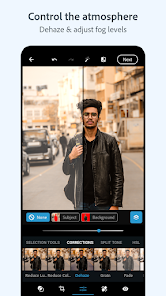
- 🎨 Pro-Level Corrections, Simplified: Tools like 'Clarity', 'Dehaze', and 'Vibrance' are presented in a simple slider format. These are features you'd find in professional software like Lightroom, but here they're made incredibly easy to use on a small screen.
- 🧼 Powerful Spot Healing: The 'Heal' tool for removing objects is a standout. In many free editors, this feature is either missing or very basic. Here, it works impressively well for erasing small distractions, making it much more useful than the simple clone stamps in other apps.
- ✂️ Precise Cropping and Straightening: The cropping interface is super intuitive with guides and a straighten tool that feels more responsive and accurate than the one in apps like Google Photos' editor, giving you perfect alignment every time.
Advantages & Benefits
- ✅ Adobe Reliability: Coming from Adobe, the editing algorithms for noise reduction and sharpening just feel more trustworthy and produce cleaner results than many other free editors.
- ✅ Offline Functionality: Unlike some cloud-based apps, you can do all your editing completely offline after you install it, which is great when you're traveling or have a poor connection.
- ✅ Seamless Sharing: Once you're done, exporting and sharing to platforms like Instagram is streamlined within the app, faster than the process in something like PicsArt.
Areas for Improvement
- ❌ Aggressive Upselling: The free version pushes its premium subscription quite hard with frequent ads and locked features, more so than in Snapseed, which is completely free.
- ❌ Limited Layer Support: For more complex edits involving multiple adjustments on separate layers, you're out of luck. Apps like PixelLab offer more in that creative department.
- ❌ Basic Retouching: While the healing tool is good, tools for advanced portrait retouching (like detailed skin smoothing or reshaping) are very limited compared to dedicated apps like FaceTune.
Recommended Apps
![]()
ZEPETO: Avatar, Connect & Play
Naver Z Corporation4.3
![]()
Reverse Voice: Flip Singing
NindaFuit0![]()
AI Chat Ask Assistant - NowAI
Now Tech4.3![]()
Lie Detector Test: Prank App
DkTech inc.4.3![]()
Peachy - AI Face & Body Editor
InShot Video Editor4.8
![]()
AI Video Art Creator - Livensa
FERASET4.5![]()
Google Voice
Google LLC4.3![]()
Horoscopes & Tarot
Astrolis Horoscopes4.7![]()
eBay online shopping & selling
eBay Mobile4.6![]()
JPay
Jpay Mobile4.1![]()
Stranger Things 5 Challenges
MVH Entertainment Team5![]()
Chat Master: Prank Story
ABI Game Studio4.8![]()
Google Maps
Google LLC4.2![]()
AI Chat・Ask Chatbot Assistant
AI Chat Studio4.5![]()
Name Meanings with Impact
Alif Innovative Solution3.7















You May Like
-
![]()
True Tarot Card Reading
KaApps4.2 -
![]()
LinkedIn: Jobs & Business News
LinkedIn4.2 -
![]()
iControl: Easy Widgets Themes
Fancy keyboard for theme apps4.6 -
![]()
Duolingo: Language & Chess
Duolingo4.7 -
![]()
Flipped:Chat with AI Character
First Group pte ltd4.1 -
![]()
Hearing Age
Mobile Solutions Tech0 -
![]()
TikTok
TikTok Pte. Ltd.4.4 -
![]()
Pretty Makeup - Beauty Camera
Photo Editor Perfect Corp.4.4 -
![]()
PhotoRoom AI Photo Editor
PhotoRoom Background Editor App4.7 -
![]()
Lightleap by Lightricks
Lightricks Ltd.4.3 -
![]()
Name Meaning
Dexati4.1 -
![]()
Truth Social
T Media Tech LLC3.3 -
![]()
Ace Hardware
Ace Hardware Corporation4.7 -
![]()
Kpop Fans Demon Hunter Wallpap
JHNStudio4.3 -
![]()
Artplay - AI Photo & Video
Hideaway Technology Limited4.5










































