

Photo Collage Maker & Editor
Lyrebird Studio
Installs
100M+
Developer
Lyrebird Studio
-
Category
Video Players & Editors
-
Content Rating
Rated for 3+
Developer Email
Privacy Policy
http://lyrebirdstudio.net/privacy_policy.htm
Screenshots
Expert Review
I've been using the Photo Collage Maker & Editor app from Lyrebird Studio for a while now, and it's become my go-to tool for quickly putting together pictures. It's a photo editing and collage-making app that lets you combine multiple photos into a single, stylish layout. I first downloaded it from the Google Play Store a couple of years ago, and it's been consistently updated since. The app is completely free to download and install, which is a huge plus. You don't even need to register or create an account to start using it right away. While there are some in-app ads, they're not too intrusive, and there are optional in-app purchases if you want to remove ads or access some premium collage frames and stickers.
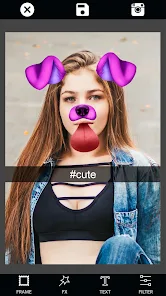
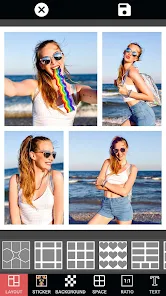
Using the app is super straightforward. After you install it, you just pick the photos from your gallery, choose a collage template, and drag your pictures into the slots. A tip I found useful is to use the 'Adjust' tool for each photo within the collage to fine-tune the zoom and position so nothing important gets cut off. You can also add filters, text, and backgrounds before saving or sharing your creation. It's perfect for making quick social media posts or preserving memories from a trip.
There are tons of similar apps out there, like Canva or PicCollage. I tried a few before settling on this one. The main reason I stuck with Lyrebird Studio's app is its simplicity and speed. Some other apps feel bloated with features I never use, making them slow to load. This Photo Collage Maker & Editor app opens fast, the templates are modern and plentiful, and it just gets the job done without any fuss. For basic, everyday collage needs, it's more than enough.
Key Functional Highlights
- 🖼️ Huge Template Library: Right after you install the app, you get access to hundreds of grid, freestyle, and themed templates. Compared to a popular app like InstaSize, which often pushes its premium templates, this app offers a wider variety for free, updating them regularly with seasonal designs.
- ✂️ Intuitive Cutting & Editing Tools: The in-app editor for individual photos within a collage is surprisingly powerful. You can precisely cut out backgrounds or unwanted objects with a simple brush tool, something that usually requires a separate, more complex app like Photoshop Express.
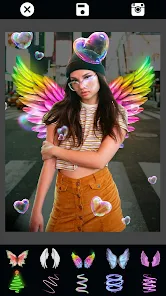
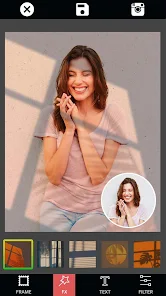
- 🎨 All-in-One Basic Editing: Beyond collages, it doubles as a capable photo editor. You can apply filters, adjust brightness/contrast, add text with cool fonts, and overlay stickers without ever leaving the app. This eliminates the need to jump between multiple apps to finish a project.
Advantages & Benefits
- 🚀 Lightning-Fast Performance: This app loads and processes collages much quicker than heavier apps like Canva on my phone. The install size is small, and it doesn't lag even with multiple high-resolution photos.
- 🆓 Truly Free Core Features: Unlike some competitors (e.g., PicCollage), which heavily watermark free exports or lock essential templates behind a paywall, this app's core collage-making functionality is completely free and watermark-free.
- 📱 Offline Functionality: Once downloaded, almost all features work without an internet connection. You can create and edit collages anywhere, which isn't always the case with cloud-based editors like Adobe Spark.
Areas for Improvement
- 📢 Ad Interruptions: The free version has banner and occasional full-screen ads. While you can purchase an ad-free experience, the ads can be a bit disruptive compared to completely ad-free apps like Moldiv.
- 🔄 Limited Cloud Sync: The app doesn't offer cloud saving of your projects. If you change phones, your unfinished collages are lost. Apps like Canva automatically save your work to the cloud.
- 🎵 No Music for Slideshows: Its video slideshow feature is basic and doesn't allow you to add background music from your library, a feature commonly found in dedicated slideshow apps like InShot.
Recommended Apps
![]()
ZEPETO: Avatar, Connect & Play
Naver Z Corporation4.3
![]()
Reverse Voice: Flip Singing
NindaFuit0![]()
AI Chat Ask Assistant - NowAI
Now Tech4.3![]()
Lie Detector Test: Prank App
DkTech inc.4.3![]()
Peachy - AI Face & Body Editor
InShot Video Editor4.8
![]()
AI Video Art Creator - Livensa
FERASET4.5![]()
Google Voice
Google LLC4.3![]()
Horoscopes & Tarot
Astrolis Horoscopes4.7![]()
eBay online shopping & selling
eBay Mobile4.6![]()
JPay
Jpay Mobile4.1![]()
Stranger Things 5 Challenges
MVH Entertainment Team5![]()
Chat Master: Prank Story
ABI Game Studio4.8![]()
Google Maps
Google LLC4.2![]()
AI Chat・Ask Chatbot Assistant
AI Chat Studio4.5![]()
Name Meanings with Impact
Alif Innovative Solution3.7















You May Like
-
![]()
True Tarot Card Reading
KaApps4.2 -
![]()
LinkedIn: Jobs & Business News
LinkedIn4.2 -
![]()
iControl: Easy Widgets Themes
Fancy keyboard for theme apps4.6 -
![]()
Duolingo: Language & Chess
Duolingo4.7 -
![]()
Flipped:Chat with AI Character
First Group pte ltd4.1 -
![]()
Hearing Age
Mobile Solutions Tech0 -
![]()
TikTok
TikTok Pte. Ltd.4.4 -
![]()
Pretty Makeup - Beauty Camera
Photo Editor Perfect Corp.4.4 -
![]()
PhotoRoom AI Photo Editor
PhotoRoom Background Editor App4.7 -
![]()
Lightleap by Lightricks
Lightricks Ltd.4.3 -
![]()
Name Meaning
Dexati4.1 -
![]()
Truth Social
T Media Tech LLC3.3 -
![]()
Ace Hardware
Ace Hardware Corporation4.7 -
![]()
Kpop Fans Demon Hunter Wallpap
JHNStudio4.3 -
![]()
Artplay - AI Photo & Video
Hideaway Technology Limited4.5










































