

Picsart AI Photo Editor, Video
PicsArt, Inc.
Installs
1B+
Developer
PicsArt, Inc.
-
Category
Video Players & Editors
-
Content Rating
Rated for 12+
Developer Email
Privacy Policy
https://picsart.com/privacy-policy
Screenshots
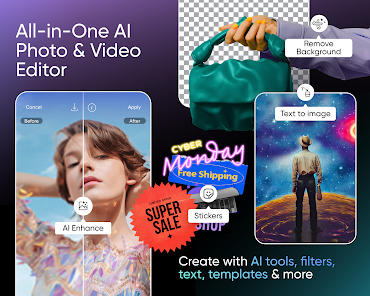
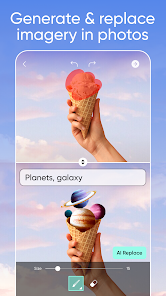

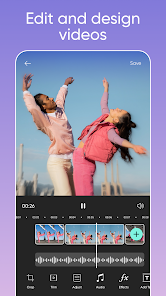
Expert Review
Picsart is my go-to app for editing photos and videos on my phone. It's basically a powerful, all-in-one creative studio that lets you do everything from basic touch-ups to making full-on digital art. I first downloaded it years ago, and it's been on my phone ever since. You can get it for free from the Google Play Store or the App Store, and it has hundreds of millions of installs. The core app is free to download and use, and you don't even need to register to start playing with a lot of the tools, though signing up unlocks cloud saving and a community feed. Of course, there are in-app purchases for a 'Gold' subscription to remove ads and get premium filters and assets, and you will see ads in the free version.
I use it for pretty much everything. If I take a quick snap that needs better lighting, I'll jump into Picsart. For more fun projects, I love using the AI tools to remove backgrounds or generate new elements with a text prompt. A good tip is to explore the 'Tools' section first for precise edits like curves or selective color, and then head to 'Effects' and 'Stickers' for the creative flair. The 'Remix' feature on other users' public edits is also a fantastic way to get inspired and learn new techniques.
Compared to other apps in the photo editing genre, like VSCO or Adobe Lightroom Mobile, Picsart feels less about presets and more about creation. Lightroom is unbeatable for raw photo correction, and VSCO has those iconic film looks. But I choose Picsart because it blends editing with graphic design. Need to make a birthday invite with a custom collage, styled text, and some doodles? Picsart handles it all in one place, while the others would need you to switch between multiple apps. For quick, creative, and often unexpected results, this app is my favorite.
Key Functional Highlights
- 🛠️ All-in-One Creative Suite: Unlike more focused apps, Picsart combines photo editing, video editing, collage making, and graphic design tools in a single interface. You can start with a photo, turn it into a sticker, use it in a video, and add text art without ever leaving the app.
- 🤖 Powerful and Accessible AI Tools: This is where it really stands out. Features like the AI Replace tool (letting you swap out skies or objects), AI Avatar generator, and text-to-image AI are surprisingly robust for a mobile app and are integrated right into the standard workflow, making advanced edits simple.
- 🎨 Massive Library of Assets: The app comes packed with thousands of free fonts, stickers, filters, and backgrounds. Compared to a similar popular app like Canva, Picsart's library feels more geared towards personal, artistic expression rather than just business templates, encouraging more unique creations.
- 📱 Optimized for Mobile Creativity: The entire experience is built for touch. Tools like the drawing brush with stabilization, intuitive layer controls, and one-tap effects make complex edits feel natural on a phone screen, which isn't always the case with ported desktop software.
Advantages & Benefits
- ✨ Unmatched Versatility: It's not just a filter app. I can do detailed photo retouching, create a social media story from scratch, and edit a short video all in Picsart. Apps like Snapseed or InShot do one thing very well, but Picsart does it all competently.
- 💡 Community and Inspiration: The built-in feed of community creations is a huge strength. Seeing how others use the tools provides endless ideas and templates ('Remixes') to start from, something most standalone editors lack.
- 🚀 Rapid Feature Updates: The developers constantly add new, trendy AI features and content. Compared to more static apps, Picsart always has something new to try, keeping the creative process fresh.
Areas for Improvement
- 📶 Can Be Resource Heavy: The app is large and can slow down on older phones. Performing complex edits, especially with multiple AI features, sometimes leads to lag or crashes, which isn't an issue with lighter apps like Google Photos' editor.
- 🔄 UI Can Feel Cluttered: With so many tools, the interface isn't always intuitive. Finding a specific setting can involve digging through menus, whereas an app like Lightroom Mobile has a cleaner, more professional layout.
- ⏳ Learning Curve for Advanced Features: While basic edits are easy, mastering layers, masks, and all the AI options takes time. For someone who just wants to apply a filter and go, it might feel overwhelming.
Recommended Apps
![]()
ZEPETO: Avatar, Connect & Play
Naver Z Corporation4.3
![]()
Reverse Voice: Flip Singing
NindaFuit0![]()
AI Chat Ask Assistant - NowAI
Now Tech4.3![]()
Lie Detector Test: Prank App
DkTech inc.4.3![]()
Peachy - AI Face & Body Editor
InShot Video Editor4.8
![]()
AI Video Art Creator - Livensa
FERASET4.5![]()
Google Voice
Google LLC4.3![]()
Horoscopes & Tarot
Astrolis Horoscopes4.7![]()
eBay online shopping & selling
eBay Mobile4.6![]()
JPay
Jpay Mobile4.1![]()
Stranger Things 5 Challenges
MVH Entertainment Team5![]()
Chat Master: Prank Story
ABI Game Studio4.8![]()
Google Maps
Google LLC4.2![]()
AI Chat・Ask Chatbot Assistant
AI Chat Studio4.5![]()
Name Meanings with Impact
Alif Innovative Solution3.7















You May Like
-
![]()
True Tarot Card Reading
KaApps4.2 -
![]()
LinkedIn: Jobs & Business News
LinkedIn4.2 -
![]()
iControl: Easy Widgets Themes
Fancy keyboard for theme apps4.6 -
![]()
Duolingo: Language & Chess
Duolingo4.7 -
![]()
Flipped:Chat with AI Character
First Group pte ltd4.1 -
![]()
Hearing Age
Mobile Solutions Tech0 -
![]()
TikTok
TikTok Pte. Ltd.4.4 -
![]()
Pretty Makeup - Beauty Camera
Photo Editor Perfect Corp.4.4 -
![]()
PhotoRoom AI Photo Editor
PhotoRoom Background Editor App4.7 -
![]()
Lightleap by Lightricks
Lightricks Ltd.4.3 -
![]()
Name Meaning
Dexati4.1 -
![]()
Truth Social
T Media Tech LLC3.3 -
![]()
Ace Hardware
Ace Hardware Corporation4.7 -
![]()
Kpop Fans Demon Hunter Wallpap
JHNStudio4.3 -
![]()
Artplay - AI Photo & Video
Hideaway Technology Limited4.5










































