
Gmail
Google LLC
Installs
10,000,000,000+
Developer
Google LLC
-
Category
Social
-
Content Rating
Rated for 3+
Developer Email
Privacy Policy
http://www.google.com/policies/privacy
Screenshots
Expert Review
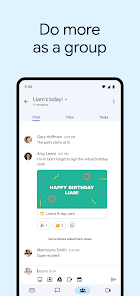
Gmail is Google's email service app, letting you manage your inbox from anywhere. It launched way back in 2004 as a web service, and the mobile app followed later, becoming a staple on both the Google Play Store and Apple's App Store. With billions of installs on Google Play alone, it's one of the most downloaded apps globally. The app itself is completely free to download and install. You do need a Google account to sign in and use it, which is pretty straightforward if you're already in the Google ecosystem. While the core email experience is ad-free, you might see some promotional emails or ads within your Promotions tab, but there are no disruptive in-app purchases or pop-up ads cluttering your main inbox.
Using the Gmail app is pretty intuitive. I have all my accounts—personal, work, and even an old university one—bundled into a single app. The swipe gestures to archive or delete emails are a lifesaver for quick inbox cleanup. A great tip is to use the snooze feature for emails you can't deal with immediately; just swipe lightly on an email to schedule it to pop back up at a better time, like tomorrow morning or next week. Also, enabling notifications for only 'Important' emails cuts down on the constant buzzing from newsletters and social updates.
Compared to other email apps like Apple Mail or Outlook, I stick with Gmail for a few reasons. Apple Mail is fine if you're all-in on Apple devices, but its web version feels limited. Outlook is powerful, especially for Microsoft 365 users, but its interface can feel a bit cluttered. Gmail strikes the best balance for me. Its search is unbeatable—thanks, Google—and the seamless integration with Google Drive, Calendar, and Meet makes it the central hub for my digital life. The simple, clean design just works without getting in the way, which is why it's remained my go-to email app for years.
Key Functional Highlights
- 🔍 Unbeatable Search: Finding any old email is a breeze. Gmail's search, powered by Google, understands natural language, so you can type things like 'that flight confirmation from Sarah last March' and it usually finds it.
- 📎 Smart Integration with Google Workspace: Attaching files is super smooth because it's directly linked to your Google Drive. You can also easily insert events from emails into Google Calendar or jump into a Google Meet call with one click.
- 🗂️ Tabbed Inbox Organization: The automatic sorting into Primary, Social, and Promotions tabs keeps my main inbox focused on what matters. It's not perfect, but it does a great job filtering out the noise.
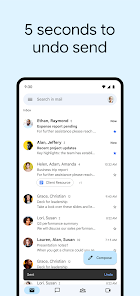
- ⏰ Snooze & Schedule Send: These are game-changers for managing workflow. Snooze an email to deal with it later, or write a reply now and schedule it to send during business hours tomorrow.
Advantages & Benefits
- ✅ Cross-Platform Sync: Whether I'm on my Android phone, an iPad, or a Windows PC, Gmail works flawlessly everywhere. Apple's Mail app can't match this universal access.
- ✅ Generous Free Storage: Compared to many services, the 15GB of free shared storage for Gmail, Drive, and Photos is hard to beat. Outlook.com offers less for free users.
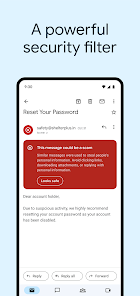
- ✅ Superior Spam Filtering: It's incredibly effective at blocking junk mail. I get far less spam in Gmail than I ever did in my old Yahoo or Outlook.com accounts.
Areas for Improvement
- ⚠️ Privacy Concerns: As a Google product, data collection for ad personalization is always a topic. Apps like Proton Mail or Tutanota offer stronger privacy-focused alternatives.
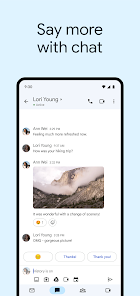
- ⚠️ Can Feel Bloated: With constant additions like Chat and Spaces, the interface can feel crowded compared to minimalist apps like Spark or Apple Mail.
- ⚠️ Organization Limits: The label system is powerful but different from traditional folders. Users coming from apps like Outlook, who rely heavily on nested folders, might find it confusing at first.
Recommended Apps
![]()
ZEPETO: Avatar, Connect & Play
Naver Z Corporation4.3
![]()
Reverse Voice: Flip Singing
NindaFuit0![]()
AI Chat Ask Assistant - NowAI
Now Tech4.3![]()
Lie Detector Test: Prank App
DkTech inc.4.3![]()
Peachy - AI Face & Body Editor
InShot Video Editor4.8
![]()
AI Video Art Creator - Livensa
FERASET4.5![]()
Google Voice
Google LLC4.3![]()
Horoscopes & Tarot
Astrolis Horoscopes4.7![]()
eBay online shopping & selling
eBay Mobile4.6![]()
JPay
Jpay Mobile4.1![]()
Stranger Things 5 Challenges
MVH Entertainment Team5![]()
Chat Master: Prank Story
ABI Game Studio4.8![]()
Google Maps
Google LLC4.2![]()
AI Chat・Ask Chatbot Assistant
AI Chat Studio4.5![]()
Name Meanings with Impact
Alif Innovative Solution3.7















You May Like
-
![]()
True Tarot Card Reading
KaApps4.2 -
![]()
LinkedIn: Jobs & Business News
LinkedIn4.2 -
![]()
iControl: Easy Widgets Themes
Fancy keyboard for theme apps4.6 -
![]()
Duolingo: Language & Chess
Duolingo4.7 -
![]()
Flipped:Chat with AI Character
First Group pte ltd4.1 -
![]()
Hearing Age
Mobile Solutions Tech0 -
![]()
TikTok
TikTok Pte. Ltd.4.4 -
![]()
Pretty Makeup - Beauty Camera
Photo Editor Perfect Corp.4.4 -
![]()
PhotoRoom AI Photo Editor
PhotoRoom Background Editor App4.7 -
![]()
Lightleap by Lightricks
Lightricks Ltd.4.3 -
![]()
Name Meaning
Dexati4.1 -
![]()
Truth Social
T Media Tech LLC3.3 -
![]()
Ace Hardware
Ace Hardware Corporation4.7 -
![]()
Kpop Fans Demon Hunter Wallpap
JHNStudio4.3 -
![]()
Artplay - AI Photo & Video
Hideaway Technology Limited4.5











































