

Messenger Viber: Chats & Calls
Viber Media S.à r.l.
Installs
1,000,000,000+
Developer
Viber Media S.à r.l.
-
Category
Social
-
Content Rating
Rated for 12+
Developer Email
Privacy Policy
https://www.viber.com/privacy
Screenshots

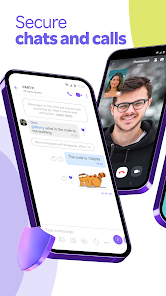
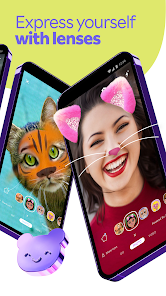
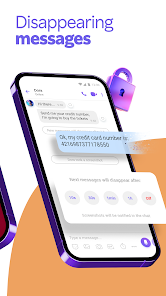
Expert Review
Viber is a messaging app I've been using for years to stay in touch with friends and family, especially those overseas. It's a free app for calling and texting, and it first launched back in 2010. You can easily find and download it from the Google Play Store or the Apple App Store. It has a massive number of installs, which tells you how popular it is. You don't need to pay anything to get the app, but you do need to register with your phone number to start using it. While the core features are free, there are some optional in-app purchases, like buying stickers for fun chats. You'll also see some ads within the app, but they're usually not too intrusive.
Using Viber is pretty straightforward. After you install it and verify your number, your phone contacts who also use Viber automatically show up. I mostly use it for one-on-one or group chats, and the voice and video call quality is generally solid. A handy tip is to use the 'Hidden Chats' feature for conversations you want to keep private with a PIN. Also, if you're messaging someone in a different country, turning on 'Free International Calls' in the settings ensures you're using data and not your cellular minutes.
Compared to other apps like WhatsApp or Telegram, I keep coming back to Viber for a few reasons. While WhatsApp is ubiquitous, Viber often feels a bit more feature-rich for social chatting with its fun sticker market and built-in games. Telegram is fantastic for large groups and channels, but for my close circle where we make a lot of video calls, Viber's call quality has been more consistently reliable for me. It strikes a good balance between being full-featured and easy for my less tech-savvy relatives to use after they install it.
Key Functional Highlights
- 🎮 Fun Social Features: Beyond basic texting, Viber has a huge marketplace for stickers and GIFs, and you can even play simple games like 'Word Game' or 'Sudoku' right inside a chat. This makes casual conversations more engaging compared to more utilitarian apps.
- 🔒 Hidden Chats & PIN Lock: This is a standout privacy feature. You can hide specific chats from the main list and secure them with a PIN or fingerprint. It adds an extra layer of security that isn't as seamlessly integrated in some other mainstream messaging apps.
- 📞 Reliable Call Quality: For voice and video calls, especially internationally, Viber's performance is consistently good. The connection is stable, and the audio clarity is excellent, which is a primary reason many people choose to download this app.
- 👥 Community Features: The 'Communities' feature allows for large group chats (up to 1 billion members!) with admin controls, similar to Telegram's supergroups but integrated into the familiar Viber interface.
Advantages & Benefits
- ✅ Superior Call Experience: Compared to WhatsApp, I find Viber's voice and video call interface and connection stability to be slightly better, especially on slower networks.
- ✅ Rich Sticker Ecosystem: The variety and quality of free and paid stickers in Viber surpass what's typically available in default WhatsApp or Signal packs.
- ✅ Balance of Features: It offers more social and fun elements than Signal, while feeling more accessible for everyday use than the power-user-focused Telegram.
Areas for Improvement
- ⚠️ Presence of Ads: Unlike WhatsApp or Signal, the free Viber app includes banner ads, which can be a minor annoyance and isn't as clean an experience.
- ⚠️ Slower Multi-Device Sync: Setting up the desktop app requires QR scanning from your phone every time, unlike Telegram which allows truly independent, simultaneous logins.
- ⚠️ Smaller Network Effect: In some regions, everyone uses WhatsApp by default. Convincing contacts to install and use Viber can sometimes be a hurdle.
Recommended Apps
![]()
ZEPETO: Avatar, Connect & Play
Naver Z Corporation4.3
![]()
Reverse Voice: Flip Singing
NindaFuit0![]()
AI Chat Ask Assistant - NowAI
Now Tech4.3![]()
Lie Detector Test: Prank App
DkTech inc.4.3![]()
Peachy - AI Face & Body Editor
InShot Video Editor4.8
![]()
AI Video Art Creator - Livensa
FERASET4.5![]()
Google Voice
Google LLC4.3![]()
Horoscopes & Tarot
Astrolis Horoscopes4.7![]()
eBay online shopping & selling
eBay Mobile4.6![]()
JPay
Jpay Mobile4.1![]()
Stranger Things 5 Challenges
MVH Entertainment Team5![]()
Chat Master: Prank Story
ABI Game Studio4.8![]()
Google Maps
Google LLC4.2![]()
AI Chat・Ask Chatbot Assistant
AI Chat Studio4.5![]()
Name Meanings with Impact
Alif Innovative Solution3.7















You May Like
-
![]()
True Tarot Card Reading
KaApps4.2 -
![]()
LinkedIn: Jobs & Business News
LinkedIn4.2 -
![]()
iControl: Easy Widgets Themes
Fancy keyboard for theme apps4.6 -
![]()
Duolingo: Language & Chess
Duolingo4.7 -
![]()
Flipped:Chat with AI Character
First Group pte ltd4.1 -
![]()
Hearing Age
Mobile Solutions Tech0 -
![]()
TikTok
TikTok Pte. Ltd.4.4 -
![]()
Pretty Makeup - Beauty Camera
Photo Editor Perfect Corp.4.4 -
![]()
PhotoRoom AI Photo Editor
PhotoRoom Background Editor App4.7 -
![]()
Lightleap by Lightricks
Lightricks Ltd.4.3 -
![]()
Name Meaning
Dexati4.1 -
![]()
Truth Social
T Media Tech LLC3.3 -
![]()
Ace Hardware
Ace Hardware Corporation4.7 -
![]()
Kpop Fans Demon Hunter Wallpap
JHNStudio4.3 -
![]()
Artplay - AI Photo & Video
Hideaway Technology Limited4.5










































