
Google Meet
Google LLC
Installs
5,000,000,000+
Developer
Google LLC
-
Category
Social
-
Content Rating
Rated for 3+
Developer Email
Privacy Policy
http://www.google.com/policies/privacy
Screenshots



Expert Review
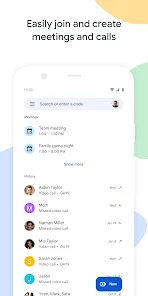
Google Meet is Google's video conferencing app, designed for everything from quick catch-ups with friends to large business meetings and online classes. It's part of the Google Workspace suite but is widely used by anyone with a Google account. The app launched in 2017 and is available on both the Google Play Store and Apple's App Store. It has been downloaded over a billion times on Google Play alone. The core app is free to download and install, and you can start or join meetings without any upfront cost. You don't need to register separately if you already have a Google account, which makes getting started super easy. While the free version is robust, there are optional paid plans through Google Workspace that offer longer meeting durations and more features for larger organizations. You might see occasional prompts about upgrading, but the free tier is very capable for most personal and small group use.
Using the app is straightforward. You can create a new meeting with a single tap and share the link or code with others. For joining, you just enter the meeting code. A handy tip is to use the scheduling integration directly with Google Calendar – it automatically creates the Meet link for you. Another great feature is the live captions during calls, which really help with clarity. The layout is clean, letting you easily switch between speaker view and a grid of all participants. For the best experience, make sure you have a stable internet connection and grant the app the necessary permissions for your camera and microphone when you first install it.
Compared to similar apps like Zoom or Microsoft Teams, I find myself choosing Google Meet more often for its sheer simplicity and deep integration with the tools I already use daily, like Gmail and Calendar. Zoom is fantastic for features like virtual backgrounds, but Meet feels lighter and faster to just jump into a call. Teams is powerful for workplace collaboration, but it can feel a bit heavy for a simple video chat. With Google Meet, there's no separate app to download for guests in a browser, which is a huge plus when coordinating with people who might not want to install another app. It just works seamlessly, which is why it's become my go-to for most video calls.
Key Functional Highlights
- 🔗 Seamless Google Integration: This is the app's standout feature. Creating or joining a meeting is baked right into your Gmail inbox and Google Calendar. An event on your calendar automatically has a Meet link, eliminating the extra step of generating and pasting links elsewhere.
- 🎥 Lightweight and Reliable Performance: Compared to some other video apps that can be resource hogs, Google Meet is optimized to run smoothly even on older devices. The connection is generally stable, and the video/audio quality adjusts well to different network conditions.
- 🔒 Strong Security by Default: Every meeting in the app is encrypted, and features like admitting participants from a waiting room and host controls to manage who can share their screen are built-in. This gives it a security edge over some competitors for sensitive discussions.
- 📝 Live Captions: The automatic live captions (available in several languages) are incredibly useful. They not only aid accessibility but also help when someone's audio is choppy or if you're in a noisy environment and need to read what was said.
Advantages & Benefits
- ✅ Zero-Friction for Guests: Unlike Zoom, where guests often need to download a client, participants can join a Google Meet directly from any modern web browser without installing anything, making it incredibly convenient.
- ✅ Completely Free for Core Use: For most personal and small-team needs, the app's free tier is fully functional with no time limit on 1-on-1 calls and generous limits on group calls, whereas apps like Microsoft Teams have more restrictions on their free plans.
- ✅ Unmatched Ecosystem Fit: If you live in the Google world (Gmail, Android, Chrome), this app feels like a native part of your workflow, reducing app-switching fatigue compared to using a standalone service like Skype.
Areas for Improvement
- ❌ Fewer Fun Features: Compared to Zoom, Google Meet has more limited options for virtual backgrounds and lacks fun interactive features like reactions that appear on video or advanced polls, making it feel more utilitarian.
- ❌ Limited Whiteboard & Collaboration Tools: While it has basic screen sharing, its built-in digital whiteboard is not as advanced as what you find in dedicated apps like Miro or even within Microsoft Teams' collaboration space.
- ❌ Meeting Management Can Be Cumbersome: For hosts managing large meetings, features like breakout rooms arrived later than in competitors and the participant management interface isn't always as intuitive as in some other enterprise-focused apps.
Recommended Apps
![]()
ZEPETO: Avatar, Connect & Play
Naver Z Corporation4.3
![]()
Reverse Voice: Flip Singing
NindaFuit0![]()
AI Chat Ask Assistant - NowAI
Now Tech4.3![]()
Lie Detector Test: Prank App
DkTech inc.4.3![]()
Peachy - AI Face & Body Editor
InShot Video Editor4.8
![]()
AI Video Art Creator - Livensa
FERASET4.5![]()
Google Voice
Google LLC4.3![]()
Horoscopes & Tarot
Astrolis Horoscopes4.7![]()
eBay online shopping & selling
eBay Mobile4.6![]()
JPay
Jpay Mobile4.1![]()
Stranger Things 5 Challenges
MVH Entertainment Team5![]()
Chat Master: Prank Story
ABI Game Studio4.8![]()
Google Maps
Google LLC4.2![]()
AI Chat・Ask Chatbot Assistant
AI Chat Studio4.5![]()
Name Meanings with Impact
Alif Innovative Solution3.7















You May Like
-
![]()
True Tarot Card Reading
KaApps4.2 -
![]()
LinkedIn: Jobs & Business News
LinkedIn4.2 -
![]()
iControl: Easy Widgets Themes
Fancy keyboard for theme apps4.6 -
![]()
Duolingo: Language & Chess
Duolingo4.7 -
![]()
Flipped:Chat with AI Character
First Group pte ltd4.1 -
![]()
Hearing Age
Mobile Solutions Tech0 -
![]()
TikTok
TikTok Pte. Ltd.4.4 -
![]()
Pretty Makeup - Beauty Camera
Photo Editor Perfect Corp.4.4 -
![]()
PhotoRoom AI Photo Editor
PhotoRoom Background Editor App4.7 -
![]()
Lightleap by Lightricks
Lightricks Ltd.4.3 -
![]()
Name Meaning
Dexati4.1 -
![]()
Truth Social
T Media Tech LLC3.3 -
![]()
Ace Hardware
Ace Hardware Corporation4.7 -
![]()
Kpop Fans Demon Hunter Wallpap
JHNStudio4.3 -
![]()
Artplay - AI Photo & Video
Hideaway Technology Limited4.5











































