

Calorie Control & Diet Tracker
Willson Studio
Installs
100K+
Developer
Willson Studio
-
Category
Health & Fitness
-
Content Rating
Everyone
Developer Email
Privacy Policy
https://willson-studio.netlify.app/privacy
Screenshots
Expert Review
Calorie Control & Diet Tracker, from developer Willson Studio, is a straightforward health and fitness application designed to help users monitor their daily food intake and manage nutritional goals. It is available for download through the Google Play store, where it has amassed a considerable number of installations, reflecting its popularity among those looking to maintain a balanced diet. The app is free to install, but it does include advertisements and offers in-app purchases for those who wish to unlock additional features or remove the ads for a more seamless experience.
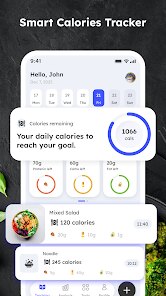
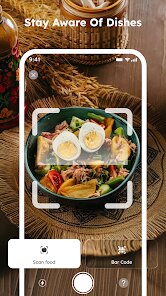
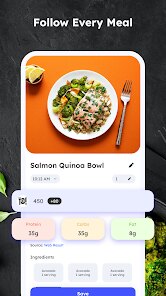
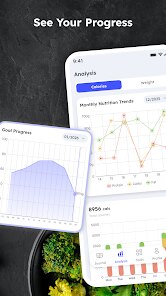
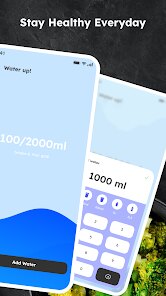
The core functionality revolves around a comprehensive food database that allows for quick logging of meals. Users can search for common food items or scan barcodes on packaged products to instantly register their nutritional information. The interface presents a clear breakdown of calories, macronutrients, and other essential data, making it simple to see how daily choices add up. During my initial use, I found the barcode scanning feature to be particularly efficient, eliminating the guesswork often associated with manual entry. The app also allows for setting personal calorie targets and tracks progress with visual charts, which provides a tangible sense of one's dietary patterns.
When placed alongside similar applications in this genre, this tracker distinguishes itself through its simplicity rather than an overload of complex features. While some competitors focus on highly detailed micronutrient tracking or advanced macro cycling, Calorie Control & Diet Tracker keeps its focus on the essentials. This approach makes it more accessible for beginners who might feel overwhelmed by more technical interfaces. I noticed the layout is less cluttered than some rivals, which I personally appreciate, although more experienced users might find the lack of advanced customization options a bit limiting.
Key Functional Highlights
- The barcode scanner is arguably the standout feature; a quick scan of most packaged foods instantly populates the diary with accurate data. This process saves considerable time and feels much more reliable than searching through the database manually, which is a step up from some apps where the scanner can be inconsistent.
- Its visual progress tracking, which includes daily charts and weekly summaries, presents consumption patterns in an easy-to-understand format. This helps with self-awareness without requiring deep analysis, which I find more motivating than purely numerical readouts.
- Setting up a personalized profile is a quick process, and the app adjusts calorie recommendations based on goals like weight loss or maintenance. The adjustments feel sensible, though they lack the granular control offered by more specialized apps on the market.
Advantages & Benefits
- It offers a reliable way to build awareness about portion sizes, which is helpful for simple weight management.
- The straightforward design means there's minimal onboarding required to start using it effectively.
- Having a comprehensive food database on your phone makes spontaneous meal decisions easier to track throughout the day.
Areas for Improvement
- The free version includes frequent ads, which can interrupt the flow of logging a meal.
- Manual entry for non-scannable items, like home-cooked dishes, is less intuitive than it could be, requiring more effort.
- There is no option to sync data with other health apps, which could be a drawback for those using multiple fitness trackers.
Recommended Apps
![]()
ZEPETO: Avatar, Connect & Play
Naver Z Corporation4.3
![]()
Reverse Voice: Flip Singing
NindaFuit0![]()
AI Chat Ask Assistant - NowAI
Now Tech4.3![]()
Lie Detector Test: Prank App
DkTech inc.4.3![]()
Peachy - AI Face & Body Editor
InShot Video Editor4.8
![]()
AI Video Art Creator - Livensa
FERASET4.5![]()
Google Voice
Google LLC4.3![]()
Horoscopes & Tarot
Astrolis Horoscopes4.7![]()
eBay online shopping & selling
eBay Mobile4.6![]()
JPay
Jpay Mobile4.1![]()
Stranger Things 5 Challenges
MVH Entertainment Team5![]()
Chat Master: Prank Story
ABI Game Studio4.8![]()
Google Maps
Google LLC4.2![]()
AI Chat・Ask Chatbot Assistant
AI Chat Studio4.5![]()
Name Meanings with Impact
Alif Innovative Solution3.7















You May Like
-
![]()
True Tarot Card Reading
KaApps4.2 -
![]()
LinkedIn: Jobs & Business News
LinkedIn4.2 -
![]()
iControl: Easy Widgets Themes
Fancy keyboard for theme apps4.6 -
![]()
Duolingo: Language & Chess
Duolingo4.7 -
![]()
Flipped:Chat with AI Character
First Group pte ltd4.1 -
![]()
Hearing Age
Mobile Solutions Tech0 -
![]()
TikTok
TikTok Pte. Ltd.4.4 -
![]()
Pretty Makeup - Beauty Camera
Photo Editor Perfect Corp.4.4 -
![]()
PhotoRoom AI Photo Editor
PhotoRoom Background Editor App4.7 -
![]()
Lightleap by Lightricks
Lightricks Ltd.4.3 -
![]()
Name Meaning
Dexati4.1 -
![]()
Truth Social
T Media Tech LLC3.3 -
![]()
Ace Hardware
Ace Hardware Corporation4.7 -
![]()
Kpop Fans Demon Hunter Wallpap
JHNStudio4.3 -
![]()
Artplay - AI Photo & Video
Hideaway Technology Limited4.5












































