

Hailuo Al: Image&Video Maker
MiniMax AI
Installs
Developer
MiniMax AI
-
Category
Generative AI
-
Content Rating
Teen
Developer Email
Privacy Policy
https://hailuoai.video/doc/privacy-policy.html
Screenshots

Expert Review
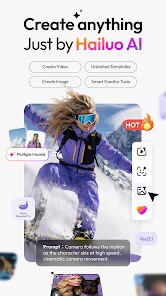
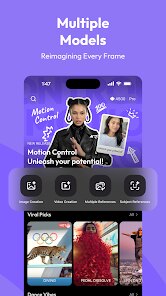
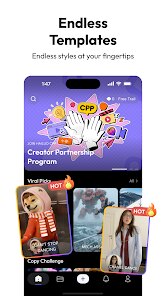
For those who enjoy turning static pictures into moving visuals, Hailuo AI: Image&Video Maker from MiniMax AI offers a straightforward way to experiment with AI-driven animation. Available on Google Play, the app falls under the photo and video editing category, providing tools to generate short video clips from uploaded images or text prompts. It is free to download and install, though like many generative AI apps, it includes optional in-app purchases for additional credits or premium features. The interface is clean and modern, making the initial impression pleasant enough for both curious newcomers and more experienced users.
Getting started is simple: you either upload a photo from your gallery or type a descriptive sentence, and the app processes the input to create a short video. The generation takes anywhere from a few seconds to a minute depending on the complexity, and the results are often surprisingly cohesive. I found the motion generation from still images particularly engaging – a simple landscape photo can become a gentle panning shot or include subtle wind effects on trees and water. The text-to-video option also works well for abstract concepts, though it tends to be less consistent with very detailed prompts.
When I compare it with similar apps like RunwayML or Pika Labs, Hailuo feels more accessible for casual users. Those apps often require a bit of familiarity with AI terminology or editing workflows, whereas this one keeps things simple. On the other hand, it lacks some of the advanced controls and style customization options found in those competitors. For someone like me who just wants quick, visually pleasing results without tweaking parameters, the trade-off feels acceptable. It is not a professional-grade tool, but it does not pretend to be one either.
Key Functional Highlights
- The animation quality from static images stands out as the most impressive feature. I uploaded a photo of a lake at sunset, and the app added realistic water ripples and cloud movement that felt natural rather than artificial. It handles subtle motion better than many alternatives in this price range.
- Text-to-video generation is decent but less reliable. Short, clear prompts like "a cat walking on a sunny street" produce recognizable results, but longer or abstract descriptions often lead to chaotic outputs. It works best when you keep expectations modest.
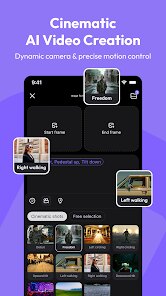
- The user interface is well-organized with minimal clutter. Icons are labeled clearly, and the generation history is easy to browse. Compared to some other AI video apps, it requires almost no learning curve, which is a practical advantage for quick projects.
- Export options are somewhat limited – you can save videos to your device or share directly, but resolution choices are fewer than what you would find in dedicated editing software. For social media sharing, though, the quality is sufficient.
Advantages & Benefits
- Saves time by automating motion effects that would take manual editing skills to achieve.
- Works well for creating short social media clips or personal project teasers without needing video editing expertise.
- Encourages creative experimentation because the generation process is fast and low-risk.
- Useful for visualizing simple concepts or adding life to static presentation materials.
Areas for Improvement
- Free version runs on a credit system, and the free credits run out fairly quickly if you generate multiple videos in a row.
- Video length is capped at a few seconds, which limits its usefulness for longer narrative projects.
- Occasionally results in artifacts or unnatural movement, especially with complex human poses or fast motion.
- No manual keyframe or timeline editing – once a video is generated, you cannot adjust specific parts without starting over.
Recommended Apps
![]()
ZEPETO: Avatar, Connect & Play
Naver Z Corporation4.3
![]()
Reverse Voice: Flip Singing
NindaFuit0![]()
AI Chat Ask Assistant - NowAI
Now Tech4.3![]()
Lie Detector Test: Prank App
DkTech inc.4.3![]()
Peachy - AI Face & Body Editor
InShot Video Editor4.8
![]()
AI Video Art Creator - Livensa
FERASET4.5![]()
Google Voice
Google LLC4.3![]()
Horoscopes & Tarot
Astrolis Horoscopes4.7![]()
eBay online shopping & selling
eBay Mobile4.6![]()
JPay
Jpay Mobile4.1![]()
Stranger Things 5 Challenges
MVH Entertainment Team5![]()
Chat Master: Prank Story
ABI Game Studio4.8![]()
Google Maps
Google LLC4.2![]()
AI Chat・Ask Chatbot Assistant
AI Chat Studio4.5![]()
Name Meanings with Impact
Alif Innovative Solution3.7















You May Like
-
![]()
True Tarot Card Reading
KaApps4.2 -
![]()
LinkedIn: Jobs & Business News
LinkedIn4.2 -
![]()
iControl: Easy Widgets Themes
Fancy keyboard for theme apps4.6 -
![]()
Duolingo: Language & Chess
Duolingo4.7 -
![]()
Flipped:Chat with AI Character
First Group pte ltd4.1 -
![]()
Hearing Age
Mobile Solutions Tech0 -
![]()
TikTok
TikTok Pte. Ltd.4.4 -
![]()
Pretty Makeup - Beauty Camera
Photo Editor Perfect Corp.4.4 -
![]()
PhotoRoom AI Photo Editor
PhotoRoom Background Editor App4.7 -
![]()
Lightleap by Lightricks
Lightricks Ltd.4.3 -
![]()
Name Meaning
Dexati4.1 -
![]()
Truth Social
T Media Tech LLC3.3 -
![]()
Ace Hardware
Ace Hardware Corporation4.7 -
![]()
Kpop Fans Demon Hunter Wallpap
JHNStudio4.3 -
![]()
Artplay - AI Photo & Video
Hideaway Technology Limited4.5










































