

Volume Control Sound Launcher
AtomApplications
Installs
500K+
Developer
AtomApplications
-
Category
Productivity
-
Content Rating
Everyone
Developer Email
Privacy Policy
https://phonevolumecontrol.com/privacy-policy
Screenshots
Expert Review
Volume Control Sound Launcher, developed by AtomApplications, is a utility app available on Google Play that combines system sound adjustment with quick app launching features. It serves as a tool for users who want faster access to volume settings and frequently used applications without digging through multiple menus. The app is free to download and install, though it includes ads and offers in-app purchases for additional functionality.
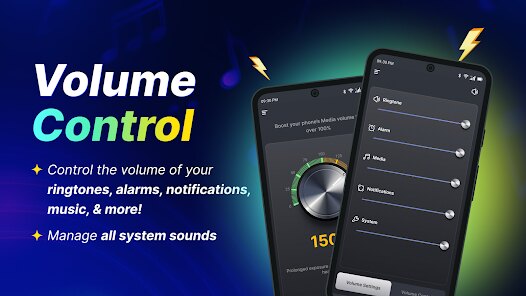
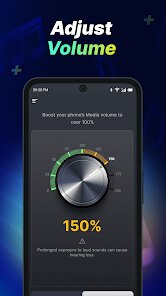
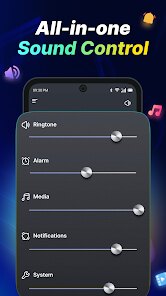
The way it operates is fairly straightforward. Upon opening the app, you are presented with sliders for media, alarm, ringtone, and notification volumes. There is also a section where you can assign shortcuts to your most used apps. Tapping on an app icon launches it immediately, while adjusting a slider changes the corresponding volume instantly. In practice, this makes switching between adjusting sound levels and opening apps feel reasonably fluid. I found the interface to be clean, though not particularly modern in appearance.
Other apps like Sound Assistant or Volume Booster offer similar volume control functions, but they tend to focus solely on audio management. What sets this one apart is the integrated app launcher, which adds a layer of convenience for users who frequently switch between applications. Some competitors have smarter gesture controls or more detailed sound profiles, but they often lack this combined approach. For someone who wants both features in a single package rather than juggling two separate apps, this is a reasonable choice.
Key Functional Highlights
- The adjustable volume sliders are responsive and cover the main sound categories without extra clutter. Unlike some sound apps that bury options in submenus, here every slider is visible on the main screen. This makes quick changes feel effortless, though the design could use a refresh.
- The app launcher section lets you add shortcuts to eight applications. During my time using it, I found this helpful for launching music players or messaging apps right after adjusting volume. However, the limit is somewhat restrictive compared to launchers that allow more customization.
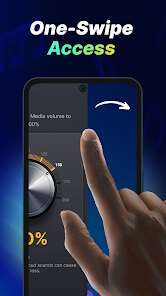
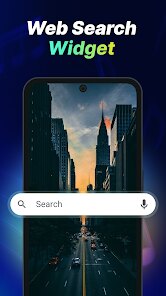
- There is a small floating widget that can be enabled for even faster access. It sits on top of other apps and provides basic volume controls without leaving your current screen. This is a useful addition, though it occasionally overlaps with other interface elements.
- Compared to something like Precise Volume, this app lacks fine-grained audio tuning. Its strength lies more in convenience than in detailed control. Users looking for professional sound settings may find it too basic, but for everyday adjustments, it works fine.
Advantages & Benefits
- Saves time by placing both volume controls and app shortcuts in one place, reducing the need to switch between different settings screens.
- The floating widget makes it easy to change sound levels while watching videos or playing games without closing the current app.
- Being free to download and install on Google Play means you can try it without any upfront cost, which is always a plus.
- It uses minimal system resources, so it does not noticeably affect battery life or performance during regular usage.
Areas for Improvement
- The app includes ads that appear occasionally, which can be slightly distracting during use. Removing them requires an in-app purchase.
- The shortcut limit of eight apps feels arbitrary and may not satisfy users with many frequently used applications.
- There is no option to create custom sound profiles for different scenarios, like silent mode for meetings or louder settings for outdoors.
- The visual design appears somewhat dated compared to modern utility apps, which might deter users who prefer a polished interface.
Recommended Apps
![]()
ZEPETO: Avatar, Connect & Play
Naver Z Corporation4.3
![]()
Reverse Voice: Flip Singing
NindaFuit0![]()
AI Chat Ask Assistant - NowAI
Now Tech4.3![]()
Lie Detector Test: Prank App
DkTech inc.4.3![]()
Peachy - AI Face & Body Editor
InShot Video Editor4.8
![]()
AI Video Art Creator - Livensa
FERASET4.5![]()
Google Voice
Google LLC4.3![]()
Horoscopes & Tarot
Astrolis Horoscopes4.7![]()
eBay online shopping & selling
eBay Mobile4.6![]()
JPay
Jpay Mobile4.1![]()
Stranger Things 5 Challenges
MVH Entertainment Team5![]()
Chat Master: Prank Story
ABI Game Studio4.8![]()
Google Maps
Google LLC4.2![]()
AI Chat・Ask Chatbot Assistant
AI Chat Studio4.5![]()
Name Meanings with Impact
Alif Innovative Solution3.7















You May Like
-
![]()
True Tarot Card Reading
KaApps4.2 -
![]()
LinkedIn: Jobs & Business News
LinkedIn4.2 -
![]()
iControl: Easy Widgets Themes
Fancy keyboard for theme apps4.6 -
![]()
Duolingo: Language & Chess
Duolingo4.7 -
![]()
Flipped:Chat with AI Character
First Group pte ltd4.1 -
![]()
Hearing Age
Mobile Solutions Tech0 -
![]()
TikTok
TikTok Pte. Ltd.4.4 -
![]()
Pretty Makeup - Beauty Camera
Photo Editor Perfect Corp.4.4 -
![]()
PhotoRoom AI Photo Editor
PhotoRoom Background Editor App4.7 -
![]()
Lightleap by Lightricks
Lightricks Ltd.4.3 -
![]()
Name Meaning
Dexati4.1 -
![]()
Truth Social
T Media Tech LLC3.3 -
![]()
Ace Hardware
Ace Hardware Corporation4.7 -
![]()
Kpop Fans Demon Hunter Wallpap
JHNStudio4.3 -
![]()
Artplay - AI Photo & Video
Hideaway Technology Limited4.5










































