

Shell
Shell Information Technology International B.V.
Installs
10M+
Developer
Shell Information Technology International B.V.
-
Category
Productivity
-
Content Rating
Everyone
Developer Email
Privacy Policy
https://www.shell.com/privacy/b2c-notice.html
Screenshots


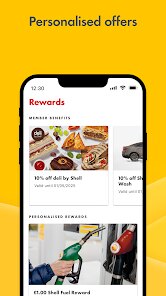
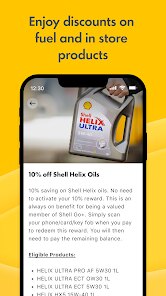
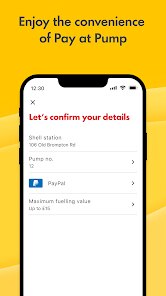

Expert Review
For anyone keeping an eye on fuel expenses or simply wanting a more streamlined experience at the pump, the Shell app available on Google Play offers a practical set of tools. Its primary function is to connect users with nearby Shell stations, display current fuel prices, and facilitate cashless payments directly from a smartphone. The app itself is free to download and install, and while it doesn't include any subscription fees, it naturally supports in-app purchases for various fuel or service options. It's a straightforward utility rather than a flashy entertainment piece, designed with a clear focus on convenience and transparency.
Setting up the app for the first time involves a quick registration where you link a payment method, after which the interface feels fairly intuitive. The home screen presents a map or list view of nearby stations, each clearly marked with prices for different fuel grades. Tapping a station provides directions, hours of operation, and the option to pay in advance or choose a specific pump. During a recent fill-up, I found the payment process to be smooth, scanning a QR code at the pump and having the transaction complete without needing to pull out a wallet. The app tracks your purchase history, which makes it easier to monitor spending across different trips without any extra effort. The experience overall feels refined, avoiding unnecessary clutter while keeping essential functions easily accessible.
When stacked against other gas station apps or general payment platforms, Shell's offering distinguishes itself primarily through its depth of station-specific data and integration. Competitors like GasBuddy or local fuel apps might offer broader price comparisons across many brands, but they often lack the direct payment and loyalty integration that the Shell app provides. The interface here is also noticeably more polished, with a clean design that prioritizes quick actions like finding fuel or paying. Where other apps can feel like a list of numbers or disconnected services, this one feels like a cohesive tool built around a single user journey, which I find a bit more practical for everyday errands.
Key Functional Highlights
- The fuel price transparency is one of its strongest features. Instead of guessing or relying on signs from the road, the app shows real-time prices for nearby stations, allowing you to make informed decisions before even leaving the house. It's a quiet convenience that adds up over time.
- Cashless payment integration feels genuinely frictionless. Once your card is saved, you can authorize a specific pump, fuel up, and drive away without any further interaction. It eliminates the small hassle of walking inside or fumbling with cards at the pump, which makes each visit feel slightly faster.
- Compared to mainstream navigation tools, the station finder offers richer details per location. You can see not just the address and hours but also what fuel types are available, whether the station has a car wash, or if it offers premium services. This saves time by filtering out locations that don't meet your specific needs.
- Purchase history tracking, while subtle, adds a layer of control. The ability to review past transactions directly in the app helps in tracking fuel costs without needing a separate spreadsheet or receipt collection. It turns sporadic purchases into a manageable dataset.
Advantages & Benefits
- I've found it most useful for planning my weekly fuel stop during busy days. Checking prices before heading out shaves a few minutes off the errand, and the payment flow stays quick even when lines are moderate.
- For long trips, the station finder becomes a practical companion. Filtering by fuel type or service amenities helps me avoid detours or surprises when I'm unfamiliar with the area.
- Having a digital record of purchases has made it easier to stick to a fuel budget. I don't have to guess how much I spent last month; it's all recorded and easy to browse.
Areas for Improvement
- The app occasionally takes a moment to refresh prices when moving between areas, and the list view can lag slightly during peak traffic hours. Refreshing manually usually solves it, but it can interrupt the flow.
- Not every Shell station is equally represented on the app. Some smaller or older locations show incomplete details or fail to connect for remote payment, which means you can't rely on the app for every single stop.
- While the interface is clean, the navigation for finding more advanced settings like loyalty rewards or receipt history isn't always intuitive. It took me a few minutes to locate the purchase log on my first visit, which felt a bit hidden.
Recommended Apps
![]()
ZEPETO: Avatar, Connect & Play
Naver Z Corporation4.3
![]()
Reverse Voice: Flip Singing
NindaFuit0![]()
AI Chat Ask Assistant - NowAI
Now Tech4.3![]()
Lie Detector Test: Prank App
DkTech inc.4.3![]()
Peachy - AI Face & Body Editor
InShot Video Editor4.8
![]()
AI Video Art Creator - Livensa
FERASET4.5![]()
Google Voice
Google LLC4.3![]()
Horoscopes & Tarot
Astrolis Horoscopes4.7![]()
eBay online shopping & selling
eBay Mobile4.6![]()
JPay
Jpay Mobile4.1![]()
Stranger Things 5 Challenges
MVH Entertainment Team5![]()
Chat Master: Prank Story
ABI Game Studio4.8![]()
Google Maps
Google LLC4.2![]()
AI Chat・Ask Chatbot Assistant
AI Chat Studio4.5![]()
Name Meanings with Impact
Alif Innovative Solution3.7















You May Like
-
![]()
True Tarot Card Reading
KaApps4.2 -
![]()
LinkedIn: Jobs & Business News
LinkedIn4.2 -
![]()
iControl: Easy Widgets Themes
Fancy keyboard for theme apps4.6 -
![]()
Duolingo: Language & Chess
Duolingo4.7 -
![]()
Flipped:Chat with AI Character
First Group pte ltd4.1 -
![]()
Hearing Age
Mobile Solutions Tech0 -
![]()
TikTok
TikTok Pte. Ltd.4.4 -
![]()
Pretty Makeup - Beauty Camera
Photo Editor Perfect Corp.4.4 -
![]()
PhotoRoom AI Photo Editor
PhotoRoom Background Editor App4.7 -
![]()
Lightleap by Lightricks
Lightricks Ltd.4.3 -
![]()
Name Meaning
Dexati4.1 -
![]()
Truth Social
T Media Tech LLC3.3 -
![]()
Ace Hardware
Ace Hardware Corporation4.7 -
![]()
Kpop Fans Demon Hunter Wallpap
JHNStudio4.3 -
![]()
Artplay - AI Photo & Video
Hideaway Technology Limited4.5









































