

Seekee - Ai Search & Assistant
Seekee Ltd
Installs
50M+
Developer
Seekee Ltd
-
Category
Generative AI
-
Content Rating
Teen
Developer Email
Privacy Policy
https://h5.seekee.ai/in/art/Seekeeai_Android_Privacy_Policy
Screenshots


Expert Review
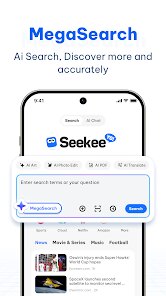
In the crowded landscape of mobile utility apps, Seekee - Ai Search & Assistant offers a somewhat different approach to how we interact with online information. Available for free download on Google Play, this application combines standard web searching capabilities with an integrated AI assistant that can handle various text-based tasks. The app doesn't require any subscription fees to access its core functions, though like many free services, it includes advertisements between uses. With several hundred thousand installations recorded on the platform, it has built a modest but growing user base since its release.
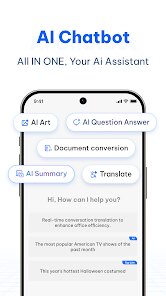
Navigating through the app feels straightforward from the first launch. The home screen presents a clean search bar at the top, where you can type queries just like any conventional search engine. Below that, you'll find suggested topics and recent searches for quick access. What distinguishes the experience is the assistant mode, activated by tapping a small icon next to the search field. Once switched, the app processes questions differently, returning more conversational answers rather than simple link lists. I found myself switching between these two modes depending on whether I wanted direct website results or a synthesized response. The assistant also handles follow-up questions decently, maintaining context across exchanges without requiring you to rephrase everything.
Compared to similar tools like Microsoft Bing's AI or standalone chatbot apps, Seekee places stronger emphasis on being a combined search and conversation tool in one interface. Bing's integration feels more deeply woven into its ecosystem, while this app keeps things more contained and simplified. The search results themselves pull from standard web indexes, so the breadth of information is comparable to what you would get from Google or DuckDuckGo. Where it falls a bit short is in the polish of the assistant responses, which sometimes feel less nuanced than what GPT-based alternatives offer. Still, for users who want both functions without managing two separate apps, this combination saves some screen space and mental switching.
Key Functional Highlights
- The dual-mode interface works well for different tasks. Switching between standard web search and AI assistant is quick, with no loading delays. I have used this mostly for quick fact checking, where the assistant mode gives a concise answer, while the search mode is better for browsing multiple sources on a topic.
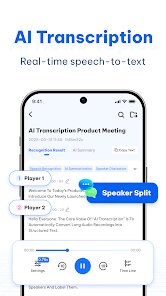
- Text handling extends beyond simple Q&A. You can ask the assistant to summarize articles, rewrite sentences, or generate short lists on given subjects. I tested it with a paragraph from a news site, and it produced a reasonable summary, though not as detailed as some dedicated writing tools.
- One area where the app shows thoughtful design is in its privacy approach. The permission requests are minimal compared to many free apps, asking only for network access and storage. It does not demand access to contacts or location unless you manually enable those features. This stands out when compared to assistant apps from larger companies that often request extensive data access by default.
Advantages & Benefits
- Having both search and assistant functions eliminates the need to keep switching between separate apps, which saves a bit of time during normal browsing sessions.
- The free model without subscription locks means you can try the full AI features without commitment, unlike many premium assistant apps.
- Clean interface with minimal clutter makes it approachable for users who just want straightforward answers without bells and whistles.
Areas for Improvement
- Advertisement placement can be distracting at times, appearing between search results and occasionally covering part of the answer area until dismissed.
- Assistant responses sometimes lack depth when handling complex questions involving multiple variables, often providing surface-level information.
- The app does not support voice input in its current version, which feels like a missing feature given that many similar tools now include it.
- Search history management is limited, offering no way to selectively delete individual entries other than clearing everything at once.
Recommended Apps
![]()
ZEPETO: Avatar, Connect & Play
Naver Z Corporation4.3
![]()
Reverse Voice: Flip Singing
NindaFuit0![]()
AI Chat Ask Assistant - NowAI
Now Tech4.3![]()
Lie Detector Test: Prank App
DkTech inc.4.3![]()
Peachy - AI Face & Body Editor
InShot Video Editor4.8
![]()
AI Video Art Creator - Livensa
FERASET4.5![]()
Google Voice
Google LLC4.3![]()
Horoscopes & Tarot
Astrolis Horoscopes4.7![]()
eBay online shopping & selling
eBay Mobile4.6![]()
JPay
Jpay Mobile4.1![]()
Stranger Things 5 Challenges
MVH Entertainment Team5![]()
Chat Master: Prank Story
ABI Game Studio4.8![]()
Google Maps
Google LLC4.2![]()
AI Chat・Ask Chatbot Assistant
AI Chat Studio4.5![]()
Name Meanings with Impact
Alif Innovative Solution3.7















You May Like
-
![]()
True Tarot Card Reading
KaApps4.2 -
![]()
LinkedIn: Jobs & Business News
LinkedIn4.2 -
![]()
iControl: Easy Widgets Themes
Fancy keyboard for theme apps4.6 -
![]()
Duolingo: Language & Chess
Duolingo4.7 -
![]()
Flipped:Chat with AI Character
First Group pte ltd4.1 -
![]()
Hearing Age
Mobile Solutions Tech0 -
![]()
TikTok
TikTok Pte. Ltd.4.4 -
![]()
Pretty Makeup - Beauty Camera
Photo Editor Perfect Corp.4.4 -
![]()
PhotoRoom AI Photo Editor
PhotoRoom Background Editor App4.7 -
![]()
Lightleap by Lightricks
Lightricks Ltd.4.3 -
![]()
Name Meaning
Dexati4.1 -
![]()
Truth Social
T Media Tech LLC3.3 -
![]()
Ace Hardware
Ace Hardware Corporation4.7 -
![]()
Kpop Fans Demon Hunter Wallpap
JHNStudio4.3 -
![]()
Artplay - AI Photo & Video
Hideaway Technology Limited4.5











































