

iCut: Video Editor & Maker
iCut -Video Editor & Video Maker App
Installs
500K+
Developer
iCut -Video Editor & Video Maker App
-
Category
Video Players & Editors
-
Content Rating
Everyone
Developer Email
Privacy Policy
https://www.icut.studio/about/privacy.html?lang=en
Screenshots





Expert Review
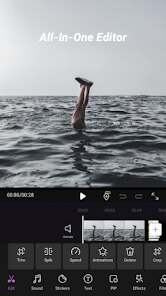
Video editing on mobile has become increasingly accessible, and iCut: Video Editor & Maker is one of those applications aiming to simplify the process for casual creators. Available for download on Google Play, this free app allows users to trim, merge, and apply effects to their footage without requiring extensive technical knowledge. It does include ads and offers in-app purchases for additional features, which is fairly standard in this category. Many people looking to enhance their social media clips or personal projects will find it a practical option to install on their devices.
The interface places core tools like cut, crop, and speed adjustment right on the main screen, making navigation fairly intuitive. Tapping on a video clip reveals a timeline where users can drag edges to trim or split segments. I found that applying transitions between clips works smoothly, though rendering times can vary depending on the complexity of the edits. The app also includes a library of music tracks and sound effects, which can be layered over the footage with adjustable volume levels. For someone who occasionally needs to make quick edits on the go, this setup feels efficient enough.
Compared to other mobile editors like KineMaster or CapCut, iCut offers a more streamlined experience but with fewer advanced controls. While KineMaster provides multi-layer timelines and keyframe animations, iCut focuses on basic adjustments and preset effects. The trade-off is a simpler learning curve, which may appeal to users who find denser interfaces overwhelming. However, those seeking fine-grained control over color grading or audio mixing might feel limited by what iCut provides. It occupies a middle ground, balancing ease of use with enough features to handle straightforward projects.
Key Functional Highlights
- The app's text and sticker overlay system works well for adding captions or decorative elements. Users can choose from various fonts, adjust opacity, and set the duration for each element. I found this useful for creating short Instagram stories, though the selection of pre-made templates is smaller than what some competitors offer.
- Speed control options allow for smooth slow-motion or fast-forward effects. The app processes these changes without noticeable stuttering on recent devices, which is a clear advantage over older editors that often produce choppy results. This feature feels polished and responsive.
- Export quality is adjustable, with options ranging from 480p to 1080p. The app maintains good clarity at higher settings, though watermarks appear on the free version. Upgrading to the pro tier removes them, a common model in this space.
- Compared to Adobe Premiere Rush, iCut lacks cloud syncing and cross-device continuity. However, for single-device editing, the performance is reliable and the storage footprint is smaller, making it a lighter alternative for users with limited phone space.
Advantages & Benefits
- Quick trimming and merging of clips saves time when compiling vacation footage or event highlights.
- The built-in music library reduces the need to source external audio files, streamlining the editing workflow.
- Direct sharing to social platforms like TikTok or YouTube is convenient after export, eliminating extra steps.
- Battery consumption during editing is reasonable, allowing for longer sessions without frequent recharging.
Areas for Improvement
- Advertisements appear between editing steps, which can interrupt the creative flow and slow down the process.
- The free version adds a watermark to exported videos, pushing users toward the paid subscription.
- Advanced features like chroma key or manual color correction are absent, limiting creative possibilities.
- Some users report occasional crashes when working with high-resolution 4K footage, though this seems device-dependent.
Recommended Apps
![]()
ZEPETO: Avatar, Connect & Play
Naver Z Corporation4.3
![]()
Reverse Voice: Flip Singing
NindaFuit0![]()
AI Chat Ask Assistant - NowAI
Now Tech4.3![]()
Lie Detector Test: Prank App
DkTech inc.4.3![]()
Peachy - AI Face & Body Editor
InShot Video Editor4.8
![]()
AI Video Art Creator - Livensa
FERASET4.5![]()
Google Voice
Google LLC4.3![]()
Horoscopes & Tarot
Astrolis Horoscopes4.7![]()
eBay online shopping & selling
eBay Mobile4.6![]()
JPay
Jpay Mobile4.1![]()
Stranger Things 5 Challenges
MVH Entertainment Team5![]()
Chat Master: Prank Story
ABI Game Studio4.8![]()
Google Maps
Google LLC4.2![]()
AI Chat・Ask Chatbot Assistant
AI Chat Studio4.5![]()
Name Meanings with Impact
Alif Innovative Solution3.7















You May Like
-
![]()
True Tarot Card Reading
KaApps4.2 -
![]()
LinkedIn: Jobs & Business News
LinkedIn4.2 -
![]()
iControl: Easy Widgets Themes
Fancy keyboard for theme apps4.6 -
![]()
Duolingo: Language & Chess
Duolingo4.7 -
![]()
Flipped:Chat with AI Character
First Group pte ltd4.1 -
![]()
Hearing Age
Mobile Solutions Tech0 -
![]()
TikTok
TikTok Pte. Ltd.4.4 -
![]()
Pretty Makeup - Beauty Camera
Photo Editor Perfect Corp.4.4 -
![]()
PhotoRoom AI Photo Editor
PhotoRoom Background Editor App4.7 -
![]()
Lightleap by Lightricks
Lightricks Ltd.4.3 -
![]()
Name Meaning
Dexati4.1 -
![]()
Truth Social
T Media Tech LLC3.3 -
![]()
Ace Hardware
Ace Hardware Corporation4.7 -
![]()
Kpop Fans Demon Hunter Wallpap
JHNStudio4.3 -
![]()
Artplay - AI Photo & Video
Hideaway Technology Limited4.5










































