

Meta AI
Meta Platforms, Inc.
Installs
10M+
Developer
Meta Platforms, Inc.
-
Category
Productivity
-
Content Rating
Everyone
Developer Email
Privacy Policy
https://www.facebook.com/privacy/policy/
Screenshots
Expert Review
I've been using the Meta AI app for a while now, and it's become a pretty handy tool on my phone. Basically, it's a free AI assistant app from Meta, the company behind Facebook and Instagram. You can think of it as a smart chatbot that can help with answering questions, generating ideas, writing drafts, or just having a conversation. I first heard about it when it launched globally earlier this year. You can easily download it from the Google Play Store or the Apple App Store. Since it's from a major company, it already has millions of installs. The app itself is free to download and use. You do need to log in with your Facebook or Instagram account to get started, which makes setup quick if you already have one. I haven't noticed any annoying in-app purchases blocking core features, and while there might be some promotional elements tied to Meta's other services, it doesn't feel cluttered with traditional video ads interrupting your chats.
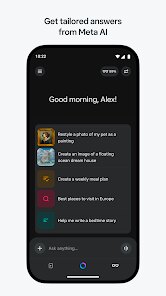
Using the app is straightforward. You open it and just start typing your questions or requests in the chat box. I use it mostly for quick fact-checks, brainstorming names for a project, or getting help drafting simple emails. A good tip is to be as specific as you can in your prompts; for example, instead of asking "write a birthday message," try "write a funny birthday message for my sister who loves hiking." It tends to give better results that way. You can also use it within other Meta apps like WhatsApp, which is convenient.
Compared to other similar apps like ChatGPT or Google Gemini, I find myself choosing Meta AI for a few reasons. It's deeply integrated into the apps I already use daily, like WhatsApp and Instagram, so I don't always have to open a separate app. For quick, casual queries, it feels a bit more conversational and less formal than some other options. While apps like ChatGPT might be more powerful for complex tasks, Meta AI is perfectly capable for everyday stuff and feels more lightweight and accessible right within my social feeds. It's a solid, no-fuss choice for someone who wants a capable AI helper without overcomplicating things.
Key Functional Highlights
- 🔗 Deep Meta Integration: This is the app's standout feature. Unlike standalone AI chatbots, Meta AI works seamlessly inside WhatsApp, Instagram, Facebook, and Messenger. You can start a chat with it right in your WhatsApp group to plan a trip or ask for info in an Instagram DM without switching apps.
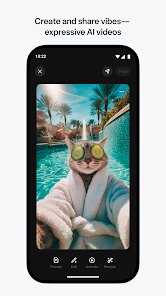
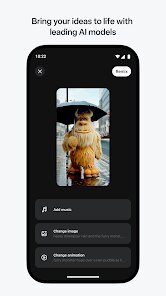
- 📸 Image Generation with Imagine: You can ask it to create images directly within your chats. Just type "Imagine a..." followed by your description, and it generates a picture right there. It's fun for creating quick visuals for ideas or just for entertainment.
- 🌐 Real-time Web Search: When you ask about current events or recent news, the app can pull in live information from the web through its partnership with Bing. This means you get up-to-date answers, not just knowledge from its training data.
- 💬 Conversational and Casual Tone: The AI has a friendly, approachable way of talking. It doesn't feel like you're querying a stiff database, which makes interactions, especially for creative brainstorming or casual questions, more enjoyable.
Advantages & Benefits
- ✅ Seamless Ecosystem Access: Its biggest strength is being built into the Meta apps I use all the time. I don't need to download a separate app or copy-paste text between them.
- ✅ Completely Free (For Now): Unlike some tiers of ChatGPT, all core features of the Meta AI app are currently free with no usage caps, which is a major plus.
- ✅ Good for Quick, Social Use: It excels at the kind of quick help you need in a social context—settling debates, planning events in group chats, or generating fun content.
Areas for Improvement
- ⚠️ Requires a Meta Account: You must have a Facebook or Instagram account to use the app. If you're avoiding Meta's ecosystem, this is a non-starter.
- ⚠️ Privacy Considerations: Given it's from Meta, data privacy is a common concern. Your interactions are used to improve the AI, which might deter some compared to other apps.
- ⚠️ Less Specialized for Complex Tasks: For advanced coding, detailed analysis, or long-form content creation, dedicated apps like ChatGPT or Claude often provide more depth and control.
Recommended Apps
![]()
ZEPETO: Avatar, Connect & Play
Naver Z Corporation4.3
![]()
Reverse Voice: Flip Singing
NindaFuit0![]()
AI Chat Ask Assistant - NowAI
Now Tech4.3![]()
Lie Detector Test: Prank App
DkTech inc.4.3![]()
Peachy - AI Face & Body Editor
InShot Video Editor4.8
![]()
AI Video Art Creator - Livensa
FERASET4.5![]()
Google Voice
Google LLC4.3![]()
Horoscopes & Tarot
Astrolis Horoscopes4.7![]()
eBay online shopping & selling
eBay Mobile4.6![]()
JPay
Jpay Mobile4.1![]()
Stranger Things 5 Challenges
MVH Entertainment Team5![]()
Chat Master: Prank Story
ABI Game Studio4.8![]()
Google Maps
Google LLC4.2![]()
AI Chat・Ask Chatbot Assistant
AI Chat Studio4.5![]()
Name Meanings with Impact
Alif Innovative Solution3.7















You May Like
-
![]()
True Tarot Card Reading
KaApps4.2 -
![]()
LinkedIn: Jobs & Business News
LinkedIn4.2 -
![]()
iControl: Easy Widgets Themes
Fancy keyboard for theme apps4.6 -
![]()
Duolingo: Language & Chess
Duolingo4.7 -
![]()
Flipped:Chat with AI Character
First Group pte ltd4.1 -
![]()
Hearing Age
Mobile Solutions Tech0 -
![]()
TikTok
TikTok Pte. Ltd.4.4 -
![]()
Pretty Makeup - Beauty Camera
Photo Editor Perfect Corp.4.4 -
![]()
PhotoRoom AI Photo Editor
PhotoRoom Background Editor App4.7 -
![]()
Lightleap by Lightricks
Lightricks Ltd.4.3 -
![]()
Name Meaning
Dexati4.1 -
![]()
Truth Social
T Media Tech LLC3.3 -
![]()
Ace Hardware
Ace Hardware Corporation4.7 -
![]()
Kpop Fans Demon Hunter Wallpap
JHNStudio4.3 -
![]()
Artplay - AI Photo & Video
Hideaway Technology Limited4.5











































