

Flowers Photo Frame
ClickLab Technology
Installs
1M+
Developer
ClickLab Technology
-
Category
Video Players & Editors
-
Content Rating
Rated for 3+
Developer Email
Privacy Policy
https://clicklabprivacypolicy.blogspot.com/
Screenshots



Expert Review
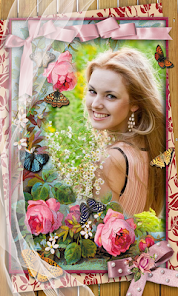
Flowers Photo Frame is a simple and fun photo editing app that lets you add beautiful floral borders and decorations to your pictures. I use it all the time to make my photos look more cheerful and artistic before sharing them on social media. The app was first launched a few years ago and you can easily download it for free from the Google Play Store. It has millions of installs, which shows how popular it is. You don't need to register or create an account to start using it, which is great for privacy. The app itself is free to install and use, but it does show some ads. There are also in-app purchases if you want to unlock more premium flower frames and remove the ads.
Using the app is really straightforward. You just open it, pick a photo from your gallery, and then browse through the huge collection of flower frames. There are classic roses, sunflowers, cherry blossoms, and all sorts of other designs. You can resize and reposition the frame, adjust the color saturation of your photo, and add text if you want. A good tip is to try the 'auto-enhance' feature on your photo first; it often makes the colors pop before you add the frame. I also like to save my edited photos in the highest quality setting available in the app's options.
Compared to other similar photo frame apps like 'Photo Frames' or 'PicFrame', I keep coming back to Flowers Photo Frame. A lot of other apps in this genre feel cluttered with too many features I don't use, like complex collage makers. This app does one thing—adding flower frames—and it does it really well. The selection is just bigger and more tasteful. While some other apps might have more filter options, the floral designs in this one are more detailed and look less 'sticker-like'. For someone who just wants to quickly beautify a photo with a nice border, this is the app I'd recommend downloading from Google Play.
Key Functional Highlights
- 🌸 Massive Frame Library: The sheer number of floral designs is this app's standout feature. Unlike many basic editors, it offers hundreds of frames, from delicate daisies to bold tropical arrangements, so you always find something that fits your photo's mood.
- 🌸 One-Tap Enhancement: Before you even pick a frame, the app has a smart 'auto-enhance' button. It brightens colors and adjusts contrast with a single tap, making your base photo look its best, which gives a better final result than apps without this tool.
- 🌸 Simple, Intuitive Editing: The controls for resizing, rotating, and placing the frame are super responsive and easy. Compared to a popular app like 'PicFrame', which can be complex for simple edits, this app's interface is streamlined and perfect for quick decoration.
Advantages & Benefits
- 👍 Specialized & Focused: Its strength is its specialization. While apps like 'PicsArt' try to do everything, this app excels specifically at floral decorations, offering a depth and quality in that one area that general editors can't match.
- 👍 Truly Free to Start: You can download and use a wide variety of frames without paying anything. Some competing frame apps lock most good designs behind a paywall immediately, but this one gives you plenty to work with for free.
- 👍 Lightweight and Fast: The app installs quickly and doesn't slow down your phone. It's much faster to open and use than heavier, all-in-one photo editing suites, making it ideal for a quick edit on the go.
Areas for Improvement
- 👎 Persistent Advertisements: The free version shows frequent video and banner ads, which can interrupt the editing flow. Apps like 'Photo Frames' sometimes have a less intrusive ad model or a cheaper one-time fee to remove them.
- 👎 Limited Advanced Editing: If you want to do more than add a frame and basic color tweaks, you'll need another app. It lacks tools for detailed retouching, layer-based editing, or advanced filters that apps like 'Snapseed' offer.
- 👎 Premium Content Pricing: Some of the most beautiful and unique flower frames are part of pricey in-app purchase packs. The cost to unlock all content can add up, making it less of a bargain compared to some single-purchase alternatives.
Recommended Apps
![]()
ZEPETO: Avatar, Connect & Play
Naver Z Corporation4.3
![]()
Reverse Voice: Flip Singing
NindaFuit0![]()
AI Chat Ask Assistant - NowAI
Now Tech4.3![]()
Lie Detector Test: Prank App
DkTech inc.4.3![]()
Peachy - AI Face & Body Editor
InShot Video Editor4.8
![]()
AI Video Art Creator - Livensa
FERASET4.5![]()
Google Voice
Google LLC4.3![]()
Horoscopes & Tarot
Astrolis Horoscopes4.7![]()
eBay online shopping & selling
eBay Mobile4.6![]()
JPay
Jpay Mobile4.1![]()
Stranger Things 5 Challenges
MVH Entertainment Team5![]()
Chat Master: Prank Story
ABI Game Studio4.8![]()
Google Maps
Google LLC4.2![]()
AI Chat・Ask Chatbot Assistant
AI Chat Studio4.5![]()
Name Meanings with Impact
Alif Innovative Solution3.7















You May Like
-
![]()
True Tarot Card Reading
KaApps4.2 -
![]()
LinkedIn: Jobs & Business News
LinkedIn4.2 -
![]()
iControl: Easy Widgets Themes
Fancy keyboard for theme apps4.6 -
![]()
Duolingo: Language & Chess
Duolingo4.7 -
![]()
Flipped:Chat with AI Character
First Group pte ltd4.1 -
![]()
Hearing Age
Mobile Solutions Tech0 -
![]()
TikTok
TikTok Pte. Ltd.4.4 -
![]()
Pretty Makeup - Beauty Camera
Photo Editor Perfect Corp.4.4 -
![]()
PhotoRoom AI Photo Editor
PhotoRoom Background Editor App4.7 -
![]()
Lightleap by Lightricks
Lightricks Ltd.4.3 -
![]()
Name Meaning
Dexati4.1 -
![]()
Truth Social
T Media Tech LLC3.3 -
![]()
Ace Hardware
Ace Hardware Corporation4.7 -
![]()
Kpop Fans Demon Hunter Wallpap
JHNStudio4.3 -
![]()
Artplay - AI Photo & Video
Hideaway Technology Limited4.5










































