
Simple Calendar - easy planner
Komorebi Inc.
Installs
5M+
Developer
Komorebi Inc.
-
Category
Productivity
-
Content Rating
Everyone
Developer Email
Privacy Policy
https://komorebi-studio.com/policyredirect.html
Screenshots
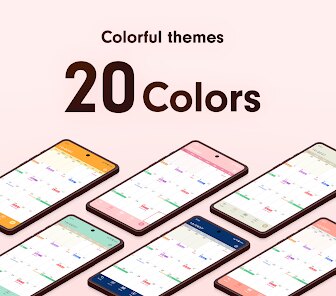
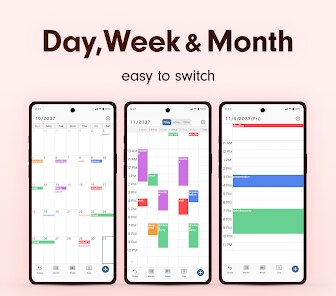
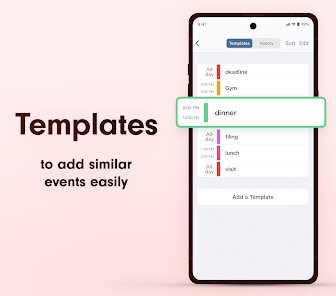
Expert Review
Simple Calendar - easy planner is a straightforward scheduling tool designed for users who need quick access to their daily, weekly, or monthly events without extra complexity. It's available on Google Play where it has been downloaded over a million times, and the basic version is free to use. The app does include ads, though there is an option to purchase an ad-free experience through an in-app upgrade, which keeps the core functionality accessible for everyone who simply wants to install a no-fuss calendar.
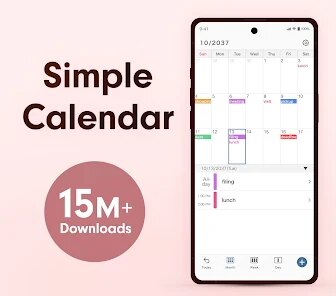
Once you download the app and set it up, the layout is remarkably clean. The main screen shows the month view by default, and tapping a date pulls up a list of any saved events for that day. Adding an event is a quick two-step process: you pick the date, type in the title and time, and it's saved. The app also provides a widget that you can place on your device's home screen for immediate visibility of the next few events. I found that this simplicity made it easy to check my schedule without getting lost in menus or settings.
Compared to more feature-packed calendar apps like Google Calendar or Any.do, Simple Calendar strips away collaborative features, task integration, and complex reminders. This is both a strength and a limitation. The app focuses purely on personal event scheduling, which means there is no learning curve whatsoever. For someone like me who rarely needs shared calendars or advanced notifications, this minimal approach feels refreshing. However, users who rely on linking calendars across accounts or need color-coded categories might find it too basic for their daily workflow.
Key Functional Highlights
- One notable aspect is the ease of adding recurring events. For a weekly gym session or a monthly bill reminder, you simply select the repeat interval during event creation. I found this much simpler than juggling multiple settings in larger calendar apps.
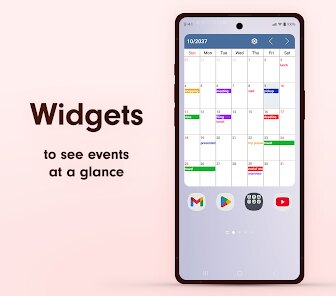
- The home screen widget deserves a mention because it updates in real time. It shows the current date and the next two to three events without requiring the app to be opened. For a quick morning glance, this works perfectly and reduces screen time.
- Another feature is the week view, which displays a horizontal timeline for each day. This makes planning specific hours of the day more visual, though it only shows text without colors or icons. In contrast, apps like aCalendar have more visually rich week views.
Advantages & Benefits
- A major benefit is the offline access: no internet connection needed to view or add events. This is great when traveling or in areas with poor connectivity.
- The app takes up minimal storage space on the device, so it doesn't slow down older phones.
- Setting up reminders is quick; you can set default notification times in the settings, and every event automatically follows that schedule.
Areas for Improvement
- The interface doesn't support swiping between months or days, requiring taps on the navigation buttons instead. This can feel less fluid than other calendar apps.
- There is no option to sync events across multiple devices or with cloud services like Google Calendar, so the data stays exclusively on the phone.
- When adding an event, the time selection interface is a bit small on larger screens, which can make setting minutes slightly fiddly.
Recommended Apps
![]()
ZEPETO: Avatar, Connect & Play
Naver Z Corporation4.3
![]()
Reverse Voice: Flip Singing
NindaFuit0![]()
AI Chat Ask Assistant - NowAI
Now Tech4.3![]()
Lie Detector Test: Prank App
DkTech inc.4.3![]()
Peachy - AI Face & Body Editor
InShot Video Editor4.8
![]()
AI Video Art Creator - Livensa
FERASET4.5![]()
Google Voice
Google LLC4.3![]()
Horoscopes & Tarot
Astrolis Horoscopes4.7![]()
eBay online shopping & selling
eBay Mobile4.6![]()
JPay
Jpay Mobile4.1![]()
Stranger Things 5 Challenges
MVH Entertainment Team5![]()
Chat Master: Prank Story
ABI Game Studio4.8![]()
Google Maps
Google LLC4.2![]()
AI Chat・Ask Chatbot Assistant
AI Chat Studio4.5![]()
Name Meanings with Impact
Alif Innovative Solution3.7















You May Like
-
![]()
True Tarot Card Reading
KaApps4.2 -
![]()
LinkedIn: Jobs & Business News
LinkedIn4.2 -
![]()
iControl: Easy Widgets Themes
Fancy keyboard for theme apps4.6 -
![]()
Duolingo: Language & Chess
Duolingo4.7 -
![]()
Flipped:Chat with AI Character
First Group pte ltd4.1 -
![]()
Hearing Age
Mobile Solutions Tech0 -
![]()
TikTok
TikTok Pte. Ltd.4.4 -
![]()
Pretty Makeup - Beauty Camera
Photo Editor Perfect Corp.4.4 -
![]()
PhotoRoom AI Photo Editor
PhotoRoom Background Editor App4.7 -
![]()
Lightleap by Lightricks
Lightricks Ltd.4.3 -
![]()
Name Meaning
Dexati4.1 -
![]()
Truth Social
T Media Tech LLC3.3 -
![]()
Ace Hardware
Ace Hardware Corporation4.7 -
![]()
Kpop Fans Demon Hunter Wallpap
JHNStudio4.3 -
![]()
Artplay - AI Photo & Video
Hideaway Technology Limited4.5










































