

Persona: Beauty Camera
TICKET TO THE MOON, INC.
Installs
5M+
Developer
TICKET TO THE MOON, INC.
-
Category
Generative AI
-
Content Rating
Rated for 3+
Developer Email
Privacy Policy
https://persona.camera/privacy_policy_persona.html
Screenshots
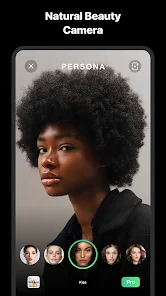
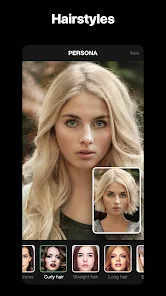
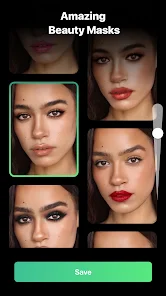
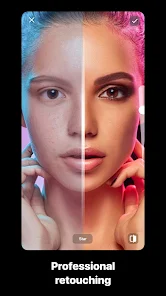
Expert Review
I've been using the Beauty Camera app for a while now, and it's become my go-to for quick photo touch-ups. Basically, it's a photo editing app focused on beautifying selfies and portraits. You can download it for free from the Google Play Store or the Apple App Store. I first installed it a couple of years ago, and it's had a ton of updates since then. It doesn't require any registration to start using it, which is super convenient. The app itself is free to download and install, but you'll see ads pop up now and then. There are also in-app purchases if you want to unlock more advanced filters or remove the ads.
Using it is pretty straightforward. You just open the app, take a picture or choose one from your gallery, and then the magic happens. It automatically smooths skin, brightens eyes, and can even reshape your face a bit if you want. My tip is to go easy on the sliders – the 'beautify' effect can look a bit unnatural if you max everything out. I usually dial it back to around 30-40% for a more realistic, polished look. The one-tap filters are great for when you're in a hurry.
I've tried a few other apps in this genre, like Meitu and YouCam Perfect. While those are powerful, I often find Beauty Camera to be faster and less cluttered. For everyday selfies that just need a little boost, it gets the job done without making me navigate through a million complicated menus. Some similar apps feel like they're trying to do too much, but this one sticks to its core purpose: making you look good quickly. That's why I keep it installed on my phone.
Key Functional Highlights
- ✨ One-Tap Magic: The standout feature for me is the intelligent one-touch beautification. Unlike some apps where you manually adjust every detail, Beauty Camera analyzes your photo and applies a balanced set of enhancements instantly. It's perfect for when you don't have time to fiddle with individual settings.
- ✨ Real-Time Preview: When you're taking a selfie within the app, you see the beautification effects live on the camera screen. This is a huge advantage over apps where you only see the result after taking the shot, allowing you to pose and adjust knowing exactly how the final image will look.
- ✨ Lightweight and Fast: Compared to a behemoth like Adobe Lightroom, which is packed with pro tools, Beauty Camera is incredibly lightweight. It opens instantly, processes photos in a flash, and doesn't slow down my phone, making it ideal for quick social media posts.
Advantages & Benefits
- 👍 Simplicity Wins: Its interface is much cleaner and more intuitive than something like FaceTune. YouCam Perfect can feel overwhelming with all its options, but Beauty Camera keeps things simple, so you're not lost in a sea of icons.
- 👍 Effective Auto-Correction: The automatic skin smoothing and blemish removal often work better out-of-the-box than on Meitu. It tends to preserve more skin texture, avoiding that overly plastic look if you don't overdo it.
- 👍 No Login Hassle: You can just download, install, and start using it immediately. Many similar apps now force you to create an account, but this one respects your time and gets straight to the point.
Areas for Improvement
- 👎 Ad Interruptions: The free version has quite intrusive ads. Apps like Snow or B612 also have ads, but they sometimes feel less disruptive. The pop-up ads in Beauty Camera can break your editing flow.
- 👎 Limited Advanced Tools: If you want to do detailed retouching like removing specific objects or advanced color grading, you'll hit a wall. An app like PicsArt offers far more creative control and layers, whereas Beauty Camera is mostly about preset enhancements.
- 👎 Filter Variety: The collection of filters and frames isn't as vast or trendy as what you find on VSCO or Instagram's built-in tools. The styles can feel a bit generic compared to those platforms.
Recommended Apps
![]()
ZEPETO: Avatar, Connect & Play
Naver Z Corporation4.3
![]()
Reverse Voice: Flip Singing
NindaFuit0![]()
AI Chat Ask Assistant - NowAI
Now Tech4.3![]()
Lie Detector Test: Prank App
DkTech inc.4.3![]()
Peachy - AI Face & Body Editor
InShot Video Editor4.8
![]()
AI Video Art Creator - Livensa
FERASET4.5![]()
Google Voice
Google LLC4.3![]()
Horoscopes & Tarot
Astrolis Horoscopes4.7![]()
eBay online shopping & selling
eBay Mobile4.6![]()
JPay
Jpay Mobile4.1![]()
Stranger Things 5 Challenges
MVH Entertainment Team5![]()
Chat Master: Prank Story
ABI Game Studio4.8![]()
Google Maps
Google LLC4.2![]()
AI Chat・Ask Chatbot Assistant
AI Chat Studio4.5![]()
Name Meanings with Impact
Alif Innovative Solution3.7















You May Like
-
![]()
True Tarot Card Reading
KaApps4.2 -
![]()
LinkedIn: Jobs & Business News
LinkedIn4.2 -
![]()
iControl: Easy Widgets Themes
Fancy keyboard for theme apps4.6 -
![]()
Duolingo: Language & Chess
Duolingo4.7 -
![]()
Flipped:Chat with AI Character
First Group pte ltd4.1 -
![]()
Hearing Age
Mobile Solutions Tech0 -
![]()
TikTok
TikTok Pte. Ltd.4.4 -
![]()
Pretty Makeup - Beauty Camera
Photo Editor Perfect Corp.4.4 -
![]()
PhotoRoom AI Photo Editor
PhotoRoom Background Editor App4.7 -
![]()
Lightleap by Lightricks
Lightricks Ltd.4.3 -
![]()
Name Meaning
Dexati4.1 -
![]()
Truth Social
T Media Tech LLC3.3 -
![]()
Ace Hardware
Ace Hardware Corporation4.7 -
![]()
Kpop Fans Demon Hunter Wallpap
JHNStudio4.3 -
![]()
Artplay - AI Photo & Video
Hideaway Technology Limited4.5












































