
Google Maps Go
Google LLC
Installs
500,000,000+
Developer
Google LLC
-
Category
Travel & Local
-
Content Rating
Rated for 3+
Developer Email
Privacy Policy
http://www.google.com/policies/privacy
Screenshots

Expert Review
Google Maps Go is a lightweight version of the popular navigation app, designed to work smoothly on devices with limited storage or slower internet connections. It's perfect for getting directions, checking traffic, and finding local businesses. The app was first launched a few years ago as part of Google's 'Go' series for emerging markets. You can download it for free from the Google Play Store. It doesn't require a separate install of the main Google Maps app to function. While the core app is free, using some features might require you to sign in with a Google account. I haven't noticed any in-app purchases, and the ads are very minimal and non-intrusive, which is great.
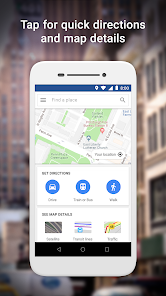
I use this app almost daily for my commute. It's straightforward: you just type in where you want to go, and it gives you options for driving, walking, or public transport. A handy tip is to download offline maps for your area when you're on Wi-Fi. This way, you can still get basic navigation even if your mobile data is slow or you lose connection. The interface is simple, so you don't waste time figuring out complicated menus.
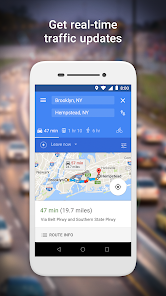
Compared to other similar apps like Maps.me or Here WeGo, I stick with Google Maps Go because of its reliability. The traffic data and business information are consistently more up-to-date, thanks to Google's vast database. While other apps might offer more detailed offline features, for everyday, quick look-ups and reliable directions, this app just works without fuss. It feels like using the full Google Maps app, but it's faster to load on my older phone.
Key Functional Highlights
- 🗺️ Lightweight & Fast: The core appeal of this app is its size. It's a fraction of the size of the standard Google Maps app, which means it downloads and installs in seconds from Google Play. It launches quickly and runs smoothly even on basic smartphones.
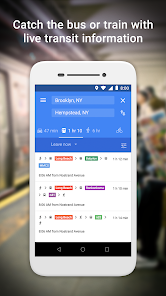
- 🔍 Solid Core Navigation: Don't let the 'Go' name fool you. It provides turn-by-turn driving, walking, and public transit directions. The search function pulls from Google's extensive Places database, so finding shops, restaurants, or addresses is very reliable.
- 📁 Offline Maps Support: You can download specific areas for offline use. This is a game-changer for traveling or if you have a limited data plan. The process is simple within the app, and the downloaded maps provide basic navigation and search.
- 🌐 Data-Friendly: The app is designed to use less mobile data. It loads map tiles and information efficiently, which is a significant advantage over the full version of Google Maps if you're watching your data usage.
Advantages & Benefits
- ✅ Unbeatable Data Accuracy: Compared to alternatives like Maps.me, the live traffic conditions, business hours, and road information in Google Maps Go are simply more accurate and updated more frequently.
- ✅ Seamless Google Integration: If you're signed in, it can sync with your saved places from the main Google Maps app or your Chrome browser, which is super convenient. Other standalone apps can't do this.
- ✅ Consistent Updates: Being a Google product, the app receives regular updates through the Google Play Store, ensuring bug fixes and occasional new features trickle down to this lightweight version.
Areas for Improvement
- ⚠️ Fewer Advanced Features: It lacks some bells and whistles of the full Google Maps app or even some competitors. For example, you won't find indoor maps, location sharing, or detailed lane guidance here, which apps like Waze excel at.
- ⚠️ Limited Offline Search: While you can download maps offline, the search functionality within those offline areas is more limited compared to a dedicated offline app like Maps.me, which stores full point-of-interest data.
- ⚠️ Dependent on Google Services: The app works best with a Google account and an internet connection for full features. In regions where Google services are restricted, other apps like Here WeGo might be a more reliable independent choice.
Recommended Apps
![]()
ZEPETO: Avatar, Connect & Play
Naver Z Corporation4.3
![]()
Reverse Voice: Flip Singing
NindaFuit0![]()
AI Chat Ask Assistant - NowAI
Now Tech4.3![]()
Lie Detector Test: Prank App
DkTech inc.4.3![]()
Peachy - AI Face & Body Editor
InShot Video Editor4.8
![]()
AI Video Art Creator - Livensa
FERASET4.5![]()
Google Voice
Google LLC4.3![]()
Horoscopes & Tarot
Astrolis Horoscopes4.7![]()
eBay online shopping & selling
eBay Mobile4.6![]()
JPay
Jpay Mobile4.1![]()
Stranger Things 5 Challenges
MVH Entertainment Team5![]()
Chat Master: Prank Story
ABI Game Studio4.8![]()
Google Maps
Google LLC4.2![]()
AI Chat・Ask Chatbot Assistant
AI Chat Studio4.5![]()
Name Meanings with Impact
Alif Innovative Solution3.7















You May Like
-
![]()
True Tarot Card Reading
KaApps4.2 -
![]()
LinkedIn: Jobs & Business News
LinkedIn4.2 -
![]()
iControl: Easy Widgets Themes
Fancy keyboard for theme apps4.6 -
![]()
Duolingo: Language & Chess
Duolingo4.7 -
![]()
Flipped:Chat with AI Character
First Group pte ltd4.1 -
![]()
Hearing Age
Mobile Solutions Tech0 -
![]()
TikTok
TikTok Pte. Ltd.4.4 -
![]()
Pretty Makeup - Beauty Camera
Photo Editor Perfect Corp.4.4 -
![]()
PhotoRoom AI Photo Editor
PhotoRoom Background Editor App4.7 -
![]()
Lightleap by Lightricks
Lightricks Ltd.4.3 -
![]()
Name Meaning
Dexati4.1 -
![]()
Truth Social
T Media Tech LLC3.3 -
![]()
Ace Hardware
Ace Hardware Corporation4.7 -
![]()
Kpop Fans Demon Hunter Wallpap
JHNStudio4.3 -
![]()
Artplay - AI Photo & Video
Hideaway Technology Limited4.5










































