

Personalized Call from Santa (
www.PackageFromSanta.com
Installs
1M+
Developer
www.PackageFromSanta.com
-
Category
Entertainment
-
Content Rating
Rated for 3+
Developer Email
Privacy Policy
http://www.packagefromsanta.com/privacy_policy_app.html
Screenshots


Expert Review
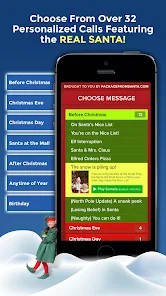
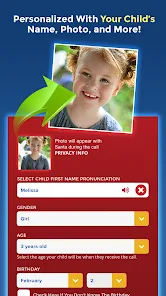
I've been using the Personalized Call from Santa app for a few years now to create a bit of extra holiday magic for my kids. It's exactly what it sounds like – an app that lets you set up a personalized video or phone call from Santa Claus. You can download it for free from the Google Play Store or the App Store, and it's super easy to install. Once you open the app, you choose whether you want a video message or an actual phone call. You then fill in details like your child's name, age, hometown, and even specific accomplishments (like learning to ride a bike) or gentle reminders (to be nice to their sibling). The app uses this info to generate a unique message. It launched back in 2016, and I've seen it grow with millions of downloads now. The basic features are free, but to unlock the full personalization and remove watermarks, there are in-app purchases. You don't need to register to try it out, which is nice for a quick look.
My tip is to prepare your info before you start recording. Have the child's details and what you want Santa to mention written down. For the video calls, find a quiet, well-lit spot. The app lets you preview the message before you send or schedule it, which is a lifesaver for catching any typos. I always schedule the call for Christmas Eve dinner – it's become our tradition. The interface is straightforward; you basically just follow the steps it gives you. It's not an app you use daily, but for that one special moment, it's perfect.
There are other Santa call apps out there, like Call Santa or Santa's Call. I tried a couple before settling on this one. The main reason I stick with Personalized Call from Santa is the quality of the production. The Santa actor looks and sounds more authentic to me, and the video backgrounds feel less cheesy and more immersive. Some other apps feel a bit low-budget or have overly robotic voice synthesis. This one strikes a better balance between customization and a believable, heartwarming delivery. It just feels more special, which is what you're going for with something like this.
Key Functional Highlights
- 🎅 Deep Personalization: Unlike simpler apps that just insert a name, this app lets you customize nearly every aspect of Santa's message. You can include specific events from the past year, mention pets by name, and even have Santa reference the child's exact hometown, making the call feel incredibly genuine and tailored.
- 🎅 Flexible Delivery Options: You can choose between a pre-recorded HD video message or schedule an actual phone call. The ability to schedule the call for a specific date and time is fantastic for planning the big reveal on Christmas Eve or during a family gathering.
- 🎅 User-Friendly Creator Studio: The step-by-step process within the app is very intuitive. It guides you through entering all the personal details, selecting a Santa performer, and choosing a background scene. The preview function is essential for ensuring everything is perfect before finalizing.
Advantages & Benefits
- ✅ Superior Production Value: Compared to apps like 'Santa Call Video Maker', the Santa performers, video quality, and sound design in this app are consistently higher. It feels less like a novelty filter and more like a mini-movie scene.
- ✅ Richer Story Elements: Where some competitors offer a basic template, this app allows for complex, multi-part messages. Santa can 'look up' info in his book, react to the child's achievements, and create a cohesive narrative, which apps like 'Call from Santa 3D' often lack.
- ✅ No Forced Social Logins: Many similar apps require a Facebook or Google sign-in to save projects. This app lets you create and download your video without mandatory registration, which is a big plus for privacy and convenience.
Areas for Improvement
- ⚠️ Cost for Full Features: The free version has clear limitations (watermarks, shorter calls). To get the good stuff, you need an in-app purchase. Apps like 'Santa Call - Free Video Call' are more generous with their free tier, though the quality is often lower.
- ⚠️ Storage Space: The high-quality video messages can be large files. On an older phone with limited storage, downloading and saving multiple videos can be an issue, something lighter apps don't have.
- ⚠️ Limited Offline Use: You need a solid internet connection to create, render, and download your video. You can't fully prepare calls while offline, unlike some simpler text-based Santa message apps.
Recommended Apps
![]()
ZEPETO: Avatar, Connect & Play
Naver Z Corporation4.3
![]()
Reverse Voice: Flip Singing
NindaFuit0![]()
AI Chat Ask Assistant - NowAI
Now Tech4.3![]()
Lie Detector Test: Prank App
DkTech inc.4.3![]()
Peachy - AI Face & Body Editor
InShot Video Editor4.8
![]()
AI Video Art Creator - Livensa
FERASET4.5![]()
Google Voice
Google LLC4.3![]()
Horoscopes & Tarot
Astrolis Horoscopes4.7![]()
eBay online shopping & selling
eBay Mobile4.6![]()
JPay
Jpay Mobile4.1![]()
Stranger Things 5 Challenges
MVH Entertainment Team5![]()
Chat Master: Prank Story
ABI Game Studio4.8![]()
Google Maps
Google LLC4.2![]()
AI Chat・Ask Chatbot Assistant
AI Chat Studio4.5![]()
Name Meanings with Impact
Alif Innovative Solution3.7















You May Like
-
![]()
True Tarot Card Reading
KaApps4.2 -
![]()
LinkedIn: Jobs & Business News
LinkedIn4.2 -
![]()
iControl: Easy Widgets Themes
Fancy keyboard for theme apps4.6 -
![]()
Duolingo: Language & Chess
Duolingo4.7 -
![]()
Flipped:Chat with AI Character
First Group pte ltd4.1 -
![]()
Hearing Age
Mobile Solutions Tech0 -
![]()
TikTok
TikTok Pte. Ltd.4.4 -
![]()
Pretty Makeup - Beauty Camera
Photo Editor Perfect Corp.4.4 -
![]()
PhotoRoom AI Photo Editor
PhotoRoom Background Editor App4.7 -
![]()
Lightleap by Lightricks
Lightricks Ltd.4.3 -
![]()
Name Meaning
Dexati4.1 -
![]()
Truth Social
T Media Tech LLC3.3 -
![]()
Ace Hardware
Ace Hardware Corporation4.7 -
![]()
Kpop Fans Demon Hunter Wallpap
JHNStudio4.3 -
![]()
Artplay - AI Photo & Video
Hideaway Technology Limited4.5










































