

Step Counter - Pedometer
Hitchhike Tech
Installs
10M+
Developer
Hitchhike Tech
-
Category
Health & Fitness
-
Content Rating
Rated for 3+
Developer Email
Privacy Policy
https://inston.ltd/privacypolicy.html?pkg=stepcounter.pedometer.stepstracker
Screenshots
Expert Review
Step Counter - Pedometer by Hitchhike Tech is a straightforward fitness tracking app that lives up to its name. It's designed to count your daily steps, helping you monitor your activity levels without any fuss. I first downloaded this app from the Google Play Store a couple of years ago, and it's been a reliable companion ever since. It's completely free to install and use, with no registration required to start tracking. While there are occasional ads, they're not overly intrusive, and there's an option for an in-app purchase to remove them if they bother you. The app has garnered millions of downloads, which speaks to its popularity and trustworthiness in the health and fitness genre.
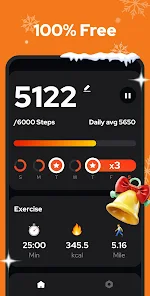
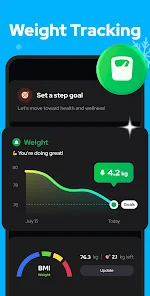
Using the app is incredibly simple. After you install it, you just need to grant it the necessary permissions, and it starts counting your steps automatically in the background. I keep it running all day, and it barely drains my battery. A handy tip is to make sure you carry your phone in your pocket or a bag for the most accurate step count. The home screen gives you a clear view of your daily progress, and you can set personal step goals to stay motivated. It's one of those apps you set up once and then almost forget about, until you check it at the end of the day to see how active you've been.
When I was looking for a pedometer app, I tried a few others like Accupedo and Pacer. While they are also great, I ultimately stuck with Step Counter - Pedometer. The main reason is its sheer simplicity and lightness. Some other apps in this genre come packed with social features, detailed calorie calculators, or complex workout plans, which can feel overwhelming if you just want a basic step count. This app does one job and does it well without cluttering your screen or mind. For someone who just wants a no-nonsense way to track daily movement, this is the perfect choice.
Key Functional Highlights
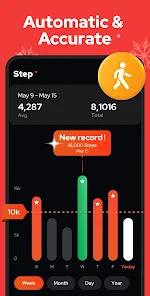
- 🎯 Automatic & Accurate Tracking: Once you install the app and grant permissions, it works silently in the background. Compared to Google Fit, which can sometimes be inconsistent, I've found this app's step counting to be remarkably reliable and accurate for daily use.
- 📊 Clean & Focused Interface: The main screen shows your step count, distance, and calories burned in a very clean, easy-to-read format. Unlike some feature-bloated fitness apps, this one keeps the data presentation simple and immediately understandable.
- 🎯 Minimal Battery Impact: A standout feature is how little battery it uses. Many similar apps are notorious battery hogs, but this one is optimized so well that I often forget it's even running until I check my progress.
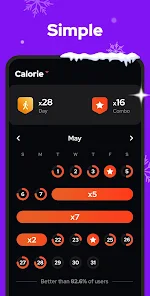
- 📊 Customizable Goals & History: You can easily set your own daily step target and view your historical data in simple charts. It offers the core tracking functionality of more complex apps without the unnecessary extras.
Advantages & Benefits
- ✅ Pure Simplicity: Its biggest strength is doing one thing perfectly. Unlike apps like Pacer or MyFitnessPal that try to be all-in-one health hubs, this app is dedicated solely to being a pedometer, making it less confusing.
- ✅ Truly Free Core Features: You can download and use all essential tracking features without paying. Some competitors lock basic history or goal-setting behind a paywall.
- ✅ Lightweight and Fast: The app installs quickly and runs smoothly even on older phones, whereas some other pedometer apps can feel sluggish.
Areas for Improvement
- ⚠️ Basic Feature Set: If you want GPS route mapping, social challenges, or integration with other health apps like Samsung Health, this app lacks those features. An app like Strava is far superior for community and detailed analytics.
- ⚠️ Presence of Ads: The free version displays ads. While they can be removed via a purchase, apps like Google Fit offer ad-free tracking by default as they're part of a larger ecosystem.
- ⚠️ Limited Customization: You can't change the app's theme or layout much. Compared to something like Fitbit's app, which allows for more personalization of the dashboard, this app offers a one-size-fits-all view.
Recommended Apps
![]()
ZEPETO: Avatar, Connect & Play
Naver Z Corporation4.3
![]()
Reverse Voice: Flip Singing
NindaFuit0![]()
AI Chat Ask Assistant - NowAI
Now Tech4.3![]()
Lie Detector Test: Prank App
DkTech inc.4.3![]()
Peachy - AI Face & Body Editor
InShot Video Editor4.8
![]()
AI Video Art Creator - Livensa
FERASET4.5![]()
Google Voice
Google LLC4.3![]()
Horoscopes & Tarot
Astrolis Horoscopes4.7![]()
eBay online shopping & selling
eBay Mobile4.6![]()
JPay
Jpay Mobile4.1![]()
Stranger Things 5 Challenges
MVH Entertainment Team5![]()
Chat Master: Prank Story
ABI Game Studio4.8![]()
Google Maps
Google LLC4.2![]()
AI Chat・Ask Chatbot Assistant
AI Chat Studio4.5![]()
Name Meanings with Impact
Alif Innovative Solution3.7















You May Like
-
![]()
True Tarot Card Reading
KaApps4.2 -
![]()
LinkedIn: Jobs & Business News
LinkedIn4.2 -
![]()
iControl: Easy Widgets Themes
Fancy keyboard for theme apps4.6 -
![]()
Duolingo: Language & Chess
Duolingo4.7 -
![]()
Flipped:Chat with AI Character
First Group pte ltd4.1 -
![]()
Hearing Age
Mobile Solutions Tech0 -
![]()
TikTok
TikTok Pte. Ltd.4.4 -
![]()
Pretty Makeup - Beauty Camera
Photo Editor Perfect Corp.4.4 -
![]()
PhotoRoom AI Photo Editor
PhotoRoom Background Editor App4.7 -
![]()
Lightleap by Lightricks
Lightricks Ltd.4.3 -
![]()
Name Meaning
Dexati4.1 -
![]()
Truth Social
T Media Tech LLC3.3 -
![]()
Ace Hardware
Ace Hardware Corporation4.7 -
![]()
Kpop Fans Demon Hunter Wallpap
JHNStudio4.3 -
![]()
Artplay - AI Photo & Video
Hideaway Technology Limited4.5









































