
Skin Editor 3D for Minecraft
Remoro Studios
Installs
10M+
Developer
Remoro Studios
-
Category
Productivity
-
Content Rating
Rated for 3+
Developer Email
Privacy Policy
http://remoro-studios.com/privacy_policy
Screenshots
Expert Review
I've been using the Skin Editor 3D for Minecraft app for a while now, and it's become my go-to tool for creating custom skins. This app, as the name suggests, is a dedicated 3D editor for designing and editing Minecraft character skins right on your phone. It was first launched a few years back and you can easily find it on Google Play. The download is free, and it has millions of installs, which shows how popular it is. You don't need to register to start using it, which I really appreciate for quick projects. While the core app is free, there are some in-app purchases to unlock premium features, and you will see occasional ads in the free version.
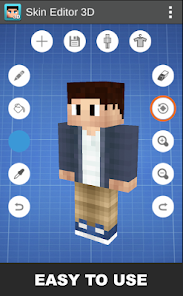
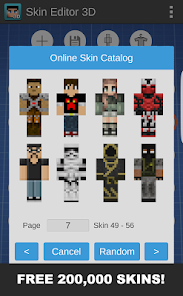
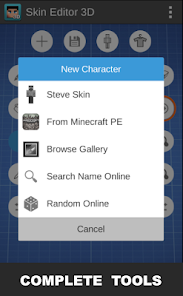
Using the app is pretty intuitive. You start with a blank template or choose from a library of community skins to edit. The 3D view lets you rotate your character model to paint on every angle, which is way better than trying to figure out a flat 2D layout. A good tip is to use the symmetry tool—it saves so much time by mirroring your edits to the other side of the skin. You can also import photos to use as textures, which is great for making really unique designs. Once you're done, exporting and installing the skin into your Minecraft game is straightforward with the app's guide.
I've tried a few other skin editors on Google Play, like Skin Seed or Skindex's official app. While they're good, I keep coming back to Skin Editor 3D. The main reason is the true 3D workspace. Other apps often feel like they're just presenting the 2D skin layout in a fancy way, but here you're actually painting on a 3D model. It feels more direct and helps you visualize the final result in the game much better. For someone who likes to tinker with details, this app just makes the whole process smoother and more fun.
Key Functional Highlights
- 🎨 True 3D Painting Workspace: Unlike many editors that just show a 3D preview, this app lets you paint directly onto a rotatable 3D model. This feature is its standout quality, making it feel like a professional tool and eliminating the guesswork from skin design.
- 📁 Robust Import and Template System: You can start from scratch, use built-in templates, or import any skin file or photo. This flexibility is superior to apps like 'Skin Seed' which have more limited starting options, allowing for incredible creativity right from the get-go.
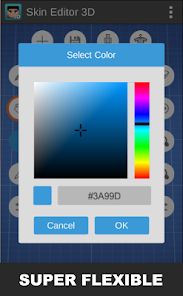
- ⚙️ Advanced Editing Tools: Features like layer support, a color picker, symmetry painting, and detailed brush settings are packed in. Compared to the simpler toolset in the official Minecraft Skin Studio, this app offers much finer control for serious creators.
- 🔗 Direct Game Integration: The app provides clear steps to export your creation and install it directly into your Minecraft game. This seamless pipeline from design to play is a huge practical advantage over web-based editors where transferring files is more cumbersome.
Advantages & Benefits
- 👍 The immersive 3D editing environment is unmatched by competitors like Skin Seed, making complex designs easier and more accurate.
- 👍 The app is completely free to download and use for basic creation, with no mandatory account, lowering the barrier to entry compared to some web-based platforms.
- 👍 It receives regular updates from Remoro Studios, adding new features and templates, which keeps the tool fresh and compatible with new Minecraft versions.
Areas for Improvement
- 👎 The free version contains ads, which can be intrusive during focused editing sessions, whereas apps like 'Skin Studio for Minecraft' are ad-free.
- 👎 Some of the most powerful features, like advanced layers and certain texture packs, are locked behind a one-time purchase. Other free apps might offer these tools without payment.
- 👎 The interface, while powerful, can feel a bit cluttered for absolute beginners compared to the simpler, more guided approach of an app like Skin Seed.
Recommended Apps
![]()
ZEPETO: Avatar, Connect & Play
Naver Z Corporation4.3
![]()
Reverse Voice: Flip Singing
NindaFuit0![]()
AI Chat Ask Assistant - NowAI
Now Tech4.3![]()
Lie Detector Test: Prank App
DkTech inc.4.3![]()
Peachy - AI Face & Body Editor
InShot Video Editor4.8
![]()
AI Video Art Creator - Livensa
FERASET4.5![]()
Google Voice
Google LLC4.3![]()
Horoscopes & Tarot
Astrolis Horoscopes4.7![]()
eBay online shopping & selling
eBay Mobile4.6![]()
JPay
Jpay Mobile4.1![]()
Stranger Things 5 Challenges
MVH Entertainment Team5![]()
Chat Master: Prank Story
ABI Game Studio4.8![]()
Google Maps
Google LLC4.2![]()
AI Chat・Ask Chatbot Assistant
AI Chat Studio4.5![]()
Name Meanings with Impact
Alif Innovative Solution3.7















You May Like
-
![]()
True Tarot Card Reading
KaApps4.2 -
![]()
LinkedIn: Jobs & Business News
LinkedIn4.2 -
![]()
iControl: Easy Widgets Themes
Fancy keyboard for theme apps4.6 -
![]()
Duolingo: Language & Chess
Duolingo4.7 -
![]()
Flipped:Chat with AI Character
First Group pte ltd4.1 -
![]()
Hearing Age
Mobile Solutions Tech0 -
![]()
TikTok
TikTok Pte. Ltd.4.4 -
![]()
Pretty Makeup - Beauty Camera
Photo Editor Perfect Corp.4.4 -
![]()
PhotoRoom AI Photo Editor
PhotoRoom Background Editor App4.7 -
![]()
Lightleap by Lightricks
Lightricks Ltd.4.3 -
![]()
Name Meaning
Dexati4.1 -
![]()
Truth Social
T Media Tech LLC3.3 -
![]()
Ace Hardware
Ace Hardware Corporation4.7 -
![]()
Kpop Fans Demon Hunter Wallpap
JHNStudio4.3 -
![]()
Artplay - AI Photo & Video
Hideaway Technology Limited4.5









































