

MyHyundai with Bluelink
Hyundai Motor America
Installs
1M+
Developer
Hyundai Motor America
-
Category
Auto & Vehicles
-
Content Rating
Everyone
Developer Email
Privacy Policy
https://www.hyundaiusa.com/privacy-policy.aspx
Screenshots
Expert Review
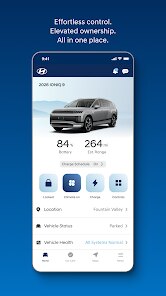
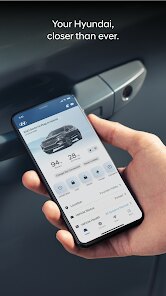
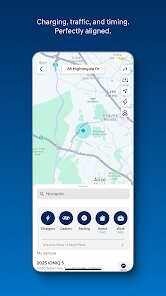
For Hyundai owners looking to get more out of their vehicle, MyHyundai with Bluelink serves as a comprehensive companion application available through the Google Play store. This free download provides remote access to various car functions, though it does include optional paid subscription services for certain features. The app integrates directly with compatible Hyundai models, allowing users to monitor vehicle status, control climate settings remotely, and access roadside assistance when needed. Since its release, it has seen a substantial number of installs, reflecting its utility for Hyundai drivers who want to stay connected to their cars from anywhere.
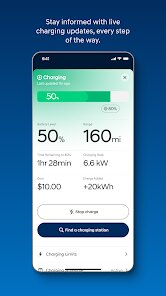
Getting started with the app requires pairing it with a compatible Hyundai vehicle through a straightforward setup process. Once linked, the main dashboard displays critical information like fuel level, tire pressure, and battery charge for electric models, all updated in real time. I found navigating through the different sections fairly intuitive, with clearly labeled tabs for remote commands, vehicle health, and account settings. The remote start function, which lets me warm up the cabin before stepping outside, has proven particularly useful during colder mornings. Additionally, the app sends alerts for maintenance reminders or unusual vehicle activity, which adds a layer of awareness without being intrusive.
In comparison with similar automotive companion apps like FordPass or Toyota Remote Connect, MyHyundai with Bluelink offers a more streamlined interface that prioritizes essential controls over excessive features. While FordPass provides comparable remote functionalities, its layout sometimes feels cluttered with promotional content, whereas this app keeps the focus on vehicle management. Toyota's version places heavier emphasis on connected navigation services, which can be useful for some drivers but adds complexity for those who simply want basic remote access. MyHyundai strikes a reasonable balance, though its feature set heavily depends on whether users subscribe to the paid Bluelink package, leaving the free tier somewhat limited in what it can actually do.
Key Functional Highlights
- The remote climate control works reliably across distances, allowing me to set the temperature before entering the car on extreme weather days. Response times have been consistent, typically executing commands within seconds after sending them through the app.
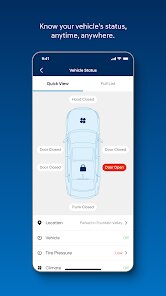
- Vehicle health reports provide a clear snapshot of system status, including engine diagnostics and battery condition for hybrids. This gives me confidence about upcoming road trips without needing to visit a dealership for basic checks.
- Valet mode sets speed and distance restrictions when someone else drives my car, offering peace of mind that feels more thoughtful than similar options in competitors like BMW's connected apps, which focus more on geo-fencing alerts.
- Navigation send-to-car feature transfers destinations from phone directly to the vehicle's GPS, though it works more smoothly with newer models than older ones, a limitation I noticed after using my family's 2022 Sonata compared to my 2020 Elantra.
Advantages & Benefits
- Knowing my car's lock status and fuel level without walking to the driveway saves time during busy mornings, especially when I am already running late.
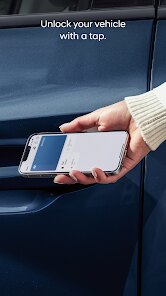
- Remote door unlock has helped in situations when I accidentally left keys inside, avoiding the hassle of waiting for roadside assistance to arrive.
- Maintenance reminders based on actual mileage keep service schedules organized, which has reduced the chance of missing important oil changes or tire rotations.
Areas for Improvement
- The free version limits core functions like remote start and climate control to only three months, after which a subscription fee becomes necessary to keep them active.
- Occasional connection delays occur when parked in areas with weak cellular reception, making the app temporarily unresponsive during critical moments.
- The user interface could benefit from a dark mode option, as the bright default theme feels harsh during nighttime use in the car.
- Some features, such as the panic button and roadside assistance, require redundant steps to access, which feels inefficient when time matters most.
Recommended Apps
![]()
ZEPETO: Avatar, Connect & Play
Naver Z Corporation4.3
![]()
Reverse Voice: Flip Singing
NindaFuit0![]()
AI Chat Ask Assistant - NowAI
Now Tech4.3![]()
Lie Detector Test: Prank App
DkTech inc.4.3![]()
Peachy - AI Face & Body Editor
InShot Video Editor4.8
![]()
AI Video Art Creator - Livensa
FERASET4.5![]()
Google Voice
Google LLC4.3![]()
Horoscopes & Tarot
Astrolis Horoscopes4.7![]()
eBay online shopping & selling
eBay Mobile4.6![]()
JPay
Jpay Mobile4.1![]()
Stranger Things 5 Challenges
MVH Entertainment Team5![]()
Chat Master: Prank Story
ABI Game Studio4.8![]()
Google Maps
Google LLC4.2![]()
AI Chat・Ask Chatbot Assistant
AI Chat Studio4.5![]()
Name Meanings with Impact
Alif Innovative Solution3.7















You May Like
-
![]()
True Tarot Card Reading
KaApps4.2 -
![]()
LinkedIn: Jobs & Business News
LinkedIn4.2 -
![]()
iControl: Easy Widgets Themes
Fancy keyboard for theme apps4.6 -
![]()
Duolingo: Language & Chess
Duolingo4.7 -
![]()
Flipped:Chat with AI Character
First Group pte ltd4.1 -
![]()
Hearing Age
Mobile Solutions Tech0 -
![]()
TikTok
TikTok Pte. Ltd.4.4 -
![]()
Pretty Makeup - Beauty Camera
Photo Editor Perfect Corp.4.4 -
![]()
PhotoRoom AI Photo Editor
PhotoRoom Background Editor App4.7 -
![]()
Lightleap by Lightricks
Lightricks Ltd.4.3 -
![]()
Name Meaning
Dexati4.1 -
![]()
Truth Social
T Media Tech LLC3.3 -
![]()
Ace Hardware
Ace Hardware Corporation4.7 -
![]()
Kpop Fans Demon Hunter Wallpap
JHNStudio4.3 -
![]()
Artplay - AI Photo & Video
Hideaway Technology Limited4.5












































