

Filters for pictures - FaceArt
VysionApps
Installs
10M+
Developer
VysionApps
-
Category
Entertainment
-
Content Rating
Rated for 3+
Developer Email
Privacy Policy
https://www.iubenda.com/privacy-policy/7831612
Screenshots


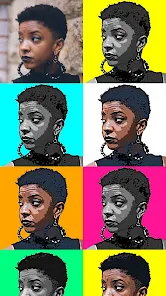
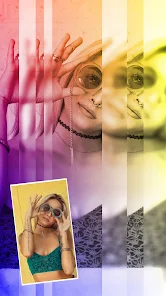
Expert Review
FaceArt, developed by VysionApps, is a photo editing app focused on AI-powered beautification and creative filters. It's designed for anyone who wants to quickly enhance selfies or portraits with smooth skin, enlarged eyes, slimmer faces, and a huge variety of artistic effects. The app launched a few years back and is available for free download on the Google Play Store. It has racked up millions of installs, which shows how popular it is for casual photo touch-ups. You don't need to register to start using it right after install, which is super convenient. However, like many free apps in this genre, FaceArt includes ads and offers in-app purchases to unlock premium filters or remove watermark.
Using the app is straightforward. You just pick a photo from your gallery or take a new one, and the app's AI automatically suggests enhancements. I usually tweak the 'Beauty' sliders for skin smoothing and eye brightening first before diving into the filters. A good tip is to not overdo the automatic adjustments; sometimes the AI can make skin look a bit plastic, so adjusting the strength manually gives a more natural result. The 'Art' filters can turn your photo into a painting or sketch, which is fun for social media posts.
I've tried a few similar apps like AirBrush and BeautyPlus. While they all do a good job, I keep coming back to FaceArt. The main reason is the speed and the specific style of its 'Korean-style' beauty filters that I prefer – they tend to be a bit more subtle and natural-looking compared to some others that go overboard. Also, for a free app, the variety of filters you get without paying is pretty decent. It's not the most professional tool out there, but for quick, share-ready edits on my phone, this app gets the job done perfectly.
Key Functional Highlights
- ✨ AI Auto-Enhance: Right after you install FaceArt and open a photo, its AI kicks in to suggest optimal beautification. It analyzes the face and applies a balanced set of corrections for skin, eyes, and face shape in one tap, which is faster than manually adjusting each setting in apps like AirBrush.
- 🎨 Diverse Filter Library: The app boasts a massive collection of filters, from natural beauty tweaks to full-on artistic transformations like oil painting or cartoon styles. This variety within one app means you don't need to download separate apps for different looks.
- 📏 Precise Manual Controls: Beyond auto-mode, you get detailed sliders for every feature – you can adjust eye size, nose width, skin smoothness, and even add makeup. This level of control rivals premium apps, allowing for highly customized edits.
- ⚡ Quick Export & Sharing: Once your edit is done, exporting is instant. You can save the photo without a watermark (sometimes requiring watching an ad or using a premium feature) and share it directly to platforms like Instagram, all within the app's clean interface.
Advantages & Benefits
- 👍 Free Filter Variety: Compared to Meitu, which locks many trendy filters behind a subscription, FaceArt offers a wider initial library for free upon download, giving users more to play with immediately.
- 👍 Lightweight & Fast: The app installs quickly and runs smoothly even on older phones, whereas some competitors like Perfect365 can feel more bloated and slower to open and process images.
- 👍 One-Tap Natural Results: Its auto-beautify often delivers a more naturally enhanced look 'out of the box' compared to the sometimes overly dramatic default settings in apps like BeautyCam.
Areas for Improvement
- 👎 Persistent Ads: The free version has frequent full-screen video ads, especially after saving an edit. This is more intrusive than the ad implementation in, say, SNOW, which tends to use smaller banner ads.
- 👎 Watermark on Free Saves: By default, saved photos include a FaceArt logo watermark. Removing it usually requires watching an ad or making a purchase, a practice that apps like YouCam Perfect have moved away from for basic saves.
- 👎 Limited Advanced Tools: For detailed blemish removal or advanced reshaping, you might need a more professional app like Facetune. FaceArt's tools are great for overall enhancements but less precise for spot corrections.
Recommended Apps
![]()
ZEPETO: Avatar, Connect & Play
Naver Z Corporation4.3
![]()
Reverse Voice: Flip Singing
NindaFuit0![]()
AI Chat Ask Assistant - NowAI
Now Tech4.3![]()
Lie Detector Test: Prank App
DkTech inc.4.3![]()
Peachy - AI Face & Body Editor
InShot Video Editor4.8
![]()
AI Video Art Creator - Livensa
FERASET4.5![]()
Google Voice
Google LLC4.3![]()
Horoscopes & Tarot
Astrolis Horoscopes4.7![]()
eBay online shopping & selling
eBay Mobile4.6![]()
JPay
Jpay Mobile4.1![]()
Stranger Things 5 Challenges
MVH Entertainment Team5![]()
Chat Master: Prank Story
ABI Game Studio4.8![]()
Google Maps
Google LLC4.2![]()
AI Chat・Ask Chatbot Assistant
AI Chat Studio4.5![]()
Name Meanings with Impact
Alif Innovative Solution3.7















You May Like
-
![]()
True Tarot Card Reading
KaApps4.2 -
![]()
LinkedIn: Jobs & Business News
LinkedIn4.2 -
![]()
iControl: Easy Widgets Themes
Fancy keyboard for theme apps4.6 -
![]()
Duolingo: Language & Chess
Duolingo4.7 -
![]()
Flipped:Chat with AI Character
First Group pte ltd4.1 -
![]()
Hearing Age
Mobile Solutions Tech0 -
![]()
TikTok
TikTok Pte. Ltd.4.4 -
![]()
Pretty Makeup - Beauty Camera
Photo Editor Perfect Corp.4.4 -
![]()
PhotoRoom AI Photo Editor
PhotoRoom Background Editor App4.7 -
![]()
Lightleap by Lightricks
Lightricks Ltd.4.3 -
![]()
Name Meaning
Dexati4.1 -
![]()
Truth Social
T Media Tech LLC3.3 -
![]()
Ace Hardware
Ace Hardware Corporation4.7 -
![]()
Kpop Fans Demon Hunter Wallpap
JHNStudio4.3 -
![]()
Artplay - AI Photo & Video
Hideaway Technology Limited4.5











































