

Adobe Photoshop Mix - Cut-out,
Adobe
Installs
10M+
Developer
Adobe
-
Category
Video Players & Editors
-
Content Rating
Rated for 3+
Developer Email
Privacy Policy
https://www.adobe.com/privacy/policy.html
Screenshots
Expert Review
Adobe Photoshop Mix is a fantastic mobile app for quick and powerful photo editing, especially when you need to cut out objects or blend images. It's part of the Adobe Photoshop family, so you get some of that professional-grade power right on your phone. The app launched back in 2014 and is available for free on both Google Play and the Apple App Store. It's racked up millions of downloads on Google Play alone. You can download and install it without paying anything, and you don't even need to register an account to start using most of its core features. That's a big plus for jumping right in. While the app itself is free, there are some advanced tools and cloud storage options that require a subscription to Adobe's Creative Cloud services. You might also see occasional prompts for these premium features, but the ads aren't overly intrusive for the free version.
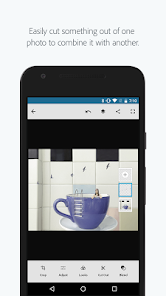
Using the app is pretty intuitive. The main attraction is the 'Cut Out' tool. You just roughly trace around the object you want to isolate, and the app's smart algorithms do a surprisingly good job of refining the edges. It's perfect for creating collages or removing backgrounds. A great tip is to use the 'Refine Edge' brush after the initial cut-out to clean up tricky areas like hair or fuzzy textures. You can then easily layer this cut-out onto another photo, adjust colors, and apply filters. It feels like having a mini-Photoshop in your pocket for on-the-go projects.
I've tried a few other similar photo editing apps like PicsArt and Background Eraser. While PicsArt has more social and fun features, Photoshop Mix feels more precise and professional for actual compositing work. Background Eraser is great for one simple job, but Mix gives you a whole set of blending and adjustment tools in one place. I chose this app because it delivers reliable, high-quality cut-outs without the clutter of a million stickers and frames. It integrates smoothly with other Adobe apps too, which is a bonus if you use their ecosystem. For serious editing tasks on mobile, this app is my go-to.
Key Functional Highlights
- ✂️ Precision Cut-Out Tool: The star feature of this app is its intelligent selection tool. Unlike many similar apps that require painstaking manual work, Photoshop Mix's algorithm helps you get clean edges quickly, which is perfect for complex subjects.
- 🔄 Seamless Adobe Ecosystem Integration: This app stands out because it works hand-in-hand with Adobe Creative Cloud. You can open a PSD from Photoshop on your desktop, edit layers in Mix on your phone, and save it back to the cloud, a workflow most other mobile apps can't match.
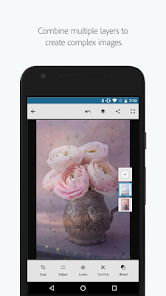
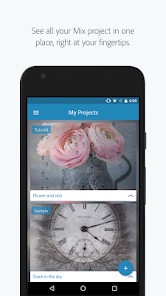
- 🎨 Non-Destructive, Layer-Based Editing: True to its Photoshop heritage, Mix lets you work with layers. You can adjust, hide, or blend each layer without permanently altering your original image, offering much more control than apps with a linear, step-by-step edit process.
- 📤 Direct Sharing to Social Platforms: Once your edit is complete, you can export and share your creation directly to Instagram, Facebook, or other platforms right from the app, streamlining the process from edit to post.
Advantages & Benefits
- ✅ Superior Selection Technology: Compared to apps like 'Background Eraser,' Photoshop Mix provides more advanced edge refinement, making complex cut-outs (like people with wavy hair) look more natural.
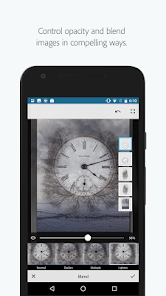
- ✅ Professional-Grade Blending Options: It offers layer blending modes (e.g., Multiply, Screen) similar to desktop Photoshop, which apps like PicsArt often simplify or lack, giving you more creative control.
- ✅ Clean, Focused Interface: The app is designed for editing, not social networking. It avoids the crowded, ad-heavy interfaces found in some all-in-one apps, keeping the focus on the tools.
Areas for Improvement
- ❌ Premium Features Behind a Paywall: Some of the most powerful tools, like certain advanced adjustments and cloud storage, require a Creative Cloud subscription, whereas many features in apps like Snapseed are completely free.
- ❌ Can Be Resource Heavy: The app might run slower on older phones compared to lighter alternatives, as it's handling complex image processing similar to its desktop cousin.
- ❌ Steeper Learning Curve: For someone used to simpler apps like Instagram's editing suite, the layer-based system and professional terms can be a bit intimidating at first.
Recommended Apps
![]()
ZEPETO: Avatar, Connect & Play
Naver Z Corporation4.3
![]()
Reverse Voice: Flip Singing
NindaFuit0![]()
AI Chat Ask Assistant - NowAI
Now Tech4.3![]()
Lie Detector Test: Prank App
DkTech inc.4.3![]()
Peachy - AI Face & Body Editor
InShot Video Editor4.8
![]()
AI Video Art Creator - Livensa
FERASET4.5![]()
Google Voice
Google LLC4.3![]()
Horoscopes & Tarot
Astrolis Horoscopes4.7![]()
eBay online shopping & selling
eBay Mobile4.6![]()
JPay
Jpay Mobile4.1![]()
Stranger Things 5 Challenges
MVH Entertainment Team5![]()
Chat Master: Prank Story
ABI Game Studio4.8![]()
Google Maps
Google LLC4.2![]()
AI Chat・Ask Chatbot Assistant
AI Chat Studio4.5![]()
Name Meanings with Impact
Alif Innovative Solution3.7















You May Like
-
![]()
True Tarot Card Reading
KaApps4.2 -
![]()
LinkedIn: Jobs & Business News
LinkedIn4.2 -
![]()
iControl: Easy Widgets Themes
Fancy keyboard for theme apps4.6 -
![]()
Duolingo: Language & Chess
Duolingo4.7 -
![]()
Flipped:Chat with AI Character
First Group pte ltd4.1 -
![]()
Hearing Age
Mobile Solutions Tech0 -
![]()
TikTok
TikTok Pte. Ltd.4.4 -
![]()
Pretty Makeup - Beauty Camera
Photo Editor Perfect Corp.4.4 -
![]()
PhotoRoom AI Photo Editor
PhotoRoom Background Editor App4.7 -
![]()
Lightleap by Lightricks
Lightricks Ltd.4.3 -
![]()
Name Meaning
Dexati4.1 -
![]()
Truth Social
T Media Tech LLC3.3 -
![]()
Ace Hardware
Ace Hardware Corporation4.7 -
![]()
Kpop Fans Demon Hunter Wallpap
JHNStudio4.3 -
![]()
Artplay - AI Photo & Video
Hideaway Technology Limited4.5











































