

Square InPic - Photo Editor &
Studio 8 Apps
Installs
50M+
Developer
Studio 8 Apps
-
Category
Video Players & Editors
-
Content Rating
Rated for 3+
Developer Email
Privacy Policy
http://www.studio8apps.com/privacy-policy/
Screenshots
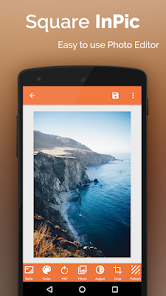
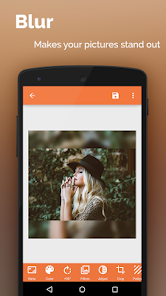

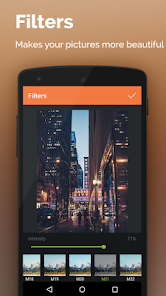
Expert Review
I've been using Square InPic - Photo Editor for a few months now, and it's become my go-to app for quickly making my photos look great for social media. Basically, it's a photo editing app focused on creating those clean, framed looks, like putting your picture inside a colored border or a stylish collage. The app first launched a while back, and you can easily find it on the Google Play store. It's had millions of downloads, which shows how popular it is. The best part is that you can download and install it for free. You don't even need to register or create an account to start using it, which I really appreciate for a quick edit. Of course, like many free apps, it does show some ads and offers in-app purchases if you want to unlock extra frames or remove the ads, but the free version is surprisingly powerful.
Using the app is super straightforward. After you install it, you just pick a photo from your gallery. Then, you browse through tons of frame templates – there are simple colored borders, multi-photo grids, and even artistic designs. You tap on one, and your photo snaps right into place. You can adjust the photo's position and zoom, change the border color, and add basic filters or text. My tip is to play with the 'background' feature for some frames; you can set a custom color or even a pattern behind your main photo to make it pop before you save or share.
When I was looking for a simple collage maker, I tried a few others like Photo Grid and Canva. They're great, but they can feel a bit overwhelming with all their features. I chose Square InPic because it does one thing really well: frames and borders. It's much faster for creating a single, polished image for Instagram or WhatsApp. Other apps might have more editing tools, but for just adding a nice frame quickly without any fuss, this app is perfect. It's less cluttered and gets the job done in seconds, which is exactly what I need most of the time.
Key Functional Highlights
- 🖼️ Huge Library of Instant Frames: Unlike apps where you build a collage from scratch, Square InPic offers a massive, constantly updated collection of pre-designed frames. You just pick your photo and choose a template – it instantly creates a professional-looking composition, saving a ton of time compared to manual editors.
- 🎨 One-Tap Style & Color Changes: For any frame, you can change the border color, background, and even apply a filter to your photo with a single tap. This is much simpler than similar apps where adjusting these elements often requires navigating through multiple menus.
- 📱 Optimized for Social Sharing: The app is built with social media in mind. Most frames output in perfect square or story dimensions. The 'save and share' flow is seamless, directly linking to platforms like Instagram. Compared to a general editor like Snapseed, Square InPic's output is ready-to-post without extra cropping.
- ⚡ Extremely Lightweight & Fast: The app downloads and installs quickly and doesn't lag, even on older phones. It opens and processes photos faster than heavier, all-in-one photo editors, making it ideal for quick edits on the go.
Advantages & Benefits
- ✅ Simplicity is Key: It's far more intuitive for basic framing than Canva or PhotoGrid, which have steeper learning curves. You get beautiful results in three taps.
- ✅ Focus on Aesthetics: The frame designs are generally more modern and trendy compared to some older, generic templates in apps like PicCollage.
- ✅ Truly Free to Start: You can use the core features extensively without paying, unlike some apps that heavily restrict free usage. The ads are not overly intrusive.
- ✅ No Account Needed: You can use the app immediately after install, no email sign-up required, which is a big plus for privacy and convenience over apps like Adobe Express.
Areas for Improvement
- ❌ Limited Advanced Editing: If you need to fine-tune brightness, contrast, or remove blemishes, you must edit the photo first in another app. It lacks the robust tools of VSCO or Lightroom.
- ❌ Ads in the Free Version: The ads can interrupt the workflow. To remove them permanently requires a purchase, which might be a dealbreaker for some.
- ❌ Watermark on Some Frames: Certain premium frames in the free version add a small watermark, a limitation you don't face with paid apps like Unfold.
- ❌ Occasional Glitches: Sometimes, after an update, specific frames might not load correctly, a stability issue I've rarely encountered with more established apps like Instagram's layout.
Recommended Apps
![]()
ZEPETO: Avatar, Connect & Play
Naver Z Corporation4.3
![]()
Reverse Voice: Flip Singing
NindaFuit0![]()
AI Chat Ask Assistant - NowAI
Now Tech4.3![]()
Lie Detector Test: Prank App
DkTech inc.4.3![]()
Peachy - AI Face & Body Editor
InShot Video Editor4.8
![]()
AI Video Art Creator - Livensa
FERASET4.5![]()
Google Voice
Google LLC4.3![]()
Horoscopes & Tarot
Astrolis Horoscopes4.7![]()
eBay online shopping & selling
eBay Mobile4.6![]()
JPay
Jpay Mobile4.1![]()
Stranger Things 5 Challenges
MVH Entertainment Team5![]()
Chat Master: Prank Story
ABI Game Studio4.8![]()
Google Maps
Google LLC4.2![]()
AI Chat・Ask Chatbot Assistant
AI Chat Studio4.5![]()
Name Meanings with Impact
Alif Innovative Solution3.7















You May Like
-
![]()
True Tarot Card Reading
KaApps4.2 -
![]()
LinkedIn: Jobs & Business News
LinkedIn4.2 -
![]()
iControl: Easy Widgets Themes
Fancy keyboard for theme apps4.6 -
![]()
Duolingo: Language & Chess
Duolingo4.7 -
![]()
Flipped:Chat with AI Character
First Group pte ltd4.1 -
![]()
Hearing Age
Mobile Solutions Tech0 -
![]()
TikTok
TikTok Pte. Ltd.4.4 -
![]()
Pretty Makeup - Beauty Camera
Photo Editor Perfect Corp.4.4 -
![]()
PhotoRoom AI Photo Editor
PhotoRoom Background Editor App4.7 -
![]()
Lightleap by Lightricks
Lightricks Ltd.4.3 -
![]()
Name Meaning
Dexati4.1 -
![]()
Truth Social
T Media Tech LLC3.3 -
![]()
Ace Hardware
Ace Hardware Corporation4.7 -
![]()
Kpop Fans Demon Hunter Wallpap
JHNStudio4.3 -
![]()
Artplay - AI Photo & Video
Hideaway Technology Limited4.5












































