

Prisma Art Effect Photo Editor
Prisma Labs, Inc.
Installs
50M+
Developer
Prisma Labs, Inc.
-
Category
Video Players & Editors
-
Content Rating
Rated for 3+
Developer Email
Privacy Policy
http://prisma-ai.com/privacy.html
Screenshots
Expert Review
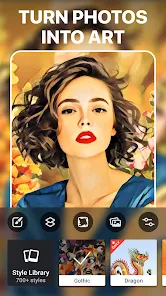
Prisma is a photo editing app that turns your regular photos into artworks using AI. It's like having a bunch of famous art styles right in your pocket. You take a picture or pick one from your gallery, and the app transforms it to look like it was painted by Van Gogh, Picasso, or other famous artists. It's super fun and easy to use, even if you're not into editing photos much. The app first came out a few years ago and got really popular fast. You can download it for free from the Google Play Store or the App Store. It has millions of installs, which shows how many people love it. You don't need to register or sign up to start using it, which is great. Just install the app and you're ready to go. There are some ads in the free version, and you can buy a subscription to remove them and get more filters.
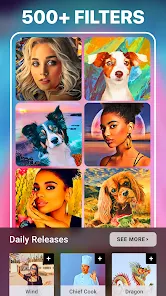
Using Prisma is straightforward. You open the app, choose a photo, and then swipe through all the different art filters. My tip is to try a few different ones on the same picture because some styles work better depending on the photo. For example, a landscape might look amazing with a vibrant, colorful filter, while a portrait might need something more subtle. The processing takes a few seconds, and then you can save or share your masterpiece. It's become my go-to app when I want to make my social media posts look more unique and artistic without a lot of effort.
There are other similar apps out there, like PicsArt or Adobe Photoshop Express, which are more like full editing suites. I've tried them, but I keep coming back to Prisma for one main reason: its special AI art filters. While other apps have filters too, Prisma's feel different. They genuinely make photos look like real paintings, not just with a color overlay. The results from Prisma are often more surprising and artistic. For quick, impressive art transformations, this app is hard to beat. It does one thing and does it really well, which is why I prefer it over the more complicated, all-in-one editors.
Key Functional Highlights
- 🎨 Unique AI Art Filters: This is the core of the app. Prisma doesn't just apply simple color changes; its AI analyzes your photo and completely re-renders it in the chosen artistic style. Compared to a popular app like Instagram, which has basic filters, Prisma creates results that look like actual paintings, with brush strokes and texture.
- 📱 Simple and Fast Workflow: The app is designed for speed. You pick a photo, choose a style, and let it process. There's no complex editing timeline or layers to manage. This makes it much more accessible for casual users than a powerhouse like Adobe Lightroom, which can be overwhelming.
- 🆓 Free to Start with No Account Needed: You can download and install Prisma from Google Play immediately and start using it without creating an account. This lowers the barrier to entry significantly compared to some apps that require sign-up before you can even try a basic feature.
- 🔄 Regular Filter Updates: The developers add new art styles regularly, often inspired by trending artists or art movements. This keeps the app feeling fresh and gives you new reasons to open it, unlike some apps where the filter collection stays static for years.
Advantages & Benefits
- ✨ Superior Artistic Output: The quality of the art transformation is simply better than most competitors. Apps like PicsArt have art filters, but Prisma's AI-powered results are consistently more detailed and authentic-looking.
- 🚀 Instant Gratification: The process from photo to artwork is incredibly quick. You get a stunning result in seconds, which is perfect for sharing on social media. Other apps might require more manual tweaking to achieve a similar effect.
- 👌 User-Friendly Design: The interface is clean and intuitive. Swiping through filters is smooth, and saving/sharing is effortless. It avoids the cluttered toolbars found in apps like Snapseed, making it less intimidating for beginners.
Areas for Improvement
- ⏳ Processing Requires Internet: Most filters need an internet connection to process because the AI work happens on servers. This is a downside compared to apps like VSCO, where all edits are done locally on your device, allowing offline use.
- 📶 Can Be Slow on Weak Connection: If your internet is slow, the AI processing can take a while or even fail. This isn't an issue with simpler filter apps that work completely offline.
- 💰 Premium Model Limits Free Use: The free version shows ads and limits access to the newest and best filters. To unlock everything, you need a subscription. Some similar apps, like Google Snapseed, are completely free with no ads or paywalls.
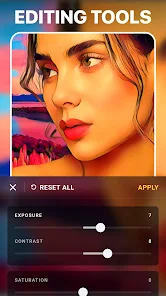
- ✂️ Limited Basic Editing Tools: Prisma is focused on art filters, so it lacks basic photo adjustments like cropping, brightness, or contrast sliders. You often need to edit your photo in another app first, whereas an app like Photoshop Express includes both basic tools and creative filters.
Recommended Apps
![]()
ZEPETO: Avatar, Connect & Play
Naver Z Corporation4.3
![]()
Reverse Voice: Flip Singing
NindaFuit0![]()
AI Chat Ask Assistant - NowAI
Now Tech4.3![]()
Lie Detector Test: Prank App
DkTech inc.4.3![]()
Peachy - AI Face & Body Editor
InShot Video Editor4.8
![]()
AI Video Art Creator - Livensa
FERASET4.5![]()
Google Voice
Google LLC4.3![]()
Horoscopes & Tarot
Astrolis Horoscopes4.7![]()
eBay online shopping & selling
eBay Mobile4.6![]()
JPay
Jpay Mobile4.1![]()
Stranger Things 5 Challenges
MVH Entertainment Team5![]()
Chat Master: Prank Story
ABI Game Studio4.8![]()
Google Maps
Google LLC4.2![]()
AI Chat・Ask Chatbot Assistant
AI Chat Studio4.5![]()
Name Meanings with Impact
Alif Innovative Solution3.7















You May Like
-
![]()
True Tarot Card Reading
KaApps4.2 -
![]()
LinkedIn: Jobs & Business News
LinkedIn4.2 -
![]()
iControl: Easy Widgets Themes
Fancy keyboard for theme apps4.6 -
![]()
Duolingo: Language & Chess
Duolingo4.7 -
![]()
Flipped:Chat with AI Character
First Group pte ltd4.1 -
![]()
Hearing Age
Mobile Solutions Tech0 -
![]()
TikTok
TikTok Pte. Ltd.4.4 -
![]()
Pretty Makeup - Beauty Camera
Photo Editor Perfect Corp.4.4 -
![]()
PhotoRoom AI Photo Editor
PhotoRoom Background Editor App4.7 -
![]()
Lightleap by Lightricks
Lightricks Ltd.4.3 -
![]()
Name Meaning
Dexati4.1 -
![]()
Truth Social
T Media Tech LLC3.3 -
![]()
Ace Hardware
Ace Hardware Corporation4.7 -
![]()
Kpop Fans Demon Hunter Wallpap
JHNStudio4.3 -
![]()
Artplay - AI Photo & Video
Hideaway Technology Limited4.5











































