

Ancestry: Family History & DNA
Ancestry.com
Installs
10M+
Developer
Ancestry.com
-
Category
Parenting
-
Content Rating
Rated for 3+
Developer Email
Privacy Policy
http://www.ancestry.com/cs/legal/privacyphilosophy
Screenshots

Expert Review
I've been using the Ancestry app for a few years now to dig into my family history. It's a genealogy app that lets you build your family tree, search historical records, and even take a DNA test to discover your ethnic origins and find relatives. The app itself is free to download from the Google Play Store or the App Store, and it's been around for a long time, with millions of installs. You do need to create an account to use it, and while the basic app is free, you need a paid subscription to access most of the historical records and advanced features. There are also optional in-app purchases for things like the DNA test kit.
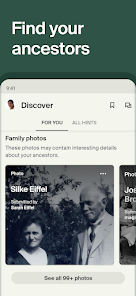
Using the app is pretty straightforward. I usually start by adding names and details to my tree, and then I use the app's search tools to look for hints in their massive collection of records like census data, birth certificates, and immigration lists. A good tip is to start with what you know for sure and work backwards. The app's hint system is super helpful—it automatically suggests records that might match people in your tree, which saves a ton of time. I often use it on my tablet because the bigger screen is nice for looking at old documents and building out branches of the family.
Compared to other genealogy apps like FamilySearch or MyHeritage, I keep coming back to Ancestry. The main reason is the sheer size of its database. It feels like Ancestry has more records, especially for the U.S. and U.K., which is where a lot of my research is focused. While FamilySearch is completely free and run by a non-profit, I found Ancestry's search tools and user interface to be a bit more polished and easier for a beginner to navigate. MyHeritage is also great, especially for international records, but for me, Ancestry just has that critical mass of data that often leads to breakthroughs in my research.
Key Functional Highlights
- 🔍 Record Hints & Search: The app's hint system is its engine. As you build your tree, it continuously scans billions of records in Ancestry's database to suggest potential matches for your ancestors. It's like having a research assistant working 24/7.
- 🌳 Interactive Family Tree Builder: Building your tree on mobile is intuitive. You can easily add relatives, attach photos and stories, and navigate through generations with a simple tap. It syncs instantly with the website, so you can switch between devices seamlessly.
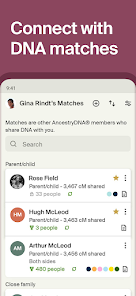
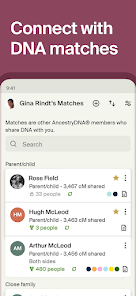
- 🧬 DNA Integration: If you've taken an AncestryDNA test, the app brilliantly integrates your results. You can see your ethnicity estimate, review DNA matches, and even see how potential relatives fit into your existing family tree.
- 📜 Historical Record Access: With a subscription, you can view and save original historical documents directly to your tree. The image viewer is robust, allowing you to zoom, rotate, and transcribe details on the go.
Advantages & Benefits
- ✅ Unmatched Database Size: Compared to competitors like FamilySearch, Ancestry's collection of user-submitted trees and indexed records is massive, particularly for North America and Western Europe, leading to more potential discoveries.
- ✅ Polished, User-Friendly Interface: For beginners, the Ancestry app is less daunting than some other platforms. The design guides you through the process logically, making complex genealogy feel more accessible.
- ✅ Powerful Hint System: The automated record-matching "hints" are a standout feature that apps like MyHeritage also have, but Ancestry's implementation feels particularly deep and accurate due to its vast underlying data.
Areas for Improvement
- ❌ Cost Barrier for Full Access: Unlike the completely free FamilySearch, Ancestry requires a paid subscription to access the core record collections, which can be a significant ongoing expense for serious researchers.
- ❌ Focus on Subscription Markets: While strong in certain regions, its record coverage can be thinner for areas outside the U.S., U.K., Canada, and Australia compared to more internationally-focused apps like MyHeritage.
- ❌ Occasional Hint Overload: The powerful hint system can sometimes feel overwhelming, generating many shaky or incorrect suggestions that require manual review, which can clutter the research process.
Recommended Apps
![]()
ZEPETO: Avatar, Connect & Play
Naver Z Corporation4.3
![]()
Reverse Voice: Flip Singing
NindaFuit0![]()
AI Chat Ask Assistant - NowAI
Now Tech4.3![]()
Lie Detector Test: Prank App
DkTech inc.4.3![]()
Peachy - AI Face & Body Editor
InShot Video Editor4.8
![]()
AI Video Art Creator - Livensa
FERASET4.5![]()
Google Voice
Google LLC4.3![]()
Horoscopes & Tarot
Astrolis Horoscopes4.7![]()
eBay online shopping & selling
eBay Mobile4.6![]()
JPay
Jpay Mobile4.1![]()
Stranger Things 5 Challenges
MVH Entertainment Team5![]()
Chat Master: Prank Story
ABI Game Studio4.8![]()
Google Maps
Google LLC4.2![]()
AI Chat・Ask Chatbot Assistant
AI Chat Studio4.5![]()
Name Meanings with Impact
Alif Innovative Solution3.7















You May Like
-
![]()
True Tarot Card Reading
KaApps4.2 -
![]()
LinkedIn: Jobs & Business News
LinkedIn4.2 -
![]()
iControl: Easy Widgets Themes
Fancy keyboard for theme apps4.6 -
![]()
Duolingo: Language & Chess
Duolingo4.7 -
![]()
Flipped:Chat with AI Character
First Group pte ltd4.1 -
![]()
Hearing Age
Mobile Solutions Tech0 -
![]()
TikTok
TikTok Pte. Ltd.4.4 -
![]()
Pretty Makeup - Beauty Camera
Photo Editor Perfect Corp.4.4 -
![]()
PhotoRoom AI Photo Editor
PhotoRoom Background Editor App4.7 -
![]()
Lightleap by Lightricks
Lightricks Ltd.4.3 -
![]()
Name Meaning
Dexati4.1 -
![]()
Truth Social
T Media Tech LLC3.3 -
![]()
Ace Hardware
Ace Hardware Corporation4.7 -
![]()
Kpop Fans Demon Hunter Wallpap
JHNStudio4.3 -
![]()
Artplay - AI Photo & Video
Hideaway Technology Limited4.5












































