

Google One
Google LLC
Installs
1B+
Developer
Google LLC
-
Category
Productivity
-
Content Rating
Everyone
Developer Email
Privacy Policy
http://www.google.com/policies/privacy
Screenshots
Expert Review
Google One is a cloud storage and subscription service from Google. It's basically the paid, upgraded version of the storage you get with a free Google account. I use it mainly to back up my photos, videos, and important documents from my phone and computer so I never run out of space. The app itself launched back in 2018, and you can easily download it from the Google Play Store or the Apple App Store. It's got over 100 million installs on Google Play alone. The app is free to install, but you need a Google account to use it. The core service is a subscription; you pay monthly or yearly for more storage. There aren't really any in-app ads, which is nice.
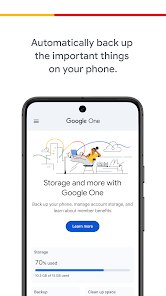
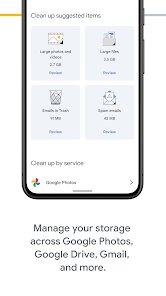
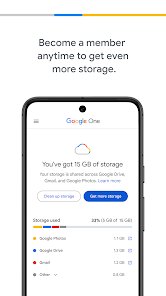
Using the Google One app is pretty straightforward. Once you install it and sign in, it gives you a clear overview of how much storage you're using across Gmail, Drive, and Photos. I find the automatic phone backup feature super handy—it just runs in the background. A good tip is to check the 'Storage' tab regularly to see what's taking up the most space; you can often clear out old Gmail attachments or blurry photos right from the app to free up room without upgrading your plan.
Compared to other cloud services like Dropbox or iCloud, I stick with Google One because it's deeply integrated with the Android phone and Google apps I use every day. For someone already in the Google ecosystem with Gmail and Photos, it just makes sense. While Dropbox is great for file sharing and iCloud is seamless for Apple users, Google One feels like a central hub for all my Google stuff. The family sharing feature is also a big reason I chose it over others, as I can easily share my storage plan with up to five other people.
Key Functional Highlights
- 🔒 Centralized Google Storage Management: This is the app's main job. Instead of jumping between Google Drive, Photos, and Gmail settings, everything is in one place. You can see exactly what's eating your space and clean it up with a few taps.
- 📱 Automatic Phone Backup: Unlike the basic Google Photos backup, the Google One app can back up your entire phone—including your MMS texts, call history, and device settings. It's a more complete safety net if you ever lose or switch phones.
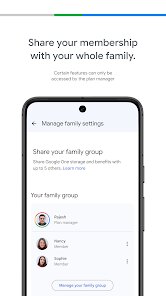
- 👨👩👧👦 Easy Family Plan Sharing: A standout feature compared to many competitors. With one subscription, you can invite up to five family members to share your storage pool. Everyone gets their own private space, and you manage the billing—no need for everyone to have their own separate plan.
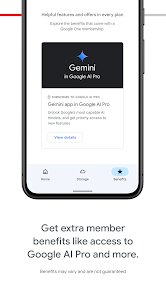
- 🛡️ Extra Google Benefits: Subscribing gives you more than just space. You get access to Google experts for help with any Google product, exclusive deals in the Google Store, and a VPN for your Android device (on higher plans). It adds value beyond simple storage.
Advantages & Benefits
- ✅ Deep Google Integration: It works flawlessly with Photos, Drive, and Gmail. For Android users, it's the most native and hassle-free cloud storage app.
- ✅ Simple Family Sharing: Beats managing individual iCloud or Dropbox accounts for a household. The setup is incredibly easy within the app.
- ✅ Clear Value Bundle: The mix of storage, expert support, VPN, and other perks makes the subscription feel more worthwhile than just buying plain storage from another service.
Areas for Improvement
- ❌ Primarily for Google Users: If you don't heavily use Google services, the app's value drops significantly. Services like pCloud or Sync.com offer more platform-agnostic storage.
- ❌ VPN and Perks are Platform-Limited: The VPN feature, a big selling point, is only for Android. iPhone users on the same plan don't get it, which feels inconsistent.
- ❌ Less Focus on File Collaboration: Compared to Dropbox or OneDrive, Google One is more about personal/family backup and storage management. For heavy team-based file collaboration, other apps are stronger.
Recommended Apps
![]()
ZEPETO: Avatar, Connect & Play
Naver Z Corporation4.3
![]()
Reverse Voice: Flip Singing
NindaFuit0![]()
AI Chat Ask Assistant - NowAI
Now Tech4.3![]()
Lie Detector Test: Prank App
DkTech inc.4.3![]()
Peachy - AI Face & Body Editor
InShot Video Editor4.8
![]()
AI Video Art Creator - Livensa
FERASET4.5![]()
Google Voice
Google LLC4.3![]()
Horoscopes & Tarot
Astrolis Horoscopes4.7![]()
eBay online shopping & selling
eBay Mobile4.6![]()
JPay
Jpay Mobile4.1![]()
Stranger Things 5 Challenges
MVH Entertainment Team5![]()
Chat Master: Prank Story
ABI Game Studio4.8![]()
Google Maps
Google LLC4.2![]()
AI Chat・Ask Chatbot Assistant
AI Chat Studio4.5![]()
Name Meanings with Impact
Alif Innovative Solution3.7















You May Like
-
![]()
True Tarot Card Reading
KaApps4.2 -
![]()
LinkedIn: Jobs & Business News
LinkedIn4.2 -
![]()
iControl: Easy Widgets Themes
Fancy keyboard for theme apps4.6 -
![]()
Duolingo: Language & Chess
Duolingo4.7 -
![]()
Flipped:Chat with AI Character
First Group pte ltd4.1 -
![]()
Hearing Age
Mobile Solutions Tech0 -
![]()
TikTok
TikTok Pte. Ltd.4.4 -
![]()
Pretty Makeup - Beauty Camera
Photo Editor Perfect Corp.4.4 -
![]()
PhotoRoom AI Photo Editor
PhotoRoom Background Editor App4.7 -
![]()
Lightleap by Lightricks
Lightricks Ltd.4.3 -
![]()
Name Meaning
Dexati4.1 -
![]()
Truth Social
T Media Tech LLC3.3 -
![]()
Ace Hardware
Ace Hardware Corporation4.7 -
![]()
Kpop Fans Demon Hunter Wallpap
JHNStudio4.3 -
![]()
Artplay - AI Photo & Video
Hideaway Technology Limited4.5









































