

YouVersion Bible App + Audio
Life.Church
Installs
100M+
Developer
Life.Church
-
Category
Books & Reference
-
Content Rating
Teen
Developer Email
Privacy Policy
https://www.bible.com/privacy
Screenshots

Expert Review
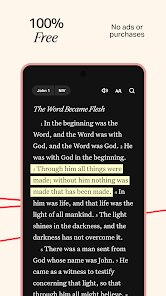
In the crowded space of digital faith tools, the YouVersion Bible App + Audio has carved out a notable presence on Google Play and the App Store. Developed by Life.Church, it's one of the most downloaded Bible applications available, often cited as having over half a billion installs globally. The core service is entirely free. While there are no forced ads interrupting the reading experience, users may encounter optional in-app purchases for certain premium features or specific reading plans. Its primary mission is straightforward: make the Bible accessible across hundreds of translations and dozens of languages, complete with integrated audio options.
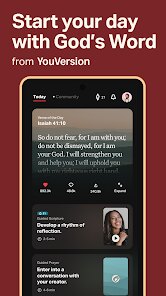
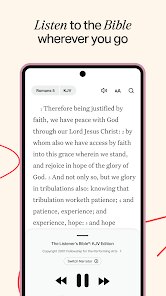
Navigating the app feels intuitive from the first download and install. Upon opening, you're greeted with a clean interface where you can swipe or tap between the main sections: Bible reading, verse search, daily verse, and a library of plans. The audio function is embedded directly within the text display, so switching from reading to listening is a single tap on a small speaker icon. I found the bookmarking and highlighting system particularly smooth; long-pressing a verse pulls up color-coded options and note-taking tools without leaving the page. The app also sends a notification each day with a featured verse, which feels gentle rather than intrusive.
When compared to other faith apps like Bible.is or the KJV Bible app, YouVersion stands out mostly due to its community-driven features. Bible.is focuses more on audio-first experiences, but YouVersion balances text and audio equally well. The KJV app, on the other hand, is strictly limited to one translation. YouVersion offers a much wider translation selection, including modern versions like NIV or ESV alongside older ones. What I noticed is that this variety comes with a trade-off: the interface can feel slightly less focused than a single-translation app, though the customization options make up for it.
Key Functional Highlights
- The audio narration is well-produced and synchronized with the verse scrolling, making it easy to follow along. Several voice actors are used across translations, which adds variety without being distracting. Compared to Bible.is, YouVersion's audio feels more integrated into the reading flow rather than being a separate mode.
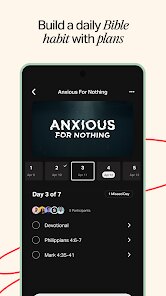
- Reading plans are structured by topic, book, or time-based goals (like 7-day or 365-day options). The daily readings are short enough to fit into a morning routine. I appreciated that you can join plans with friends and see their progress, which adds a mild social motivator without forcing interaction.
- The verse image creator is a surprisingly useful feature. You can pick a verse, choose a background, and generate a shareable image. While not unique to this app, the variety of templates is decent, and the output looks clean on social media. Some competitors limit this to paid tiers.
- The search function is fast and supports partial phrases and book names. It also offers suggested related verses, which helped me find passages I was only vaguely remembering. However, the search doesn't index notes or highlights yet, which would be a logical improvement.
Advantages & Benefits
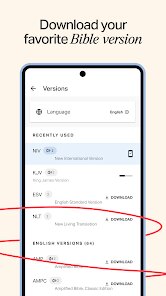
- Having dozens of translations in one app means I can compare phrasings without switching between separate downloads. This is helpful for personal study or when preparing a discussion.
- The daily verse notification serves as a gentle reminder to check in, and I found myself reading more consistently over time than when using a physical Bible.
- The offline download option is a practical addition. Once you download a translation, you can read or listen anywhere without a data connection, which is useful for travel or areas with weak reception.
Areas for Improvement
- The app can feel slightly cluttered with too many features. The main screen has several tabs and menus, and it took me a few days to locate everything without searching.
- Some premium features, like certain reading plans or advanced audio settings, require in-app purchases. While the core remains free, the upselling can be slightly noticeable after a while.
- Audio playback sometimes pauses unexpectedly after switching between sections, though it resumes after a few seconds. This happens only on longer listening sessions, not during short use.
- The social features (like sharing progress or prayer requests) are optional, but they may not appeal to users who prefer a quieter, more private experience. The app doesn't force them, but they are prominent enough to distract some.
Recommended Apps
![]()
ZEPETO: Avatar, Connect & Play
Naver Z Corporation4.3
![]()
Reverse Voice: Flip Singing
NindaFuit0![]()
AI Chat Ask Assistant - NowAI
Now Tech4.3![]()
Lie Detector Test: Prank App
DkTech inc.4.3![]()
Peachy - AI Face & Body Editor
InShot Video Editor4.8
![]()
AI Video Art Creator - Livensa
FERASET4.5![]()
Google Voice
Google LLC4.3![]()
Horoscopes & Tarot
Astrolis Horoscopes4.7![]()
eBay online shopping & selling
eBay Mobile4.6![]()
JPay
Jpay Mobile4.1![]()
Stranger Things 5 Challenges
MVH Entertainment Team5![]()
Chat Master: Prank Story
ABI Game Studio4.8![]()
Google Maps
Google LLC4.2![]()
AI Chat・Ask Chatbot Assistant
AI Chat Studio4.5![]()
Name Meanings with Impact
Alif Innovative Solution3.7















You May Like
-
![]()
True Tarot Card Reading
KaApps4.2 -
![]()
LinkedIn: Jobs & Business News
LinkedIn4.2 -
![]()
iControl: Easy Widgets Themes
Fancy keyboard for theme apps4.6 -
![]()
Duolingo: Language & Chess
Duolingo4.7 -
![]()
Flipped:Chat with AI Character
First Group pte ltd4.1 -
![]()
Hearing Age
Mobile Solutions Tech0 -
![]()
TikTok
TikTok Pte. Ltd.4.4 -
![]()
Pretty Makeup - Beauty Camera
Photo Editor Perfect Corp.4.4 -
![]()
PhotoRoom AI Photo Editor
PhotoRoom Background Editor App4.7 -
![]()
Lightleap by Lightricks
Lightricks Ltd.4.3 -
![]()
Name Meaning
Dexati4.1 -
![]()
Truth Social
T Media Tech LLC3.3 -
![]()
Ace Hardware
Ace Hardware Corporation4.7 -
![]()
Kpop Fans Demon Hunter Wallpap
JHNStudio4.3 -
![]()
Artplay - AI Photo & Video
Hideaway Technology Limited4.5









































