

Transit: Bus & Subway Times
Transit, Inc.
Installs
10,000,000+
Developer
Transit, Inc.
-
Category
Travel & Local
-
Content Rating
Rated for 3+
Developer Email
Privacy Policy
https://transit.app/privacy
Screenshots
Expert Review
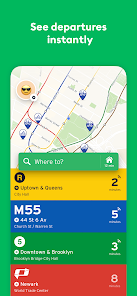
I've been using the Transit app for a few years now, and it's become my go-to for getting around the city. It's a public transit app that shows real-time bus, subway, and train times, along with schedules and service alerts. I remember it launched a while back, and it's been steadily improving ever since. You can download it for free from the Google Play Store or the App Store. It has millions of installs, which makes sense because it's super useful for anyone who relies on public transport. You don't need to register to use the basic features, which is great for privacy. The app itself is free, but there is a premium subscription called 'Transit Royale' that unlocks some extra perks. You'll also see some ads in the free version, but they're not too intrusive.
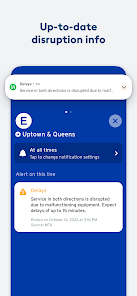
Using the app is straightforward. You open it, and it immediately shows you nearby transit options based on your location. I use it mostly to check when the next bus is coming so I don't have to wait outside in the cold. A good tip is to enable notifications for your favorite routes; that way, the app can alert you about delays or cancellations. You can also plan trips from point A to point B, and it will give you a few options, comparing travel times and how much walking is involved. It even integrates with bike-share and scooter services in some cities, which is handy for the last leg of a journey.
There are other apps out there, like Citymapper or even the official transit agency apps. I've tried a few, but I keep coming back to Transit. Citymapper is fantastic in the cities it covers, but Transit seems to work in more places, especially smaller cities. The official apps from the transit companies are often clunky and only show information for their specific service. Transit pulls everything together in one clean interface. For me, the main reason I chose this app is its reliability and the fact that it's community-powered. Users can report where a bus actually is, which helps everyone get more accurate times than the official schedule sometimes provides.
Key Functional Highlights
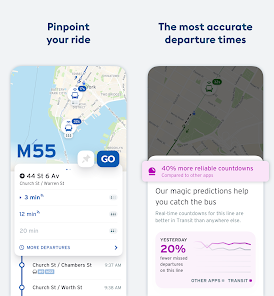
- 🚌 Go Feature for Real-Time Tracking: One of Transit's standout tools is 'GO.' You start a trip, and it gives you step-by-step navigation, but the best part is the real-time, moving icon on the map that shows your actual bus or train. It uses your phone's location (with permission) to follow along, so you know exactly where you are and when you'll arrive. It feels much more interactive than just watching a countdown timer.
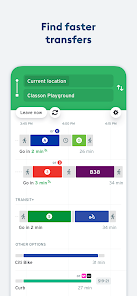
- 🗺️ Comprehensive Multi-Modal Trip Planning: Unlike some apps that only handle one transit agency, Transit excels at mixing modes. It doesn't just show bus and subway times; it will suggest a combination of walking, taking the subway, and then hopping on a bike-share to complete your journey in the fastest way possible. It compares all options side-by-side.
- 👥 Community-Powered Reports: This feature sets it apart from many official apps. Users can quickly report if a bus is crowded, if it's arriving now, or if there's an issue. This crowd-sourced data gives you a much clearer, real-world picture of what's happening on your route, which is often more accurate than the static schedule.
Advantages & Benefits
- ✅ Superior Real-Time Accuracy: Compared to something like Google Maps, Transit often has more precise, second-by-second arrival predictions for buses because it directly integrates with transit agency data and supplements it with user reports.
- ✅ Cleaner, More Focused Interface: Next to the often-busy official transit agency apps, Transit's design is intuitive and puts the information you need (next departures) front and center without clutter.
- ✅ Better Coverage in Some Areas: For regional travel that involves multiple transit systems, Transit does a better job of connecting the dots than apps that are limited to a single city or provider.
Areas for Improvement
- ⚠️ Battery Usage Can Be High: The 'GO' live-tracking feature is fantastic, but keeping your location active for a long trip can drain your battery faster than a more passive app like just checking a schedule.
- ⚠️ Ad-Supported Free Version: The presence of ads in the free version can be a minor annoyance. Some competing apps, or the official agency apps, are completely ad-free.
- ⚠️ Feature Parity Varies: Not all cities have access to every feature like bike-share integration or scooter options. Your experience can depend heavily on where you live, unlike more uniformly featured apps.
Recommended Apps
![]()
ZEPETO: Avatar, Connect & Play
Naver Z Corporation4.3
![]()
Reverse Voice: Flip Singing
NindaFuit0![]()
AI Chat Ask Assistant - NowAI
Now Tech4.3![]()
Lie Detector Test: Prank App
DkTech inc.4.3![]()
Peachy - AI Face & Body Editor
InShot Video Editor4.8
![]()
AI Video Art Creator - Livensa
FERASET4.5![]()
Google Voice
Google LLC4.3![]()
Horoscopes & Tarot
Astrolis Horoscopes4.7![]()
eBay online shopping & selling
eBay Mobile4.6![]()
JPay
Jpay Mobile4.1![]()
Stranger Things 5 Challenges
MVH Entertainment Team5![]()
Chat Master: Prank Story
ABI Game Studio4.8![]()
Google Maps
Google LLC4.2![]()
AI Chat・Ask Chatbot Assistant
AI Chat Studio4.5![]()
Name Meanings with Impact
Alif Innovative Solution3.7















You May Like
-
![]()
True Tarot Card Reading
KaApps4.2 -
![]()
LinkedIn: Jobs & Business News
LinkedIn4.2 -
![]()
iControl: Easy Widgets Themes
Fancy keyboard for theme apps4.6 -
![]()
Duolingo: Language & Chess
Duolingo4.7 -
![]()
Flipped:Chat with AI Character
First Group pte ltd4.1 -
![]()
Hearing Age
Mobile Solutions Tech0 -
![]()
TikTok
TikTok Pte. Ltd.4.4 -
![]()
Pretty Makeup - Beauty Camera
Photo Editor Perfect Corp.4.4 -
![]()
PhotoRoom AI Photo Editor
PhotoRoom Background Editor App4.7 -
![]()
Lightleap by Lightricks
Lightricks Ltd.4.3 -
![]()
Name Meaning
Dexati4.1 -
![]()
Truth Social
T Media Tech LLC3.3 -
![]()
Ace Hardware
Ace Hardware Corporation4.7 -
![]()
Kpop Fans Demon Hunter Wallpap
JHNStudio4.3 -
![]()
Artplay - AI Photo & Video
Hideaway Technology Limited4.5










































