

Opera Mini: Fast Web Browser
Opera
Installs
500,000,000+
Developer
Opera
-
Category
Social
-
Content Rating
Rated for 3+
Developer Email
Privacy Policy
http://www.opera.com/privacy
Screenshots
Expert Review
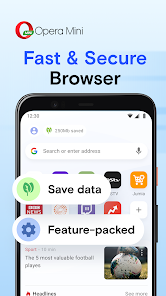
I've been using Opera Mini as my go-to browser for a while now, especially when I'm on the move. It's a mobile web browser, a stripped-down version of the main Opera app, designed specifically for speed and data savings. The app first launched way back, and it's been a solid choice for people with slower connections or limited data plans ever since. You can easily download Opera Mini from the Google Play Store or the Apple App Store. It's completely free to install, and you don't even need to create an account or register to start using it right away. The app does show some ads, but they're usually not too intrusive, and there are no mandatory in-app purchases to worry about. It has millions of downloads on Google Play, which shows how popular it is for basic, efficient browsing.
Using the app is straightforward. You just open it, type in a web address, and it loads pages in a special compressed format. A great tip is to use the data savings feature in the settings – you can choose between different levels of compression. The 'Extreme' mode saves the most data but might make some images look a bit blurry. I also like to use the night mode for reading in the dark. It's perfect for quickly checking news, looking up information, or reading articles without eating up your mobile data.
Compared to other browsers like Chrome or Firefox, Opera Mini is much lighter. Chrome is great if you need all the syncing and extensions, but it can be a battery and data hog. Firefox Focus is another privacy-focused, lightweight option, but I find Opera Mini to be faster at loading pages on my sometimes spotty network. I chose this app because when I just need to get online fast without any fuss, it delivers. It's not trying to be a desktop browser on your phone; it's focused on one job and does it really well. For anyone who needs a no-nonsense, speedy browser that saves data, this is the app to install.
Key Functional Highlights
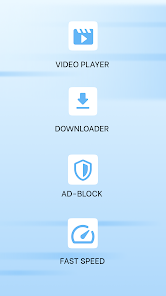
- 🚀 Blazing Fast Page Loads: The core of this app is its compression technology. By routing web traffic through Opera's servers, pages are compressed before they reach your phone. This means websites load incredibly fast, even on slower 3G or crowded Wi-Fi networks, compared to browsers that download everything directly.
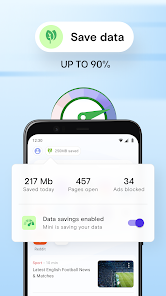
- 📉 Serious Data Savings: This is the standout feature. In the settings, you can see exactly how much data the app has saved you. Compared to using a standard browser like Samsung Internet, the difference can be huge, sometimes reducing data use by up to 90%. It's a game-changer for limited data plans.
- 🌙 Built-in Night Mode: Unlike many browsers where you need an extension, Opera Mini has a simple one-touch night mode. It inverts colors for easier reading in the dark, which is easier on the eyes than the bright white backgrounds of sites loaded in Chrome.
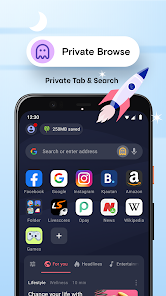
- 🔒 Private Browsing with a Twist: The private mode not only doesn't save history, but because your traffic goes through Opera's servers, it can also hide your browsing from your local network provider, adding an extra layer of privacy compared to basic incognito modes.
Advantages & Benefits
- ✅ Unbeatable on Slow Networks: Where Chrome might time out or struggle, Opera Mini almost always gets the page to load, making it more reliable in areas with poor signal.
- ✅ Extremely Lightweight: The app itself is small to download and install, and it uses very little RAM and battery compared to feature-heavy browsers like Microsoft Edge.
- ✅ Truly Free & No Sign-in Needed: You get the full data-saving experience immediately after install without any account. Other apps, like UC Browser, often push you to log in for more features.
Areas for Improvement
- ⚠️ Compression Can Affect Media: Heavy compression means videos and high-res images don't look as sharp as they do in Firefox or Chrome. It's a trade-off for speed and savings.
- ⚠️ Limited Modern Features: You won't find extensive extension support or advanced developer tools here. If you need those, this isn't the app for you.
- ⚠️ Ad Presence: While the core app is free, it displays ads. Some competitors, like Brave, block ads by default, offering a cleaner experience.
Recommended Apps
![]()
ZEPETO: Avatar, Connect & Play
Naver Z Corporation4.3
![]()
Reverse Voice: Flip Singing
NindaFuit0![]()
AI Chat Ask Assistant - NowAI
Now Tech4.3![]()
Lie Detector Test: Prank App
DkTech inc.4.3![]()
Peachy - AI Face & Body Editor
InShot Video Editor4.8
![]()
AI Video Art Creator - Livensa
FERASET4.5![]()
Google Voice
Google LLC4.3![]()
Horoscopes & Tarot
Astrolis Horoscopes4.7![]()
eBay online shopping & selling
eBay Mobile4.6![]()
JPay
Jpay Mobile4.1![]()
Stranger Things 5 Challenges
MVH Entertainment Team5![]()
Chat Master: Prank Story
ABI Game Studio4.8![]()
Google Maps
Google LLC4.2![]()
AI Chat・Ask Chatbot Assistant
AI Chat Studio4.5![]()
Name Meanings with Impact
Alif Innovative Solution3.7















You May Like
-
![]()
True Tarot Card Reading
KaApps4.2 -
![]()
LinkedIn: Jobs & Business News
LinkedIn4.2 -
![]()
iControl: Easy Widgets Themes
Fancy keyboard for theme apps4.6 -
![]()
Duolingo: Language & Chess
Duolingo4.7 -
![]()
Flipped:Chat with AI Character
First Group pte ltd4.1 -
![]()
Hearing Age
Mobile Solutions Tech0 -
![]()
TikTok
TikTok Pte. Ltd.4.4 -
![]()
Pretty Makeup - Beauty Camera
Photo Editor Perfect Corp.4.4 -
![]()
PhotoRoom AI Photo Editor
PhotoRoom Background Editor App4.7 -
![]()
Lightleap by Lightricks
Lightricks Ltd.4.3 -
![]()
Name Meaning
Dexati4.1 -
![]()
Truth Social
T Media Tech LLC3.3 -
![]()
Ace Hardware
Ace Hardware Corporation4.7 -
![]()
Kpop Fans Demon Hunter Wallpap
JHNStudio4.3 -
![]()
Artplay - AI Photo & Video
Hideaway Technology Limited4.5











































