

Yahoo Mail – Organized Email
Yahoo
Installs
100,000,000+
Developer
Yahoo
-
Category
Social
-
Content Rating
Rated for 3+
Developer Email
Privacy Policy
https://policies.yahoo.com/xw/en/yahoo/privacy/directory/international/index.htm
Screenshots
Expert Review
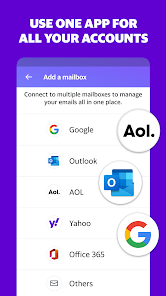
Yahoo Mail is my go-to email app for staying on top of my personal inbox. It's a free email client that lets you manage Yahoo Mail accounts, and you can also add other email services like Gmail or Outlook. The app has been around for years, and I remember downloading it from the Google Play store a long time ago. It's super popular, with over a billion downloads on Android alone. You don't need to pay to install it, and setting it up just requires your email login details. While the core app is free, you'll see some ads, and there are optional upgrades like extra storage if you need it.
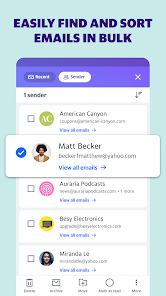
I use this app every day to sort through newsletters, receipts, and messages from friends. One tip I've found super helpful is using the swipe gestures. You can customize them to archive or delete emails quickly, which makes cleaning up my inbox a breeze. The search function is also powerful; I can often find old emails just by remembering a keyword or who sent it. For staying organized, I rely heavily on folders and the 'unread' filter to prioritize what needs my attention first.
Compared to other email apps like Gmail or Outlook, I keep coming back to Yahoo Mail for a few reasons. The interface feels less cluttered to me than Gmail's sometimes-busy tabs. While Outlook is great for work, Yahoo Mail's design is perfect for my personal use—it's straightforward and gets the job done without too many extra features I won't use. The fact that it handles my Yahoo account seamlessly is a big plus, as some other apps can be finicky with it. For a simple, reliable email experience, this app has been my consistent choice.
Key Functional Highlights
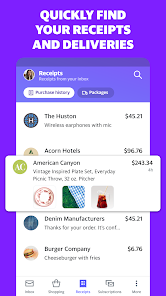
- 📁 Smart Organization: The app automatically sorts travel, finance, and package delivery emails into separate views. It's like having a personal assistant who files things before I even look.
- ⚡ Lightning-Fast Search: Finding an old email is incredibly quick. I just type a name or a word, and results pop up instantly, which isn't always the case in other clients I've tried.
- 🔒 Built-in Security: It has a handy Account Key feature for password-free sign-in and scans for suspicious activity. It gives me more peace of mind than some basic email apps.
- 📎 Generous Attachments: I can send huge files (up to 25MB) directly from my phone and even pull photos from Google Photos or Dropbox right within the app, which is super convenient.
Advantages & Benefits
- ✅ Clean, Ad-Free(ish) Inbox: While there are ads, they're less intrusive than in some webmail interfaces. The mobile app presentation is very clean compared to others.
- ✅ Seamless Yahoo Integration: For Yahoo users, this is the native experience. Features like disposable addresses work perfectly here but can be glitchy in apps like Edison Mail.
- ✅ Excellent Swipe Customization: The level of control over swipe actions is better than in Gmail's app, letting me tailor my workflow exactly how I like it.
Areas for Improvement
- ❌ Ad Presence: The free version shows ads. If you want an ad-free email experience, you'd need to look at a paid service or a different client like Spark.
- ❌ Occasional Sync Delays: Very rarely, I've noticed a slight delay in getting new emails compared to when I check on the web. Gmail's app usually feels a touch faster in push notifications.
- ❌ Battery Usage: With notifications on for multiple accounts, it can be a bit more of a battery drain than simpler, minimalist email apps.
Recommended Apps
![]()
ZEPETO: Avatar, Connect & Play
Naver Z Corporation4.3
![]()
Reverse Voice: Flip Singing
NindaFuit0![]()
AI Chat Ask Assistant - NowAI
Now Tech4.3![]()
Lie Detector Test: Prank App
DkTech inc.4.3![]()
Peachy - AI Face & Body Editor
InShot Video Editor4.8
![]()
AI Video Art Creator - Livensa
FERASET4.5![]()
Google Voice
Google LLC4.3![]()
Horoscopes & Tarot
Astrolis Horoscopes4.7![]()
eBay online shopping & selling
eBay Mobile4.6![]()
JPay
Jpay Mobile4.1![]()
Stranger Things 5 Challenges
MVH Entertainment Team5![]()
Chat Master: Prank Story
ABI Game Studio4.8![]()
Google Maps
Google LLC4.2![]()
AI Chat・Ask Chatbot Assistant
AI Chat Studio4.5![]()
Name Meanings with Impact
Alif Innovative Solution3.7















You May Like
-
![]()
True Tarot Card Reading
KaApps4.2 -
![]()
LinkedIn: Jobs & Business News
LinkedIn4.2 -
![]()
iControl: Easy Widgets Themes
Fancy keyboard for theme apps4.6 -
![]()
Duolingo: Language & Chess
Duolingo4.7 -
![]()
Flipped:Chat with AI Character
First Group pte ltd4.1 -
![]()
Hearing Age
Mobile Solutions Tech0 -
![]()
TikTok
TikTok Pte. Ltd.4.4 -
![]()
Pretty Makeup - Beauty Camera
Photo Editor Perfect Corp.4.4 -
![]()
PhotoRoom AI Photo Editor
PhotoRoom Background Editor App4.7 -
![]()
Lightleap by Lightricks
Lightricks Ltd.4.3 -
![]()
Name Meaning
Dexati4.1 -
![]()
Truth Social
T Media Tech LLC3.3 -
![]()
Ace Hardware
Ace Hardware Corporation4.7 -
![]()
Kpop Fans Demon Hunter Wallpap
JHNStudio4.3 -
![]()
Artplay - AI Photo & Video
Hideaway Technology Limited4.5











































