

GigaBody: AI Muscle filter
Bellential Inc.
Installs
100K+
Developer
Bellential Inc.
-
Category
Video Players & Editors
-
Content Rating
Everyone
Developer Email
+15145531615
Privacy Policy
https://www.gigabody.app/privacy
Screenshots
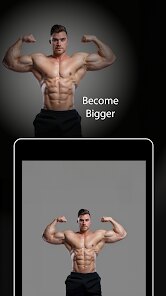
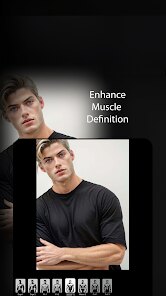
Expert Review
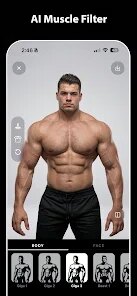
GigaBody, developed by Bellential Inc., is an AI-powered photo editing tool that transforms regular pictures by adding realistic muscle definition to the human body. The application is available for download through Google Play and the App Store, with a free installation that includes optional in-app purchases. Users can access the core muscle filter without upfront costs, though the free version does display occasional advertisements between edits.
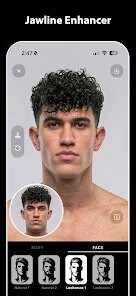
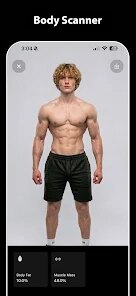
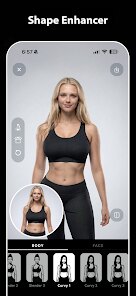
The interface presents a straightforward workflow: select a photo from your gallery or take a new one, then choose from several physique presets that range from lean athletic builds to heavier bodybuilder frames. A slider adjusts the intensity of the effect, and the processing happens locally on your device rather than requiring an upload to external servers. In practice, the tool handles most photos with decent lighting reasonably well, producing results that look surprisingly convincing on torso shots, though full-body images with complex backgrounds sometimes generate minor artifacts around the edges.
Other body-editing applications frequently rely on manual reshaping tools or require subscription payments before unlocking basic features. GigaBody takes a more direct approach with its one-tap AI processing, which makes it noticeably faster for casual use. The app does sacrifice some granular control that competitors offer, but for someone wanting quick, shareable results without tweaking dozens of parameters, this trade-off feels acceptable.
Key Functional Highlights
- The muscle definition algorithm stands out for its attention to anatomical detail, producing shadows and highlights that follow natural muscle contours rather than simply inflating the entire body uniformly. This makes the edited photos hold up better when viewed closely.
- Processing speeds impressively quick, usually completing within two or three seconds on a mid-range phone. The on-device processing also means no internet connection is required, which adds a layer of privacy that many comparable apps do not provide.
- Preset variety covers reasonable ground, from subtle toning effects to dramatic bulking transformations. Each preset adjusts not just muscle size but also skin texture and lighting in ways that feel cohesive, avoiding the plastic-looking finish common in simpler filters.
- A background detection feature works better than expected, distinguishing between the subject and the environment accurately in most cases. This allows users to apply effects to just the person rather than the entire image, a capability that some similar tools handle less gracefully.
Advantages & Benefits
- Quick results with minimal effort make it easy to create fun content for social media without learning complex editing software.
- The free tier provides enough functionality for regular use, so spending money only becomes necessary for removing ads or unlocking extra presets.
- No account registration is required, letting users jump straight into editing without creating yet another online profile.
Areas for Improvement
- The selection of free presets remains limited compared to what paid users access, which can feel restrictive after a few sessions.
- Certain photo angles, especially those taken from directly above or below, occasionally miscalculate the body proportions and produce unnatural looking results.
- Export resolution caps at moderate levels for free users, so large prints or close crops might appear slightly softer than expected.
Recommended Apps
![]()
ZEPETO: Avatar, Connect & Play
Naver Z Corporation4.3
![]()
Reverse Voice: Flip Singing
NindaFuit0![]()
AI Chat Ask Assistant - NowAI
Now Tech4.3![]()
Lie Detector Test: Prank App
DkTech inc.4.3![]()
Peachy - AI Face & Body Editor
InShot Video Editor4.8
![]()
AI Video Art Creator - Livensa
FERASET4.5![]()
Google Voice
Google LLC4.3![]()
Horoscopes & Tarot
Astrolis Horoscopes4.7![]()
eBay online shopping & selling
eBay Mobile4.6![]()
JPay
Jpay Mobile4.1![]()
Stranger Things 5 Challenges
MVH Entertainment Team5![]()
Chat Master: Prank Story
ABI Game Studio4.8![]()
Google Maps
Google LLC4.2![]()
AI Chat・Ask Chatbot Assistant
AI Chat Studio4.5![]()
Name Meanings with Impact
Alif Innovative Solution3.7















You May Like
-
![]()
True Tarot Card Reading
KaApps4.2 -
![]()
LinkedIn: Jobs & Business News
LinkedIn4.2 -
![]()
iControl: Easy Widgets Themes
Fancy keyboard for theme apps4.6 -
![]()
Duolingo: Language & Chess
Duolingo4.7 -
![]()
Flipped:Chat with AI Character
First Group pte ltd4.1 -
![]()
Hearing Age
Mobile Solutions Tech0 -
![]()
TikTok
TikTok Pte. Ltd.4.4 -
![]()
Pretty Makeup - Beauty Camera
Photo Editor Perfect Corp.4.4 -
![]()
PhotoRoom AI Photo Editor
PhotoRoom Background Editor App4.7 -
![]()
Lightleap by Lightricks
Lightricks Ltd.4.3 -
![]()
Name Meaning
Dexati4.1 -
![]()
Truth Social
T Media Tech LLC3.3 -
![]()
Ace Hardware
Ace Hardware Corporation4.7 -
![]()
Kpop Fans Demon Hunter Wallpap
JHNStudio4.3 -
![]()
Artplay - AI Photo & Video
Hideaway Technology Limited4.5










































