

Bugzz: Insect Prank Filters
Smart Utilities Hub
Installs
5M+
Developer
Smart Utilities Hub
-
Category
Entertainment
-
Content Rating
Everyone
Developer Email
Privacy Policy
https://smartutilities.mobi/policy.html
Screenshots




Expert Review
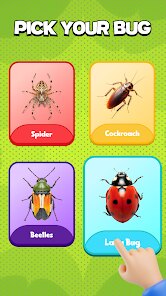
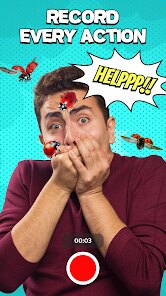
Bugzz: Insect Prank Filters is a casual entertainment app available on Google Play that lets users overlay realistic-looking bugs onto photos and videos. Developed by Smart Utilities Hub, this app focuses on creating amusing photobomb effects with various insects like spiders, cockroaches, and beetles. The app is free to download and install, though it does include advertisements and offers some in-app purchases for additional bug packs and removal of watermarks. Given its niche focus on prank content, the install base remains modest but steadily growing among users looking for a quick laugh.
The app operates through a straightforward interface where you select a photo from your gallery or capture a new one, then choose from a collection of insect stickers. Each bug comes with adjustable size and placement options, allowing you to position them in ways that look natural within the scene. I found the drag-and-drop mechanics intuitive enough, though the selection screen could benefit from larger preview thumbnails. The augmented reality feature for real-time placement works reasonably well on newer devices, but older phones may experience slight lag when rendering the insects over live camera feed.
Compared to other prank apps like Prank Camera or Fake Call Prank, Bugzz offers a narrower but more polished focus on insect-based mischief. Where alternatives try to cover multiple prank categories, this app commits entirely to making bugs look convincingly placed. The insect models have more detailed textures than what I have seen in generic photo editors, though the animations remain basic. For someone specifically wanting spider pranks, this app does the job better than general-purpose editing tools, but users seeking variety may find the single theme limiting after a few uses.
Key Functional Highlights
- The insect library offers around 30 species, which provides decent variety for a niche app. The cockroach and centipede models look particularly realistic, while some smaller bugs lack definition when zoomed out. A quick tap on any bug shows its name, a small educational touch that feels unnecessary here.
- Shake-to-place feature adds spontaneity: shaking the phone randomly positions a bug on screen. This works well for group pranks where you want unpredictable placement, though sometimes the bug lands awkwardly in corners. The feature feels gimmicky at first but becomes useful for quick edits.
- Export options support full resolution images, unlike some competing apps that compress outputs. However, the free version adds a watermark that covers about 15% of the image. Compared to Prankify which offers watermark-free basic use, Bugzz feels slightly more restrictive unless you pay.
- Sound effects play when bugs appear, mimicking scuttling noises. These are well-recorded and add to the prank effect, but cannot be disabled individually. If you are editing in a quiet environment, the sounds might draw unwanted attention before you are ready to share.
Advantages & Benefits
- Creating believable prank photos becomes easy within minutes of downloading the app. The realistic insect textures fool most people on first glance, making it effective for harmless jokes with friends and family.
- Quick sharing buttons for social media and messaging apps streamline the process. You can go from photo selection to sending a prank in under 30 seconds without leaving the app.
- The ad load remains reasonable compared to similar free apps, with banner ads only appearing between edits rather than during active use. This keeps frustration low while you work on your prank.
Areas for Improvement
- Insect selection lacks a search function, so you have to scroll through all options each time. With over 30 bugs, finding a specific one becomes tedious during repeated use.
- The free version limits you to placing only three bugs per image, which may not be enough for elaborate pranks. Upgrading removes this cap but costs more than some users might expect for a prank app.
- Bugs do not cast realistic shadows, breaking immersion in well-lit photos. Competitors like Fake Bug Camera handle lighting integration more convincingly for the same price point.
Recommended Apps
![]()
ZEPETO: Avatar, Connect & Play
Naver Z Corporation4.3
![]()
Reverse Voice: Flip Singing
NindaFuit0![]()
AI Chat Ask Assistant - NowAI
Now Tech4.3![]()
Lie Detector Test: Prank App
DkTech inc.4.3![]()
Peachy - AI Face & Body Editor
InShot Video Editor4.8
![]()
AI Video Art Creator - Livensa
FERASET4.5![]()
Google Voice
Google LLC4.3![]()
Horoscopes & Tarot
Astrolis Horoscopes4.7![]()
eBay online shopping & selling
eBay Mobile4.6![]()
JPay
Jpay Mobile4.1![]()
Stranger Things 5 Challenges
MVH Entertainment Team5![]()
Chat Master: Prank Story
ABI Game Studio4.8![]()
Google Maps
Google LLC4.2![]()
AI Chat・Ask Chatbot Assistant
AI Chat Studio4.5![]()
Name Meanings with Impact
Alif Innovative Solution3.7















You May Like
-
![]()
True Tarot Card Reading
KaApps4.2 -
![]()
LinkedIn: Jobs & Business News
LinkedIn4.2 -
![]()
iControl: Easy Widgets Themes
Fancy keyboard for theme apps4.6 -
![]()
Duolingo: Language & Chess
Duolingo4.7 -
![]()
Flipped:Chat with AI Character
First Group pte ltd4.1 -
![]()
Hearing Age
Mobile Solutions Tech0 -
![]()
TikTok
TikTok Pte. Ltd.4.4 -
![]()
Pretty Makeup - Beauty Camera
Photo Editor Perfect Corp.4.4 -
![]()
PhotoRoom AI Photo Editor
PhotoRoom Background Editor App4.7 -
![]()
Lightleap by Lightricks
Lightricks Ltd.4.3 -
![]()
Name Meaning
Dexati4.1 -
![]()
Truth Social
T Media Tech LLC3.3 -
![]()
Ace Hardware
Ace Hardware Corporation4.7 -
![]()
Kpop Fans Demon Hunter Wallpap
JHNStudio4.3 -
![]()
Artplay - AI Photo & Video
Hideaway Technology Limited4.5









































