

Perfect365 Video Makeup Editor
Perfect365, Inc.
Installs
1M+
Developer
Perfect365, Inc.
-
Category
Video Players & Editors
-
Content Rating
Everyone
Developer Email
Privacy Policy
https://www.perfect365.com/about/privacy-policy/
Screenshots
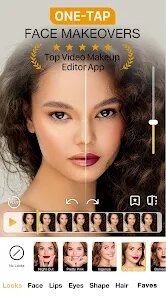
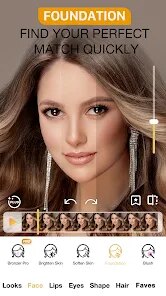
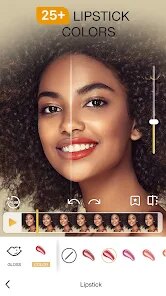
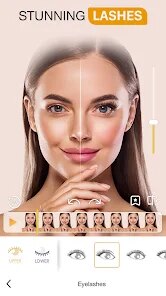
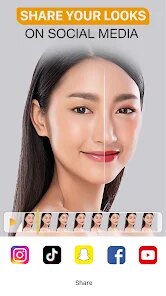
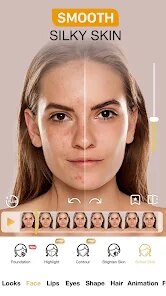
Expert Review
For anyone interested in digital beauty tools, the Perfect365 Video Makeup Editor offers a fairly comprehensive set of features for enhancing selfies and video calls. Available on Google Play, the app focuses on applying realistic virtual makeup and facial retouching to photos and live video. It is free to download and install, though it includes both ads and optional in-app purchases for unlocking premium looks and advanced tools. The app has been installed over ten million times, which gives some indication of its popularity among users looking for quick digital touch-ups.
Getting started with Perfect365 is straightforward: after installing the app, users can either upload a photo from their gallery or activate the camera for real-time video editing. The interface presents a range of adjustment sliders for skin smoothing, blemish removal, and eye enhancement, alongside virtual makeup options like lipstick, eyeshadow, and blush. During use, the facial recognition technology maps the face quite accurately, allowing the makeup to follow movements naturally during video recording. I found that the automatic detection works well under normal lighting conditions, though occasional manual adjustments are needed for more precise placement.
In comparison to other apps in this space, Perfect365 occupies a middle ground between simple filter apps and professional photo editing suites. Unlike basic beauty cameras that apply a one-size-fits-all filter, this app gives more granular control over individual features. At the same time, it lacks the advanced layering and blending capabilities found in desktop software like Photoshop. From my perspective, this balance makes it suitable for users who want more than quick filters but don't need professional-grade tools. The video editing capability is a notable differentiator, as many similar apps focus only on still images.
Key Functional Highlights
- The facial tracking for video makeup is impressively responsive, with virtual lipstick and eyeshadow staying in place fairly well even when turning the head. During calls, the makeup effect feels less artificial than what I have seen in some competing apps.
- A wide selection of presets saves time for daily use, but the manual customisation options are where the app truly shines. Users can adjust opacity, colour intensity, and placement for each element independently.
- Compared to YouCam Perfect, Perfect365 offers better real-time video performance, though YouCam provides more creative editing features for static photos. The video focus makes Perfect365 more practical for live streaming or video calls.
- Skin smoothing works at multiple intensity levels, from subtle refinement to more dramatic airbrushing. The result looks natural at moderate settings, unlike some apps that produce an overly plastic appearance.
Advantages & Benefits
- Using the app before video calls gives a polished appearance without needing actual makeup or complicated editing steps.
- Creating and saving custom looks reduces repetitive adjustments for users who maintain a consistent style across photos.
- The blemish removal tool handles minor skin imperfections quickly, saving time compared to manual editing in other software.
- Live preview helps users see final results before recording, which reduces wasted takes during content creation.
Areas for Improvement
- Some premium makeup styles require purchase, and the costs can add up if users want access to several collections.
- Occasionally the app struggles with facial hair or unusual angles, requiring repositioning or manual correction.
- Advertisements appear between features, which disrupts the workflow during longer editing sessions.
- Battery consumption is noticeable during extended video recording, as the real-time processing demands significant resources.
Recommended Apps
![]()
ZEPETO: Avatar, Connect & Play
Naver Z Corporation4.3
![]()
Reverse Voice: Flip Singing
NindaFuit0![]()
AI Chat Ask Assistant - NowAI
Now Tech4.3![]()
Lie Detector Test: Prank App
DkTech inc.4.3![]()
Peachy - AI Face & Body Editor
InShot Video Editor4.8
![]()
AI Video Art Creator - Livensa
FERASET4.5![]()
Google Voice
Google LLC4.3![]()
Horoscopes & Tarot
Astrolis Horoscopes4.7![]()
eBay online shopping & selling
eBay Mobile4.6![]()
JPay
Jpay Mobile4.1![]()
Stranger Things 5 Challenges
MVH Entertainment Team5![]()
Chat Master: Prank Story
ABI Game Studio4.8![]()
Google Maps
Google LLC4.2![]()
AI Chat・Ask Chatbot Assistant
AI Chat Studio4.5![]()
Name Meanings with Impact
Alif Innovative Solution3.7















You May Like
-
![]()
True Tarot Card Reading
KaApps4.2 -
![]()
LinkedIn: Jobs & Business News
LinkedIn4.2 -
![]()
iControl: Easy Widgets Themes
Fancy keyboard for theme apps4.6 -
![]()
Duolingo: Language & Chess
Duolingo4.7 -
![]()
Flipped:Chat with AI Character
First Group pte ltd4.1 -
![]()
Hearing Age
Mobile Solutions Tech0 -
![]()
TikTok
TikTok Pte. Ltd.4.4 -
![]()
Pretty Makeup - Beauty Camera
Photo Editor Perfect Corp.4.4 -
![]()
PhotoRoom AI Photo Editor
PhotoRoom Background Editor App4.7 -
![]()
Lightleap by Lightricks
Lightricks Ltd.4.3 -
![]()
Name Meaning
Dexati4.1 -
![]()
Truth Social
T Media Tech LLC3.3 -
![]()
Ace Hardware
Ace Hardware Corporation4.7 -
![]()
Kpop Fans Demon Hunter Wallpap
JHNStudio4.3 -
![]()
Artplay - AI Photo & Video
Hideaway Technology Limited4.5










































