

Scan My Teeth
Tabica Group
Installs
10K+
Developer
Tabica Group
-
Category
Health & Fitness
-
Content Rating
Everyone
Developer Email
Privacy Policy
http://scanmyteeth.com/privacy-policy
Screenshots
Expert Review
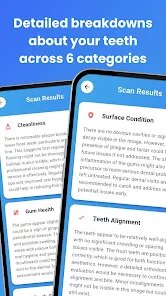
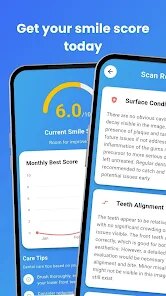
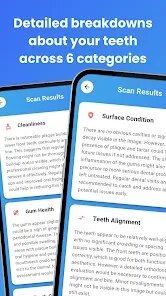
Scan My Teeth from Tabica Group offers a way to check your dental health from your phone. Available for free on Google Play, this health-focused application uses your camera to analyze the visible condition of your teeth. It identifies potential issues like plaque buildup, discoloration, or alignment irregularities without requiring a visit to the dentist. The download and install process is quick, and while the app is free, it does contain ads and offers optional in-app purchases for more detailed reports.
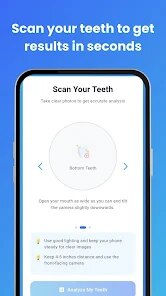
Using Scan My Teeth is relatively straightforward. After a quick initial setup, you take a photo of your smile following the on-screen guide. The app processes the image and provides an analysis of your dental surface, highlighting areas of concern with color-coded markers. I found the scanning process itself takes about thirty seconds, which is convenient. The interface uses simple icons and clear labels, so figuring out where to find your scan history or tooth care tips doesn't require much effort.
Unlike dental apps that focus on appointment reminder functions or brushing tutorials, Scan My Teeth centers on visual self-diagnosis. For instance, Brush DJ encourages better cleaning habits with music timing, but it doesn't offer image-based feedback. This app provides a snapshot of your current dental state, which feels more immediate. The analysis lacks the depth of professional equipment, yet it serves as a useful visibility tool between dental visits. I prefer having this kind of visual reference over a simple checklist app because you can see actual changes over time.
Key Functional Highlights
- The scanning process responds well to good lighting and stable hand positioning. After a few tries, I noticed the feedback about plaque coverage became more accurate, though the app suggests taking photos in natural light for best results. This is more engaging than apps that simply ask you to input symptoms manually.
- Each scan generates a tooth chart overlay that marks areas of concern. The color coding uses green, yellow, and red indicators, making it easy to understand at a glance. Compared to a basic symptom logger, this visual approach helps track which areas improve over weeks.
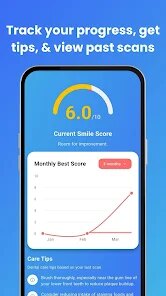
- Progress tracking stores your past scans in a timeline view. Swiping through previous analyses reveals subtle shifts in tooth color or stain size. This feature stands out because most dental apps forget to show you what changed since your last check-in.
- The app offers personalized care suggestions based on your scan results. While not as thorough as a dentist's advice, the tips about brushing angles or flossing frequency feel more relevant than standard generic recommendations.
Advantages & Benefits
- Quick detection of visible dental issues like tartar or staining before they worsen, helping you schedule professional care earlier.
- Provides a visual record to show your dentist during appointments, which supports more informed discussions about treatment options.
- Encourages more consistent oral hygiene habits by linking daily brushing routines with actual scan improvements over time.
- No cost barrier means anyone with a smartphone can start monitoring their dental health right after install.
Areas for Improvement
- The analysis sometimes mistakes food residue or shadows for plaque, requiring multiple scans for consistent results.
- Ad interruptions appear between scans and during report viewing, which breaks concentration during detailed examination.
- Limited to front tooth surfaces only; cannot assess molars or gum pockets, reducing its usefulness for comprehensive checks.
- In-app purchases for premium reports feel unnecessary when the free version already covers basic monitoring needs adequately.
Recommended Apps
![]()
ZEPETO: Avatar, Connect & Play
Naver Z Corporation4.3
![]()
Reverse Voice: Flip Singing
NindaFuit0![]()
AI Chat Ask Assistant - NowAI
Now Tech4.3![]()
Lie Detector Test: Prank App
DkTech inc.4.3![]()
Peachy - AI Face & Body Editor
InShot Video Editor4.8
![]()
AI Video Art Creator - Livensa
FERASET4.5![]()
Google Voice
Google LLC4.3![]()
Horoscopes & Tarot
Astrolis Horoscopes4.7![]()
eBay online shopping & selling
eBay Mobile4.6![]()
JPay
Jpay Mobile4.1![]()
Stranger Things 5 Challenges
MVH Entertainment Team5![]()
Chat Master: Prank Story
ABI Game Studio4.8![]()
Google Maps
Google LLC4.2![]()
AI Chat・Ask Chatbot Assistant
AI Chat Studio4.5![]()
Name Meanings with Impact
Alif Innovative Solution3.7















You May Like
-
![]()
True Tarot Card Reading
KaApps4.2 -
![]()
LinkedIn: Jobs & Business News
LinkedIn4.2 -
![]()
iControl: Easy Widgets Themes
Fancy keyboard for theme apps4.6 -
![]()
Duolingo: Language & Chess
Duolingo4.7 -
![]()
Flipped:Chat with AI Character
First Group pte ltd4.1 -
![]()
Hearing Age
Mobile Solutions Tech0 -
![]()
TikTok
TikTok Pte. Ltd.4.4 -
![]()
Pretty Makeup - Beauty Camera
Photo Editor Perfect Corp.4.4 -
![]()
PhotoRoom AI Photo Editor
PhotoRoom Background Editor App4.7 -
![]()
Lightleap by Lightricks
Lightricks Ltd.4.3 -
![]()
Name Meaning
Dexati4.1 -
![]()
Truth Social
T Media Tech LLC3.3 -
![]()
Ace Hardware
Ace Hardware Corporation4.7 -
![]()
Kpop Fans Demon Hunter Wallpap
JHNStudio4.3 -
![]()
Artplay - AI Photo & Video
Hideaway Technology Limited4.5










































