

Reverse Voice - Voice Changer
Hammad67
Installs
100K+
Developer
Hammad67
-
Category
Entertainment
-
Content Rating
Everyone
Developer Email
Privacy Policy
https://voicechangerappprivacypolicy.blogspot.com/2025/11/privacy-policy-of-prank-voice-voice.html
Screenshots
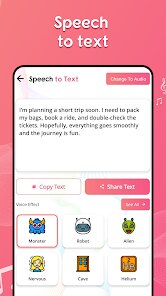
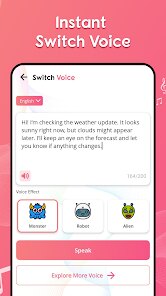
Expert Review
Voice changer apps have become increasingly popular for content creators and casual users alike, and Reverse Voice - Voice Changer by Hammad67 offers a straightforward option for those wanting to modify their vocal output. Available for free download on Google Play, this application allows users to record their voice or apply effects to existing audio files without requiring an account registration. The install base remains modest compared to industry giants, yet the app maintains a functional approach with basic editing tools. It does contain occasional advertisements, though they don't interrupt the recording process, and there are no mandatory in-app purchases to access the core voice modulation features.
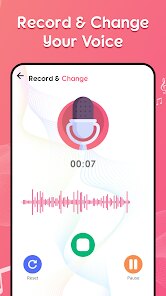
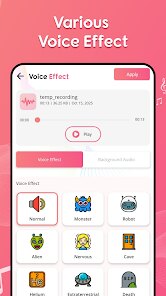
Getting started with the app requires minimal effort. After you install it, the interface presents a clean recording screen with a large button at the center. Tapping it begins capturing audio, and once you stop, a list of available effects appears on the right side. The library includes around fifteen different voice presets ranging from robotic filters to chipmunk-style pitch shifts. Applying an effect happens instantly, which makes experimentation quick. I found that the real-time preview worked reasonably well during testing, letting me hear how my voice would sound before saving the final file. Exporting recordings to the device's storage or sharing them directly to messaging platforms takes just a couple of taps.
When placed alongside apps like Voice Changer Plus or Voicemod, this one stands out for its simplicity rather than depth. Those other applications often overwhelm users with advanced audio parameters like formant shifting and reverb controls. Hammad67's version keeps everything to a single screen with clearly labeled buttons, which feels less intimidating for someone who just wants to record a funny message for friends. On the other hand, power users might miss the ability to adjust effect intensity or layer multiple filters. The app focuses on doing one thing well without unnecessary complexity, which serves a specific audience but limits its versatility compared to more feature-rich competitors available on the same platform.
Key Functional Highlights
- The real-time voice preview distinguishes this app from cheaper alternatives. While recording, you can hear the effect applied immediately through headphones, which eliminates the guesswork of applying filters after the fact. This makes it easier to adjust delivery style on the fly without multiple takes.
- Effect variety covers common categories well, including pitch shifts, distortion, and echo-based presets. The alien and helium options produce reliably funny results, while the deep voice setting sounds natural enough for quick audio projects. Some effects do feel redundant, like having two similar robot presets.
- Compared to similar apps on Google Play, the file export quality remains respectable. Recordings save in standard MP3 format at 128 kbps, which balances file size and clarity. Sharing options include direct messaging app integration, though the list feels limited compared to more polished alternatives.
- The interface layout works fine on phones with smaller screens. All buttons sit within thumb reach, and the recording level meter provides useful visual feedback. However, the design lacks dark mode support, which makes extended use at night less comfortable on the eyes.
Advantages & Benefits
- Quick recording and effect application saves time when creating short audio clips for social media or messaging.
- No account creation requirement means you can download, install, and start using it immediately without sharing personal information.
- Straightforward sharing options let me send modified recordings directly to contacts without extra file management steps.
- The light app size takes up minimal storage space, making it practical for devices with limited free memory.
Areas for Improvement
- Occasional ads appear between recording sessions, which can interrupt workflow when making multiple takes in a row.
- The lack of effect intensity sliders limits creative control, as all presets apply at a fixed strength that may not suit every recording situation.
- Background noise reduction is absent, so recordings capture ambient sounds clearly unless using a quality external microphone.
- Some effects cause noticeable latency during real-time preview when processing longer recordings, requiring a brief delay before playback.
Recommended Apps
![]()
ZEPETO: Avatar, Connect & Play
Naver Z Corporation4.3
![]()
Reverse Voice: Flip Singing
NindaFuit0![]()
AI Chat Ask Assistant - NowAI
Now Tech4.3![]()
Lie Detector Test: Prank App
DkTech inc.4.3![]()
Peachy - AI Face & Body Editor
InShot Video Editor4.8
![]()
AI Video Art Creator - Livensa
FERASET4.5![]()
Google Voice
Google LLC4.3![]()
Horoscopes & Tarot
Astrolis Horoscopes4.7![]()
eBay online shopping & selling
eBay Mobile4.6![]()
JPay
Jpay Mobile4.1![]()
Stranger Things 5 Challenges
MVH Entertainment Team5![]()
Chat Master: Prank Story
ABI Game Studio4.8![]()
Google Maps
Google LLC4.2![]()
AI Chat・Ask Chatbot Assistant
AI Chat Studio4.5![]()
Name Meanings with Impact
Alif Innovative Solution3.7















You May Like
-
![]()
True Tarot Card Reading
KaApps4.2 -
![]()
LinkedIn: Jobs & Business News
LinkedIn4.2 -
![]()
iControl: Easy Widgets Themes
Fancy keyboard for theme apps4.6 -
![]()
Duolingo: Language & Chess
Duolingo4.7 -
![]()
Flipped:Chat with AI Character
First Group pte ltd4.1 -
![]()
Hearing Age
Mobile Solutions Tech0 -
![]()
TikTok
TikTok Pte. Ltd.4.4 -
![]()
Pretty Makeup - Beauty Camera
Photo Editor Perfect Corp.4.4 -
![]()
PhotoRoom AI Photo Editor
PhotoRoom Background Editor App4.7 -
![]()
Lightleap by Lightricks
Lightricks Ltd.4.3 -
![]()
Name Meaning
Dexati4.1 -
![]()
Truth Social
T Media Tech LLC3.3 -
![]()
Ace Hardware
Ace Hardware Corporation4.7 -
![]()
Kpop Fans Demon Hunter Wallpap
JHNStudio4.3 -
![]()
Artplay - AI Photo & Video
Hideaway Technology Limited4.5










































