
Notes - Notepad, Secure Notes
PANCHHI SOLUTION
Installs
100K+
Developer
PANCHHI SOLUTION
-
Category
Productivity
-
Content Rating
Everyone
Developer Email
Privacy Policy
https://sites.google.com/view/panchhisolution-notes
Screenshots
Expert Review
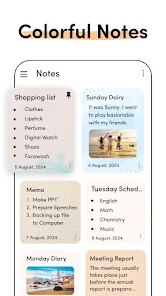
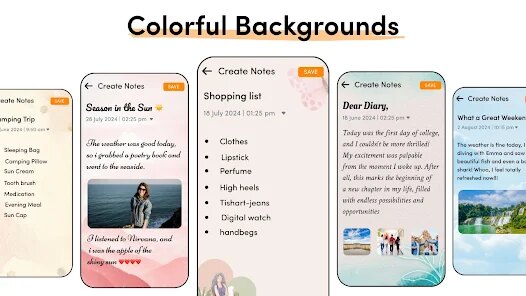
I've been using Notes - Notepad, Secure Notes for a while now, and it's become my go-to app for jotting down everything from quick reminders to longer journal entries. This app, as the name suggests, is a straightforward note-taking application in the productivity genre. It's available for free download on the Google Play Store. I first installed it a couple of years ago, and it has a solid number of installs, which gave me confidence in its reliability. You don't need to register an account to start using it, which I really appreciate for privacy and simplicity. The core app is free, though there are some in-app purchases for advanced features and occasional ads, but they're not too intrusive.
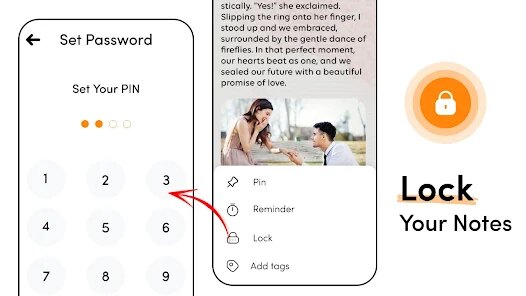
Using the app is super intuitive. I mainly open it and just start typing. A great tip I found is using hashtags within your notes; the app automatically organizes them, making it easy to find related thoughts later. For secure notes, you can set a PIN or use your fingerprint, which is perfect for locking away sensitive information like passwords or personal thoughts. I also use the widget feature a lot—it lets me create a new note right from my home screen without even opening the app, which is a huge time-saver for capturing ideas on the fly.
When I was looking for a note-taking app, I tried a few others like Google Keep and Simplenote. While those are good, I chose this one because it feels more focused and private. It doesn't try to sync everything to a cloud account by default, which I prefer for certain types of notes. The interface is cleaner and less cluttered than some of the bigger-name apps. For someone who just wants a reliable, secure place to write things down without any fuss, this app from the Google Play store is a fantastic choice. It does exactly what it says on the tin.
Key Functional Highlights
- 🔒 Lock & Hide Notes: The standout feature for me is the robust security. You can lock individual notes with a PIN, pattern, or fingerprint. It even has a 'Break-in Report' that takes a photo if someone tries to access your secure notes with the wrong PIN too many times, which is something I haven't seen in many other note apps.
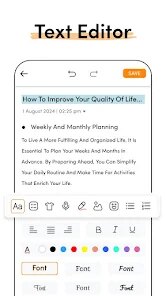
- 📝 Rich Text & Voice Notes: Unlike many basic notepads, this app lets you format text (bold, italics, lists) and even record voice notes directly inside a text note. This makes it much more versatile for different kinds of information capture compared to apps that are text-only.
- 🗂️ Smart Organization: It goes beyond simple folders. You can use #tags for automatic categorization, pin important notes to the top, and there's a powerful search function that looks through all your notes instantly. This organization system is more intuitive for me than the label system in something like Google Keep.
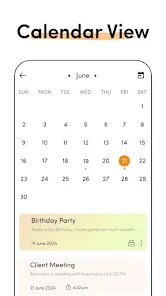
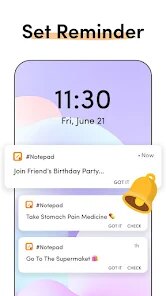
- 📅 Notes with Reminders: You can attach a date and time reminder to any note, turning a simple thought into a scheduled task. This bridges the gap between a pure notepad and a basic to-do app, which is really handy.
Advantages & Benefits
- 👍 No Forced Account: Unlike Evernote or Simplenote, you can download and use this app completely offline without being pushed to create an account. Your data stays on your device.
- 👍 Faster & Lighter: Compared to feature-heavy apps like OneNote, this app opens instantly and uses minimal storage. It's perfect for quick, lightweight note-taking.
- 👍 Superior Widgets: The home screen widgets are more customizable and functional than those in Google Keep, offering quick actions for new notes, voice notes, and checklists right from the home screen.
Areas for Improvement
- 👎 Sync is a Premium Feature: While apps like Google Keep offer free, seamless cloud sync, syncing notes across devices in this app requires a premium upgrade. For free users, notes are device-bound.
- 👎 Limited Free Theme Options: The visual customization in the free version is quite basic. Apps like ColorNote offer more theme and font choices without payment.
- 👎 Ads in Free Version: The free version displays banner ads. While not overly disruptive, note-taking apps like Standard Notes offer a completely ad-free experience in their base version.
Recommended Apps
![]()
ZEPETO: Avatar, Connect & Play
Naver Z Corporation4.3
![]()
Reverse Voice: Flip Singing
NindaFuit0![]()
AI Chat Ask Assistant - NowAI
Now Tech4.3![]()
Lie Detector Test: Prank App
DkTech inc.4.3![]()
Peachy - AI Face & Body Editor
InShot Video Editor4.8
![]()
AI Video Art Creator - Livensa
FERASET4.5![]()
Google Voice
Google LLC4.3![]()
Horoscopes & Tarot
Astrolis Horoscopes4.7![]()
eBay online shopping & selling
eBay Mobile4.6![]()
JPay
Jpay Mobile4.1![]()
Stranger Things 5 Challenges
MVH Entertainment Team5![]()
Chat Master: Prank Story
ABI Game Studio4.8![]()
Google Maps
Google LLC4.2![]()
AI Chat・Ask Chatbot Assistant
AI Chat Studio4.5![]()
Name Meanings with Impact
Alif Innovative Solution3.7















You May Like
-
![]()
True Tarot Card Reading
KaApps4.2 -
![]()
LinkedIn: Jobs & Business News
LinkedIn4.2 -
![]()
iControl: Easy Widgets Themes
Fancy keyboard for theme apps4.6 -
![]()
Duolingo: Language & Chess
Duolingo4.7 -
![]()
Flipped:Chat with AI Character
First Group pte ltd4.1 -
![]()
Hearing Age
Mobile Solutions Tech0 -
![]()
TikTok
TikTok Pte. Ltd.4.4 -
![]()
Pretty Makeup - Beauty Camera
Photo Editor Perfect Corp.4.4 -
![]()
PhotoRoom AI Photo Editor
PhotoRoom Background Editor App4.7 -
![]()
Lightleap by Lightricks
Lightricks Ltd.4.3 -
![]()
Name Meaning
Dexati4.1 -
![]()
Truth Social
T Media Tech LLC3.3 -
![]()
Ace Hardware
Ace Hardware Corporation4.7 -
![]()
Kpop Fans Demon Hunter Wallpap
JHNStudio4.3 -
![]()
Artplay - AI Photo & Video
Hideaway Technology Limited4.5










































