

Home AI - AI Interior Design
HubX
Installs
10M+
Developer
HubX
-
Category
Lifestyle
-
Content Rating
Everyone
Developer Email
Privacy Policy
https://homeinterior.ai/privacy
Screenshots



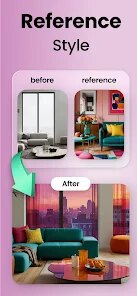
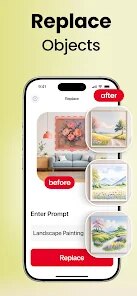
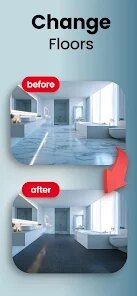
Expert Review
Home AI - AI Interior Design is a pretty cool app I've been using to get ideas for my apartment. It's basically a design helper that uses artificial intelligence. You can take a picture of any room, and the app will generate new design concepts for it. It first launched a while back, and you can easily find it and download it from the Google Play Store. It's also available on the App Store for iPhone users. The app has a lot of downloads, which shows many people are trying it out. It's free to install, which is great for just testing things out. You don't need to register right away to play with the core features, which I really appreciate. Of course, there are some in-app purchases if you want to unlock more advanced styles or remove watermarks from your designs. I've also noticed some ads, but they aren't too intrusive.
Using the app is straightforward. I just open it, point my camera at my living room, and snap a picture. The AI then asks what style I'm going for—maybe modern, rustic, or minimalist. After a few seconds, it shows me several redesigned versions of my room. A good tip is to make sure your room is well-lit when you take the photo; it helps the AI work better. I also like to try the same room with different style prompts to see all the possibilities. It's become my go-to tool before I buy any new furniture or decide on a paint color.
There are other interior design apps out there, like Planner 5D or Houzz. I've tried a few, but I keep coming back to Home AI. The main reason is the sheer speed and 'wow' factor. While Planner 5D is more for detailed, manual planning, and Houzz is great for shopping, Home AI gives me instant visual inspiration. For someone like me who isn't a professional designer and just wants quick, creative ideas, this app is perfect. It feels less like a complicated tool and more like a fun, creative partner. That's why I chose to stick with this app over the others.
Key Functional Highlights
- 🎨 Instant AI Redesigns: The core magic is taking any photo and getting multiple new design concepts in seconds. Unlike manual apps where you drag and drop items, this app does the heavy lifting with AI imagination.
- 🏠 Real Room Context: It works with your actual space. You're not designing a blank template; you're redesigning your specific room with its existing layout, which makes the results much more practical and relatable.
- 🛒 Style-Based Exploration: You guide the AI with style keywords (e.g., 'Scandinavian', 'Industrial Chic'). This is different from apps that start with a product catalog; here, the aesthetic vision comes first, which is more inspiring for the initial idea phase.
- 📱 Zero Learning Curve: Compared to feature-rich similar apps like Planner 5D, which has a steeper learning curve, this app is about instant gratification. You download it, install it, and are generating ideas within minutes.
Advantages & Benefits
- 🚀 Unmatched Speed for Inspiration: It generates complete room makeover concepts faster than any similar app I've used. Where others require time to build a scene, this app delivers visual ideas immediately.
- 🎯 Focus on Aesthetic Ideas, Not Just Products: Unlike Houzz, which is primarily a marketplace, this app is purely about the design vision first, which helps me figure out what I like before I start shopping.
- 🧠 AI Does the Creative Heavy Lifting: For non-designers, this is huge. The app provides professional-looking concepts I wouldn't have thought of myself, whereas other apps expect me to have all the ideas.
Areas for Improvement
- ⚠️ Limited Control Over Details: The AI gives you a concept, but you can't tweak individual elements like you can in a full design suite such as Planner 5D. You get what the AI generates.
- 🖼️ Watermarks on Free Outputs: The best-looking renders often have a watermark unless you make an in-app purchase. Some competing apps offer more usable free outputs.
- 📐 Accuracy Can Vary: Since it's interpreting a photo, sometimes the scale or placement of virtual furniture can look a bit off compared to apps where you build a model from precise measurements.
Recommended Apps
![]()
ZEPETO: Avatar, Connect & Play
Naver Z Corporation4.3
![]()
Reverse Voice: Flip Singing
NindaFuit0![]()
AI Chat Ask Assistant - NowAI
Now Tech4.3![]()
Lie Detector Test: Prank App
DkTech inc.4.3![]()
Peachy - AI Face & Body Editor
InShot Video Editor4.8
![]()
AI Video Art Creator - Livensa
FERASET4.5![]()
Google Voice
Google LLC4.3![]()
Horoscopes & Tarot
Astrolis Horoscopes4.7![]()
eBay online shopping & selling
eBay Mobile4.6![]()
JPay
Jpay Mobile4.1![]()
Stranger Things 5 Challenges
MVH Entertainment Team5![]()
Chat Master: Prank Story
ABI Game Studio4.8![]()
Google Maps
Google LLC4.2![]()
AI Chat・Ask Chatbot Assistant
AI Chat Studio4.5![]()
Name Meanings with Impact
Alif Innovative Solution3.7















You May Like
-
![]()
True Tarot Card Reading
KaApps4.2 -
![]()
LinkedIn: Jobs & Business News
LinkedIn4.2 -
![]()
iControl: Easy Widgets Themes
Fancy keyboard for theme apps4.6 -
![]()
Duolingo: Language & Chess
Duolingo4.7 -
![]()
Flipped:Chat with AI Character
First Group pte ltd4.1 -
![]()
Hearing Age
Mobile Solutions Tech0 -
![]()
TikTok
TikTok Pte. Ltd.4.4 -
![]()
Pretty Makeup - Beauty Camera
Photo Editor Perfect Corp.4.4 -
![]()
PhotoRoom AI Photo Editor
PhotoRoom Background Editor App4.7 -
![]()
Lightleap by Lightricks
Lightricks Ltd.4.3 -
![]()
Name Meaning
Dexati4.1 -
![]()
Truth Social
T Media Tech LLC3.3 -
![]()
Ace Hardware
Ace Hardware Corporation4.7 -
![]()
Kpop Fans Demon Hunter Wallpap
JHNStudio4.3 -
![]()
Artplay - AI Photo & Video
Hideaway Technology Limited4.5












































