

Suno - AI Music & Songs Maker
Suno, Inc
Installs
10M+
Developer
Suno, Inc
-
Category
Generative AI
-
Content Rating
Teen
Developer Email
Privacy Policy
https://suno.com/privacy
Screenshots



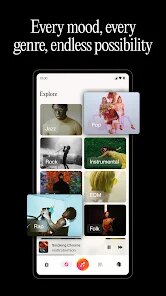
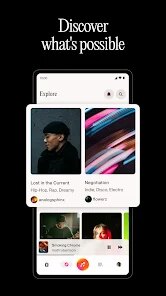
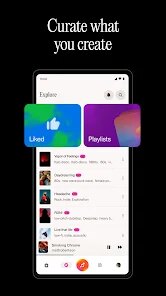
Expert Review
The music creation landscape has seen a notable shift with apps that put generative tools directly into people's hands. Suno - AI Music & Songs Maker, developed by Suno, Inc., operates squarely in this emerging space. It is primarily an AI-driven platform that lets users generate original songs and instrumental tracks from simple text prompts. Available for download on the Google Play store, the app has accumulated a substantial install base, reflecting a growing curiosity about AI-generated audio. The core service is free to use, though like many modern applications, it incorporates optional in-app purchases for those seeking additional features or faster generation times. Some advertisements appear during usage, a common trade-off in the freemium model.
Getting started with the app is a fairly straightforward process. After you download and install it, the main interface presents a clean entry point where you type a description of the music you want, including genre, mood, or even lyrics. The app then processes this input and presents a couple of generated clips to preview. During my initial tries, I found the generation speed reasonable, typically taking about thirty seconds to deliver a short snippet. The interaction feels less like composing music yourself and more like guiding a creative engine toward a desired sound. You can refine results by adjusting parameters or regenerating, which gives you some control over the final output without needing any technical music knowledge.
When compared to other AI music generators like MusicLM or AIVA, Suno takes a notably more accessible and consumer-oriented approach. MusicLM, for example, tends to produce longer, more complex compositions but lacks the same intuitive text-to-music interface that Suno provides. AIVA, on the other hand, is geared toward more classical composition and film scoring. Suno feels more playful and immediate, prioritizing quick, listenable results over deep compositional intricacy. This makes it less suited for professional scoring work but much more approachable for casual users who want to experiment or quickly create backing tracks.
Key Functional Highlights
- The prompt-based music generation is the core feature, and it works with surprising coherence. Describing a "lo-fi hip hop beat with a jazzy feel" actually yields something that fits that description. The melody rarely feels random, which sets it apart from some earlier tools that produced chaotic results.
- The ability to include custom lyrics is a strong differentiator. I pasted in a simple poem, and the app integrated it into a generated song with decent vocal phrasing. Other tools like MuseNet require more manual input for vocal lines, so this feels like a real step forward in usability.
- The generation speed, while not instant, is acceptable for an app running on a mobile device. Waiting thirty to forty seconds for a fresh track feels reasonable compared to web-based alternatives that take longer, especially when considering the convenience of having it in your pocket.
- The music quality itself is a mixed bag. Some generations sound surprisingly polished with clear instrument separation, while others suffer from muddiness in the mid-range. The consistency is improving, but it is still not reliable enough for serious production work.
Advantages & Benefits
- It is a great tool for overcoming creative block; generating a few samples can spark ideas for your own projects.
- It offers a quick way to prototype musical ideas without needing instruments or recording software.
- The app makes music creation accessible to anyone, regardless of their musical background or training.
Areas for Improvement
- Generation quality can sometimes be inconsistent, with some outputs sounding notably weaker than others.
- There are limitations on the length of generated tracks without purchasing extra credits, which can feel restrictive.
- The free tier includes ads that occasionally interrupt the flow of experimentation.
- The app does not offer fine-grained editing controls, meaning you cannot easily tweak individual instrument parts after generation.
Recommended Apps
![]()
ZEPETO: Avatar, Connect & Play
Naver Z Corporation4.3
![]()
Reverse Voice: Flip Singing
NindaFuit0![]()
AI Chat Ask Assistant - NowAI
Now Tech4.3![]()
Lie Detector Test: Prank App
DkTech inc.4.3![]()
Peachy - AI Face & Body Editor
InShot Video Editor4.8
![]()
AI Video Art Creator - Livensa
FERASET4.5![]()
Google Voice
Google LLC4.3![]()
Horoscopes & Tarot
Astrolis Horoscopes4.7![]()
eBay online shopping & selling
eBay Mobile4.6![]()
JPay
Jpay Mobile4.1![]()
Stranger Things 5 Challenges
MVH Entertainment Team5![]()
Chat Master: Prank Story
ABI Game Studio4.8![]()
Google Maps
Google LLC4.2![]()
AI Chat・Ask Chatbot Assistant
AI Chat Studio4.5![]()
Name Meanings with Impact
Alif Innovative Solution3.7















You May Like
-
![]()
True Tarot Card Reading
KaApps4.2 -
![]()
LinkedIn: Jobs & Business News
LinkedIn4.2 -
![]()
iControl: Easy Widgets Themes
Fancy keyboard for theme apps4.6 -
![]()
Duolingo: Language & Chess
Duolingo4.7 -
![]()
Flipped:Chat with AI Character
First Group pte ltd4.1 -
![]()
Hearing Age
Mobile Solutions Tech0 -
![]()
TikTok
TikTok Pte. Ltd.4.4 -
![]()
Pretty Makeup - Beauty Camera
Photo Editor Perfect Corp.4.4 -
![]()
PhotoRoom AI Photo Editor
PhotoRoom Background Editor App4.7 -
![]()
Lightleap by Lightricks
Lightricks Ltd.4.3 -
![]()
Name Meaning
Dexati4.1 -
![]()
Truth Social
T Media Tech LLC3.3 -
![]()
Ace Hardware
Ace Hardware Corporation4.7 -
![]()
Kpop Fans Demon Hunter Wallpap
JHNStudio4.3 -
![]()
Artplay - AI Photo & Video
Hideaway Technology Limited4.5









































