
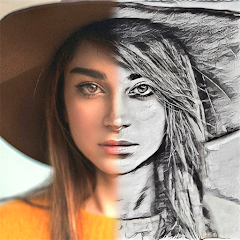
Drawify - Pencil Photo Sketch
Waitos AI
Installs
1M+
Developer
Waitos AI
-
Category
Video Players & Editors
-
Content Rating
Rated for 3+
Developer Email
Privacy Policy
https://waitos.github.io/drawify/privacy
Screenshots
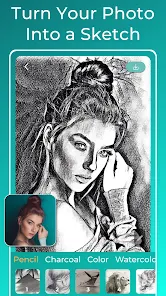
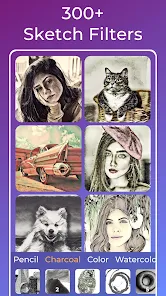
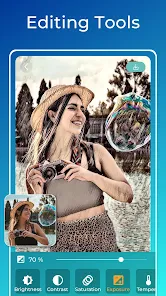
Expert Review
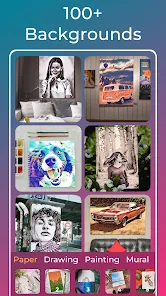
Drawify - Pencil Photo Sketch is a photo editing app that turns your regular pictures into beautiful pencil sketches and artistic drawings. It's a tool for anyone who wants to add a creative, hand-drawn touch to their photos without needing any artistic skills. The app was first launched a few years ago and you can easily find it on Google Play. It has a solid number of downloads, showing it's quite popular among users looking for this specific genre of app. The best part? You can download and install it for free. You don't even need to register or create an account to start using it right away, which makes the whole process super quick. While the app is free, it does include some in-app purchases if you want to unlock more advanced filters or remove ads. Speaking of ads, yes, you will see them, but they're typically not too intrusive as you're working on your images.
Using the app is straightforward. You just open it, pick a photo from your gallery, and then swipe through a bunch of different sketch styles. There are classic pencil looks, charcoal effects, and even some watercolor-style filters. A good tip is to start with a photo that has clear contrast; it usually gives the best sketch results. You can adjust the intensity of the effect, add some grain for texture, and then save or share your creation directly to social media. It's really that simple to get a cool, artistic result in just a few taps.
I've tried a few other similar apps like Pencil Sketch or Sketch Photo Editor, but I keep coming back to Drawify. The main reason is the quality and variety of the filters. Some other apps in this genre make your photos look too processed or fake, but Drawify's outputs often look more authentic, like a real sketch. Also, the interface is cleaner and less cluttered than some competitors. While other apps might have more features, they can feel overwhelming. For a quick, reliable, and good-looking pencil sketch, this app just gets the job done with less fuss. It's my go-to when I want to give my pictures a unique, artistic flair.
Key Functional Highlights
- 🎨 Diverse Artistic Filters: Unlike basic editors, Drawify offers a wide range of sketch styles beyond just pencil. You get charcoal, ink, pop art, and watercolor effects, all within the same app. This variety sets it apart from many single-focus sketch apps.
- ⚙️ Simple, Non-Destructive Editing: The app lets you adjust the strength of each filter and add textures without permanently altering your original photo. This level of control is great for fine-tuning, something simpler apps often lack.
- 🚀 One-Tap Sharing & No Login: After creating your sketch, you can share it directly to Instagram, Facebook, or your gallery in one tap. The fact that you don't need to register to use the app makes the whole process incredibly fast and hassle-free.
- 📱 Optimized for Mobile: The interface is designed for touch, making it easy to swipe between filters and pinch-to-zoom on details. It feels more native and responsive compared to some similar apps that feel like clunky ports.
Advantages & Benefits
- ✅ Superior Output Quality: Compared to apps like 'Sketch Me!', the pencil strokes and shading in Drawify look more natural and less like a uniform computer filter, giving a more authentic hand-drawn feel.
- ✅ Faster Processing: It generates the final sketch image much quicker than some heavier apps like 'Pencil Photo Sketch Lab', which can lag on older phones.
- ✅ Ad-Free Core Experience: While it has ads, the core sketching tool works without interruption. Other free apps, such as 'Photo to Sketch', often place ads between every single action.
Areas for Improvement
- ❌ Limited Free Filters: The best and most unique filters are locked behind a paywall. A competitor like 'Prisma' offers a rotating set of free artistic styles daily, which feels more generous.
- ❌ Watermark on Free Saves: The free version places a small watermark on saved images. Many similar free apps, including basic ones from big developers, don't do this anymore.
- ❌ Fewer Community Features: Unlike 'PicsArt' which has a social platform for sharing edits, Drawify is purely a tool. If you're looking for inspiration or trends within the app, you won't find it here.
Recommended Apps
![]()
ZEPETO: Avatar, Connect & Play
Naver Z Corporation4.3
![]()
Reverse Voice: Flip Singing
NindaFuit0![]()
AI Chat Ask Assistant - NowAI
Now Tech4.3![]()
Lie Detector Test: Prank App
DkTech inc.4.3![]()
Peachy - AI Face & Body Editor
InShot Video Editor4.8
![]()
AI Video Art Creator - Livensa
FERASET4.5![]()
Google Voice
Google LLC4.3![]()
Horoscopes & Tarot
Astrolis Horoscopes4.7![]()
eBay online shopping & selling
eBay Mobile4.6![]()
JPay
Jpay Mobile4.1![]()
Stranger Things 5 Challenges
MVH Entertainment Team5![]()
Chat Master: Prank Story
ABI Game Studio4.8![]()
Google Maps
Google LLC4.2![]()
AI Chat・Ask Chatbot Assistant
AI Chat Studio4.5![]()
Name Meanings with Impact
Alif Innovative Solution3.7















You May Like
-
![]()
True Tarot Card Reading
KaApps4.2 -
![]()
LinkedIn: Jobs & Business News
LinkedIn4.2 -
![]()
iControl: Easy Widgets Themes
Fancy keyboard for theme apps4.6 -
![]()
Duolingo: Language & Chess
Duolingo4.7 -
![]()
Flipped:Chat with AI Character
First Group pte ltd4.1 -
![]()
Hearing Age
Mobile Solutions Tech0 -
![]()
TikTok
TikTok Pte. Ltd.4.4 -
![]()
Pretty Makeup - Beauty Camera
Photo Editor Perfect Corp.4.4 -
![]()
PhotoRoom AI Photo Editor
PhotoRoom Background Editor App4.7 -
![]()
Lightleap by Lightricks
Lightricks Ltd.4.3 -
![]()
Name Meaning
Dexati4.1 -
![]()
Truth Social
T Media Tech LLC3.3 -
![]()
Ace Hardware
Ace Hardware Corporation4.7 -
![]()
Kpop Fans Demon Hunter Wallpap
JHNStudio4.3 -
![]()
Artplay - AI Photo & Video
Hideaway Technology Limited4.5











































