

AI Face Swap: MagicFace &Photo
Braly JSC
Installs
10K+
Developer
Braly JSC
-
Category
Video Players & Editors
-
Content Rating
Rated for 3+
Developer Email
Privacy Policy
https://bralyvn.com/privacy-policy.php
Screenshots
Expert Review
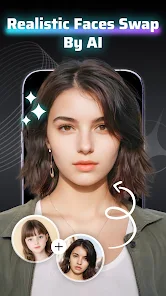
AI Face Swap: MagicFace &Photo is a fun photo editing app that lets you swap faces in pictures with just a few taps. It's part of the entertainment and photography genre, perfect for creating hilarious memes or surprising your friends. I first downloaded it from the Google Play Store a while back, and it's been a go-to for quick laughs ever since. The app is completely free to install and use. You don't even need to register an account to start swapping faces, which is super convenient. While the core features are free, there are optional in-app purchases if you want to remove ads or unlock some premium filters. Speaking of ads, you will see them, but they're usually not too intrusive during the editing process.
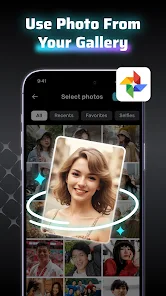
Using the app is straightforward. You just pick a photo from your gallery, select the face you want to swap, and then choose another face from a different picture or even from the app's built-in library of celebrity and meme templates. A handy tip is to use photos where faces are clearly visible and well-lit for the best, most seamless results. Sometimes the AI does a surprisingly good job, and other times the results are so weird they're funny in their own right. I mostly use it to create silly pictures to send in group chats.
There are a bunch of similar face swap apps out there, like Reface or FaceApp. I tried a few, but I keep coming back to MagicFace. For me, the main reason is its simplicity and speed. Some other apps feel clunkier or have more complicated interfaces. MagicFace gets me from selecting a photo to sharing the swapped result faster, which is great when you just want to make a quick joke. It might not have every single advanced feature that some premium apps offer, but for free, casual fun, this app hits the spot. It does one thing and does it pretty well without overcomplicating it.
Key Functional Highlights
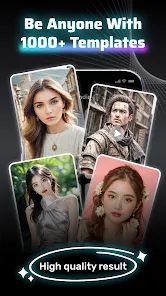
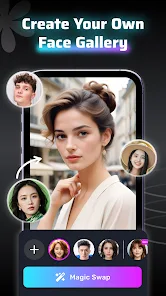
- 🎭 Instant Face Library: Unlike some apps where you have to find all your own photos, MagicFace has a built-in library of celebrity faces, cartoon characters, and popular meme templates. This makes it incredibly easy to create funny swaps without needing a second person's photo handy.
- 🤖 One-Tap AI Magic: The core face swap technology is very user-friendly. You literally just tap on the faces you want to swap in your photos, and the AI handles the rest—adjusting skin tones, angles, and lighting automatically. It's much simpler than manually aligning features in other photo apps.
- ⚡ Quick Export & Share: Once your masterpiece is ready, the app lets you save it to your gallery or share it directly to social media platforms like Instagram, WhatsApp, or Facebook in just a couple of taps. The sharing process is smoother and faster compared to some similar apps that have more steps.
- 🎨 Basic but Fun Filters: After the swap, you can apply quick filters and effects. While not as extensive as a dedicated editor like FaceApp, these filters (like vintage, pop art, etc.) add an extra layer of fun to your creations right within the same app.
Advantages & Benefits
- ✅ Truly Free to Start: You can download, install, and use the core face-swapping feature without paying anything. Apps like Reface often lock their best templates behind a subscription immediately, but MagicFace lets you play around freely.
- ✅ No Account Hassle: You don't need to sign up with an email or social media account. This is a big plus for privacy and convenience compared to many similar apps that require registration before you can even try them.
- ✅ Lightweight and Fast: The app installs quickly and doesn't take up much space on your phone. It also processes swaps faster on average than some heavier competitors, meaning less waiting around.
Areas for Improvement
- ⚠️ Ad-Supported Experience: The free version is supported by ads, which can pop up between edits or when accessing certain features. This can interrupt the flow, especially compared to paid apps or apps with less aggressive ad placement.
- ⚠️ Results Can Be Hit-or-Miss: The AI isn't always perfect. On complex angles or low-quality photos, the swap can look obviously fake or misaligned. Apps like FaceApp sometimes produce more photorealistic results in tricky scenarios.
- ⚠️ Limited Advanced Editing: Once the swap is done, your editing options are basic. If you want to fine-tune the blend, adjust facial features individually, or do more complex edits, you'd need to use another app, whereas some competitors offer more tools in one place.
Recommended Apps
![]()
ZEPETO: Avatar, Connect & Play
Naver Z Corporation4.3
![]()
Reverse Voice: Flip Singing
NindaFuit0![]()
AI Chat Ask Assistant - NowAI
Now Tech4.3![]()
Lie Detector Test: Prank App
DkTech inc.4.3![]()
Peachy - AI Face & Body Editor
InShot Video Editor4.8
![]()
AI Video Art Creator - Livensa
FERASET4.5![]()
Google Voice
Google LLC4.3![]()
Horoscopes & Tarot
Astrolis Horoscopes4.7![]()
eBay online shopping & selling
eBay Mobile4.6![]()
JPay
Jpay Mobile4.1![]()
Stranger Things 5 Challenges
MVH Entertainment Team5![]()
Chat Master: Prank Story
ABI Game Studio4.8![]()
Google Maps
Google LLC4.2![]()
AI Chat・Ask Chatbot Assistant
AI Chat Studio4.5![]()
Name Meanings with Impact
Alif Innovative Solution3.7















You May Like
-
![]()
True Tarot Card Reading
KaApps4.2 -
![]()
LinkedIn: Jobs & Business News
LinkedIn4.2 -
![]()
iControl: Easy Widgets Themes
Fancy keyboard for theme apps4.6 -
![]()
Duolingo: Language & Chess
Duolingo4.7 -
![]()
Flipped:Chat with AI Character
First Group pte ltd4.1 -
![]()
Hearing Age
Mobile Solutions Tech0 -
![]()
TikTok
TikTok Pte. Ltd.4.4 -
![]()
Pretty Makeup - Beauty Camera
Photo Editor Perfect Corp.4.4 -
![]()
PhotoRoom AI Photo Editor
PhotoRoom Background Editor App4.7 -
![]()
Lightleap by Lightricks
Lightricks Ltd.4.3 -
![]()
Name Meaning
Dexati4.1 -
![]()
Truth Social
T Media Tech LLC3.3 -
![]()
Ace Hardware
Ace Hardware Corporation4.7 -
![]()
Kpop Fans Demon Hunter Wallpap
JHNStudio4.3 -
![]()
Artplay - AI Photo & Video
Hideaway Technology Limited4.5












































