
Voi - AI Avatar Portrait Maker
Codeway Dijital
Installs
1M+
Developer
Codeway Dijital
-
Category
Generative AI
-
Content Rating
Rated for 3+
Developer Email
Privacy Policy
https://static-assets.selfbooth.app/privacy
Screenshots
Expert Review
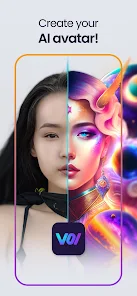
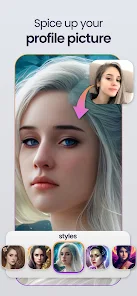
Voi - AI Avatar Portrait Maker is a photo editing app that uses artificial intelligence to transform your selfies into various artistic avatar styles. I use it mostly to create fun profile pictures for social media or unique digital portraits. The app launched a couple of years ago and is available for free download on both the Google Play Store and the Apple App Store. It has racked up millions of installs, which shows how popular it is. You can download and install the app without paying anything upfront. You don't need to register an account to start using its basic features, which is super convenient for a quick try. However, like many apps in this genre, it includes in-app purchases to unlock more styles and features, and you'll also encounter ads while using the free version.
Using Voi is pretty straightforward. You just open the app, take a new selfie or pick one from your gallery, and then browse through dozens of different AI filters. The app processes your photo and gives you a set of avatars in that chosen style. A good tip is to use a clear, well-lit selfie with a simple background for the best results. The AI seems to work better with high-quality photos. You can then save your favorites directly to your phone or share them instantly.
I've tried a few other similar avatar maker apps, but I keep coming back to Voi. Compared to others like Lensa AI or ToonMe, I find Voi's interface less cluttered and faster for generating a basic set of avatars. Some apps in this genre feel overwhelming with too many options or require a subscription right away. With Voi, I can still get a decent variety of cool portraits without immediately feeling pressured to pay. It's a solid choice if you're just looking for a simple, fun tool to create AI avatars without too much fuss.
Key Functional Highlights
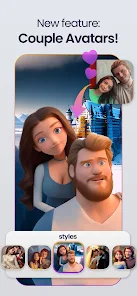
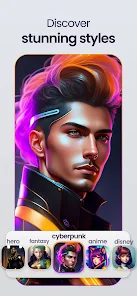
- 🎨 Wide Style Variety: The app offers an impressive range of artistic filters, from anime and cartoon styles to oil painting and cyberpunk looks. This gives you more creative freedom than some competitors that focus on just one or two genres.
- ⚡ Quick Generation: Once you select a photo and a style, the AI generates a full set of avatars in seconds. This speed is a major plus compared to other apps where you might wait longer for processing, especially on older phones.
- 🔧 Simple Editing Tools: After your avatar is created, Voi provides basic tools to tweak the result. You can adjust brightness, contrast, or apply minor fixes, which is handy for perfecting your portrait before sharing.
- 📤 Easy Sharing: The app integrates seamlessly with social platforms. With one tap, you can send your new avatar to Instagram, WhatsApp, or save it directly to your camera roll, making the whole process from creation to sharing very smooth.
Advantages & Benefits
- 👍 User-Friendly Design: The interface is intuitive and clean, making it easy for anyone to navigate, unlike some similar apps that can feel technical or confusing.
- 👍 No Mandatory Login: You can start creating immediately without signing up, which is faster and offers more privacy than apps that require an account upfront.
- 👍 Good Free Tier: It provides a satisfying number of free styles and generations, giving you a real feel for the app before considering purchases, which isn't always the case with competitors.
Areas for Improvement
- 👎 Ad Interruptions: The free version has frequent video and banner ads that can disrupt the creative flow, more so than in some other avatar apps.
- 👎 Premium Paywall: The best and most unique styles are locked behind a subscription or one-time purchase, which can feel limiting after you've exhausted the free options.
- 👎 Inconsistent AI Quality: Sometimes the avatar generation can be hit or miss, with results looking less polished or accurate compared to more expensive apps like Lensa.
Recommended Apps
![]()
ZEPETO: Avatar, Connect & Play
Naver Z Corporation4.3
![]()
Reverse Voice: Flip Singing
NindaFuit0![]()
AI Chat Ask Assistant - NowAI
Now Tech4.3![]()
Lie Detector Test: Prank App
DkTech inc.4.3![]()
Peachy - AI Face & Body Editor
InShot Video Editor4.8
![]()
AI Video Art Creator - Livensa
FERASET4.5![]()
Google Voice
Google LLC4.3![]()
Horoscopes & Tarot
Astrolis Horoscopes4.7![]()
eBay online shopping & selling
eBay Mobile4.6![]()
JPay
Jpay Mobile4.1![]()
Stranger Things 5 Challenges
MVH Entertainment Team5![]()
Chat Master: Prank Story
ABI Game Studio4.8![]()
Google Maps
Google LLC4.2![]()
AI Chat・Ask Chatbot Assistant
AI Chat Studio4.5![]()
Name Meanings with Impact
Alif Innovative Solution3.7















You May Like
-
![]()
True Tarot Card Reading
KaApps4.2 -
![]()
LinkedIn: Jobs & Business News
LinkedIn4.2 -
![]()
iControl: Easy Widgets Themes
Fancy keyboard for theme apps4.6 -
![]()
Duolingo: Language & Chess
Duolingo4.7 -
![]()
Flipped:Chat with AI Character
First Group pte ltd4.1 -
![]()
Hearing Age
Mobile Solutions Tech0 -
![]()
TikTok
TikTok Pte. Ltd.4.4 -
![]()
Pretty Makeup - Beauty Camera
Photo Editor Perfect Corp.4.4 -
![]()
PhotoRoom AI Photo Editor
PhotoRoom Background Editor App4.7 -
![]()
Lightleap by Lightricks
Lightricks Ltd.4.3 -
![]()
Name Meaning
Dexati4.1 -
![]()
Truth Social
T Media Tech LLC3.3 -
![]()
Ace Hardware
Ace Hardware Corporation4.7 -
![]()
Kpop Fans Demon Hunter Wallpap
JHNStudio4.3 -
![]()
Artplay - AI Photo & Video
Hideaway Technology Limited4.5











































