

Smile Photo Editor
Hairstyle Photo Apps
Installs
5M+
Developer
Hairstyle Photo Apps
-
Category
Video Players & Editors
-
Content Rating
Rated for 12+
Developer Email
Privacy Policy
http://bestphotoapps.ru/privacy-policy.html
Screenshots
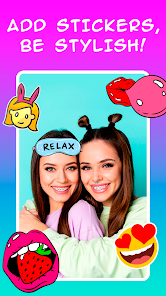
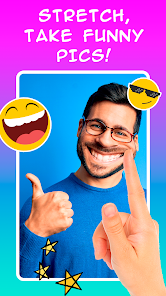
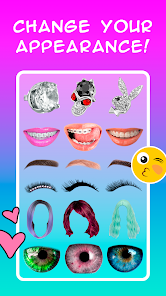
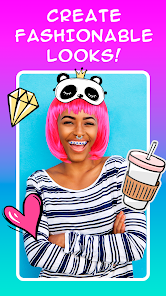
Expert Review
I've been using the Smile Photo Editor app for a while now, and it's become my go-to tool for quick photo touch-ups. This app, as the name suggests, is all about enhancing smiles in your photos. It launched a few years back and you can easily find it and download it from the Google Play Store. It's a free app to install, and it has a pretty high number of downloads, which shows how popular it is. You don't need to register an account to start using it, which I really appreciate for its simplicity. While you can use the core features without paying, there are some in-app purchases to unlock premium filters and remove ads.
Using the app is straightforward. You just pick a photo from your gallery, and the app automatically detects faces and smiles. The main feature lets you adjust the smile intensity, whiten teeth, and even change the lip color. A good tip is to use the 'auto-enhance' button first before making manual tweaks; it often gives you a great starting point. I also found that for group photos, it's best to edit each person's smile individually for a more natural look.
Compared to other photo editing apps like FaceTune or AirBrush, Smile Photo Editor is much more focused. Those other apps have a ton of features for skin smoothing, reshaping faces, and adding makeup, which can be overwhelming. I chose this app because I mostly just want to fix awkward smiles or brighten teeth in my casual snapshots without learning a complex editing suite. It does one job, and it does it quickly and well. For someone who isn't a professional editor but still wants their photos to look great, this app hits the sweet spot.
Key Functional Highlights
- 🎯 Specialized Smile Editing: Unlike general editors, this app's core feature is its powerful, dedicated smile correction. It doesn't just whiten teeth; it can subtly widen a smile or adjust its curvature for a more natural, photogenic result.
- ⚡ One-Tap Magic: The 'Auto Fix' feature is a game-changer. With a single tap, it analyzes the face and applies a balanced combination of smile enhancement, teeth whitening, and skin brightening, saving a ton of time.
- 👥 Multi-Face Support: It smartly handles group photos. You can download a family or friends picture, and the app will detect all faces, allowing you to edit each person's smile individually, which most similar apps struggle with.
- 🎨 Natural Filters: Beyond editing, it offers a collection of filters specifically tuned to complement portrait photos after smile editing, making skin tones look healthy rather than overly processed.
Advantages & Benefits
- 👍 Focused & Fast: It's incredibly quick for its specific task. I can install it, open a photo, and have a perfect smile in seconds, whereas opening a giant app like Photoshop Express feels like overkill.
- 👍 User-Friendly: The interface is dead simple. There's no confusing clutter, making it much more accessible than something like PicsArt for a beginner who just wants to fix a smile.
- 👍 Great Free Tier: You can download and use the essential smile correction tools for free, which is more generous than many competitors that heavily watermark or limit saves.
Areas for Improvement
- 👎 Ad Interruptions: The free version shows frequent video ads, which can be disruptive. Other free apps, like Snapseed, integrate ads more subtly.
- 👎 Limited Scope: If you need to do anything beyond smile and basic touch-ups (like removing objects), you'll need another app. An app like YouCam Perfect offers a broader set of beauty tools in one place.
- 👎 Occasional Bugs: Sometimes the face detection glitches, especially with glasses or unusual angles. More established apps from bigger developers tend to have more reliable detection.
Recommended Apps
![]()
ZEPETO: Avatar, Connect & Play
Naver Z Corporation4.3
![]()
Reverse Voice: Flip Singing
NindaFuit0![]()
AI Chat Ask Assistant - NowAI
Now Tech4.3![]()
Lie Detector Test: Prank App
DkTech inc.4.3![]()
Peachy - AI Face & Body Editor
InShot Video Editor4.8
![]()
AI Video Art Creator - Livensa
FERASET4.5![]()
Google Voice
Google LLC4.3![]()
Horoscopes & Tarot
Astrolis Horoscopes4.7![]()
eBay online shopping & selling
eBay Mobile4.6![]()
JPay
Jpay Mobile4.1![]()
Stranger Things 5 Challenges
MVH Entertainment Team5![]()
Chat Master: Prank Story
ABI Game Studio4.8![]()
Google Maps
Google LLC4.2![]()
AI Chat・Ask Chatbot Assistant
AI Chat Studio4.5![]()
Name Meanings with Impact
Alif Innovative Solution3.7















You May Like
-
![]()
True Tarot Card Reading
KaApps4.2 -
![]()
LinkedIn: Jobs & Business News
LinkedIn4.2 -
![]()
iControl: Easy Widgets Themes
Fancy keyboard for theme apps4.6 -
![]()
Duolingo: Language & Chess
Duolingo4.7 -
![]()
Flipped:Chat with AI Character
First Group pte ltd4.1 -
![]()
Hearing Age
Mobile Solutions Tech0 -
![]()
TikTok
TikTok Pte. Ltd.4.4 -
![]()
Pretty Makeup - Beauty Camera
Photo Editor Perfect Corp.4.4 -
![]()
PhotoRoom AI Photo Editor
PhotoRoom Background Editor App4.7 -
![]()
Lightleap by Lightricks
Lightricks Ltd.4.3 -
![]()
Name Meaning
Dexati4.1 -
![]()
Truth Social
T Media Tech LLC3.3 -
![]()
Ace Hardware
Ace Hardware Corporation4.7 -
![]()
Kpop Fans Demon Hunter Wallpap
JHNStudio4.3 -
![]()
Artplay - AI Photo & Video
Hideaway Technology Limited4.5











































