
Video Live Wallpaper Maker
ZipoApps
Installs
10M+
Developer
ZipoApps
-
Category
Productivity
-
Content Rating
Rated for 3+
Developer Email
Privacy Policy
https://zipoapps.com/videowallpaper/privacy
Screenshots
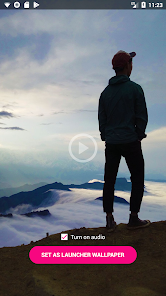
Expert Review
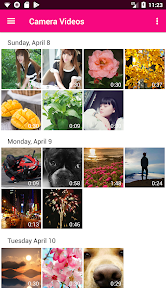
Video Live Wallpaper Maker is an Android app that lets you turn your favorite videos into animated backgrounds for your phone's home and lock screens. It's a tool for personalizing your device, allowing you to use clips from movies, personal recordings, or any video file as a live wallpaper. The app was first launched several years ago and is available for download on the Google Play Store. It has garnered millions of installs, which shows its popularity. You can download and install the app for free. It doesn't require you to create an account or register to start using its basic features, which is convenient. However, like many free apps, it does include advertisements, and there are optional in-app purchases available if you want to remove ads or unlock additional editing tools and effects.
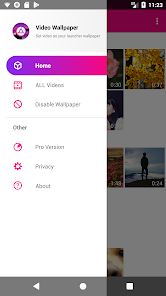
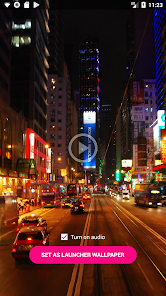
Using the app is pretty straightforward. After you install it, you just pick a video from your gallery. The app then lets you trim it, set the playback speed, or add filters before setting it as your wallpaper. A good tip is to use shorter video clips to save battery life, and to make sure the video's aspect ratio matches your screen to avoid awkward cropping. The app usually runs smoothly in the background once set up.
I've tried a few other live wallpaper apps from the Google Play Store, like 'Live Wallpapers & Backgrounds' or '3D Parallax Wallpaper', but I keep coming back to Video Live Wallpaper Maker. Many similar apps in this genre are packed with pre-made wallpapers you have to sift through, or they have complicated interfaces. This app is different because it focuses on letting you use your own content. It gives you more direct control. For me, the choice was simple: I wanted to use my own vacation videos as a background, not someone else's animations. This app does that one job really well without unnecessary clutter.
Key Functional Highlights
- 🎬 Your Videos, Your Wallpaper: The core feature is its simplicity in using personal videos. Unlike many wallpaper apps that offer a catalog of generic options, this app puts your own gallery front and center, making customization truly personal.
- ✂️ Built-in Basic Editor: You don't need a separate video editor. Right inside the app, you can trim the clip, adjust the start and end points, and apply color filters to get the look just right before setting it.
- ⚙️ Playback and Battery Controls: It offers settings to loop the video seamlessly and has options to pause the wallpaper when the battery is low, which is a thoughtful touch compared to some similar apps that just play continuously.
- 📱 Direct Set-and-Forget: The process to set the live wallpaper is integrated and simple. After editing, one tap applies it to your home screen, lock screen, or both, which is more streamlined than some competitors that require extra steps.
Advantages & Benefits
- 👍 Focus on User Content: Compared to apps like 'Live Wallpapers 4K', which is a huge library of downloadable wallpapers, this app's strength is its dedication to your own videos, offering a unique, personal touch others lack.
- 👍 Lightweight and Fast: It installs quickly and doesn't feel bloated. Some feature-heavy apps in this genre can be slow to load, but this one is generally snappy for basic video-to-wallpaper conversion.
- 👍 No Forced Registration: You can download, install, and start using it immediately without signing up, which is better for privacy and convenience than some apps that require an account.
Areas for Improvement
- 👎 Persistent Ads: The free version shows frequent ads, which can be intrusive. Other free apps, like '3D Parallax Wallpaper', might have a less aggressive ad implementation or offer a clearer one-time purchase to remove them.
- 👎 Limited Advanced Editing: If you compare it to a dedicated video editor app, its trimming and filter tools are quite basic. For complex edits, you still need another app first.
- 👎 Occasional Performance Hiccups: With very long or high-resolution videos, the app can sometimes stutter or cause slight battery drain, an area where simpler, static-wallpaper-focused apps obviously perform better.
Recommended Apps
![]()
ZEPETO: Avatar, Connect & Play
Naver Z Corporation4.3
![]()
Reverse Voice: Flip Singing
NindaFuit0![]()
AI Chat Ask Assistant - NowAI
Now Tech4.3![]()
Lie Detector Test: Prank App
DkTech inc.4.3![]()
Peachy - AI Face & Body Editor
InShot Video Editor4.8
![]()
AI Video Art Creator - Livensa
FERASET4.5![]()
Google Voice
Google LLC4.3![]()
Horoscopes & Tarot
Astrolis Horoscopes4.7![]()
eBay online shopping & selling
eBay Mobile4.6![]()
JPay
Jpay Mobile4.1![]()
Stranger Things 5 Challenges
MVH Entertainment Team5![]()
Chat Master: Prank Story
ABI Game Studio4.8![]()
Google Maps
Google LLC4.2![]()
AI Chat・Ask Chatbot Assistant
AI Chat Studio4.5![]()
Name Meanings with Impact
Alif Innovative Solution3.7















You May Like
-
![]()
True Tarot Card Reading
KaApps4.2 -
![]()
LinkedIn: Jobs & Business News
LinkedIn4.2 -
![]()
iControl: Easy Widgets Themes
Fancy keyboard for theme apps4.6 -
![]()
Duolingo: Language & Chess
Duolingo4.7 -
![]()
Flipped:Chat with AI Character
First Group pte ltd4.1 -
![]()
Hearing Age
Mobile Solutions Tech0 -
![]()
TikTok
TikTok Pte. Ltd.4.4 -
![]()
Pretty Makeup - Beauty Camera
Photo Editor Perfect Corp.4.4 -
![]()
PhotoRoom AI Photo Editor
PhotoRoom Background Editor App4.7 -
![]()
Lightleap by Lightricks
Lightricks Ltd.4.3 -
![]()
Name Meaning
Dexati4.1 -
![]()
Truth Social
T Media Tech LLC3.3 -
![]()
Ace Hardware
Ace Hardware Corporation4.7 -
![]()
Kpop Fans Demon Hunter Wallpap
JHNStudio4.3 -
![]()
Artplay - AI Photo & Video
Hideaway Technology Limited4.5












































